The new features of our software provide the ideal tools for digitally managing and controlling all files and business processes in your company. From the integrated digital signature process and clear contract and invoice dashboards to fully automated booking, company-wide searches, and AI-based invoice reading—our software combines all smart functions in one digital workplace. We present 10 of the new features that we hope will make your everyday work even easier.
With the ISR Information Office, you can manage your files and processes clearly and securely in one central location. By combining cross-company collaboration systems, data management, digital record storage, and automated review and approval processes, you can digitize your organizational business processes according to your preferences. Here is an overview of some of the new features:
New home page Depending on the user's permissions, various functions can be accessed via SmartLinks on the new start screen. Active processes assigned to the user can be edited directly, and favorites can be viewed, opened, or removed. Notifications can also be acknowledged and checked off directly. In addition, searches can be executed or opened directly, representatives can be defined, and contracts can be created. The new dashboard component and help pages can also be accessed in seconds via the start interface.
Figure 1: New homepage of the ISR Information Office | isr.de
Advanced Inbox Starting with version 13.0, you can choose between the Standard Inbox and the Advanced Inbox under "My Account." Unlike the Standard Inbox, the Advanced Inbox offers a condensed view of the processes. Each entry is displayed in a single line without field headings. These are now displayed via tooltips, which saves a significant amount of space. This allows more transactions and information to be displayed at a glance.
Active tasks One click opens the editing dialog directly if the assigned user is editing the task or is included in the role of the current editor.
Automated invoice processing from A to Z ISR Accounts Payable Flow
With ISR Accounts Payable Flow and Buildsimple for invoice capture, you can manage the entire invoicing process digitally. With intuitive, clear dialogs, our software provides comprehensive support for processing invoices, meeting deadlines, and automating approval processes. With the new features, our solution now makes your everyday work even easier.
Fully automated posting With the new version, fully automated posting is possible as standard. Exceptions can be defined specifically via the administration, e.g., according to a specific gross amount, company codes, cost centres, G/L accounts, or vendors.
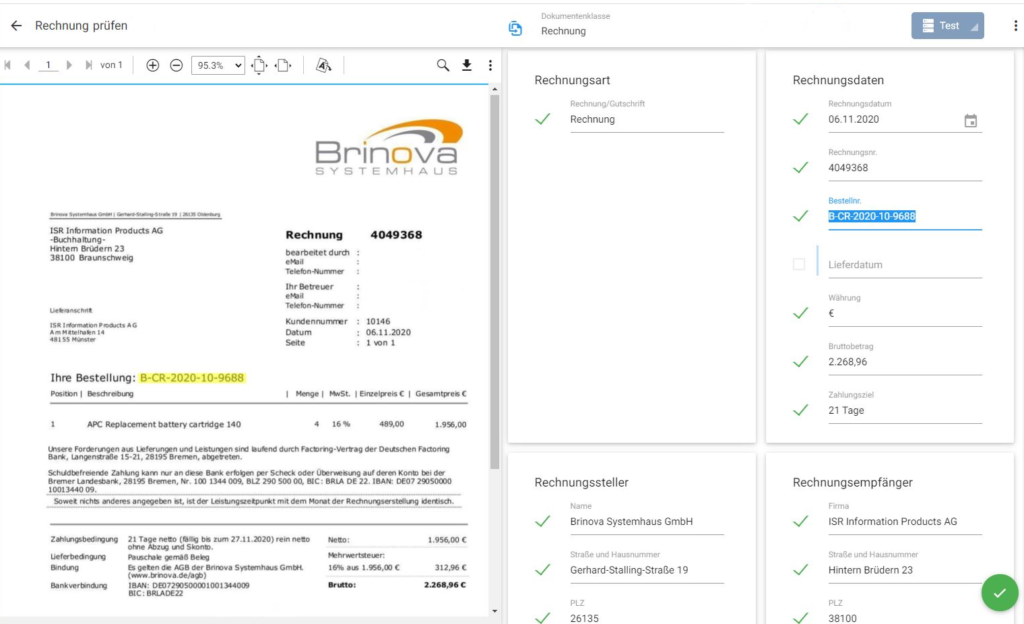
AI-based invoice reading With the new standard interface to Buildsimple as a cloud platform for separating, classifying, and extracting your documents, we at ISR offer a complete solution for up to 100% automated invoice reading. Whether paper, email, ZUGFeRD, or XRechnung—our software processes every invoice format.
Figure 2: Bill reading with the Buildsimple interface | isr.de
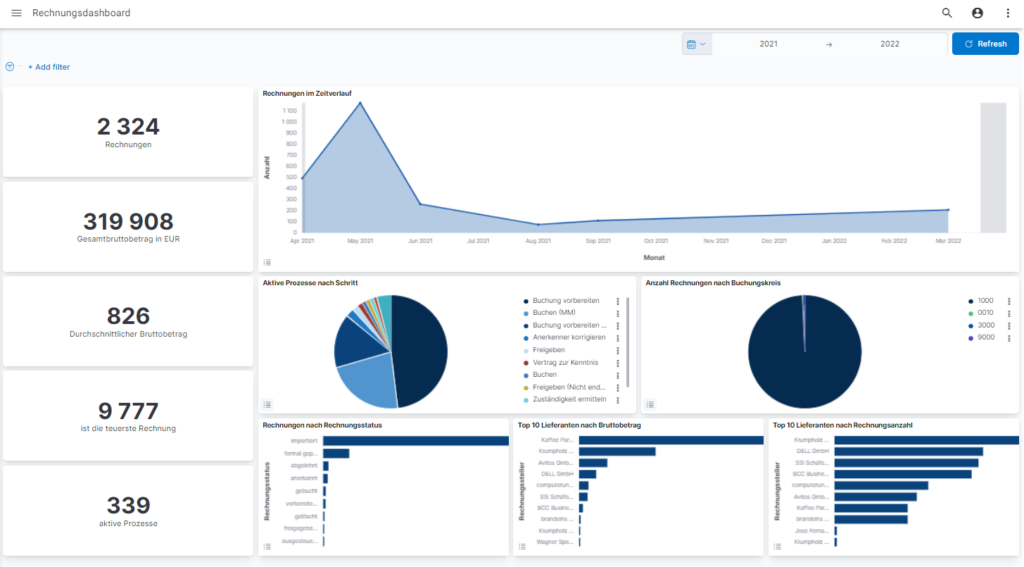
Invoice Dashboard The Kibana-based invoice dashboard provides a clear and visual overview of your invoices. The drill-down function allows you to quickly gain transparency over all open and paid invoices. There you can see, for example, an overview of the number and total amount of all invoices, your top 5 invoice issuers, or the total gross amounts payable over time. The various fields can be easily and individually arranged using drag & drop.
Contract management software for everyone ISR Contract Manager
Framework agreements, leasing agreements, loan agreements, rental agreements... There is a wide variety of contract types. It is not always easy to keep track of them all. Thanks to digital contract management, paper files and endless Excel lists are a thing of the past. We have the solution for your professional contract management: ISR Contract Manager gives you full control over your contracts. We are pleased to present some of the new features here as well.
digital signature process In the signature process workflow, you can create and use your digital signature with a single click. To do this, a selection list of internal signatories and the role of "contract coordination" is created, which can start the signature process and view the contents of the signature process inbox.
File view in folders The contract file now has a second tab where documents can be displayed in a comprehensive tree structure. It is possible to create, rename, or delete new folders. Documents can be stored in the folders and moved between them.
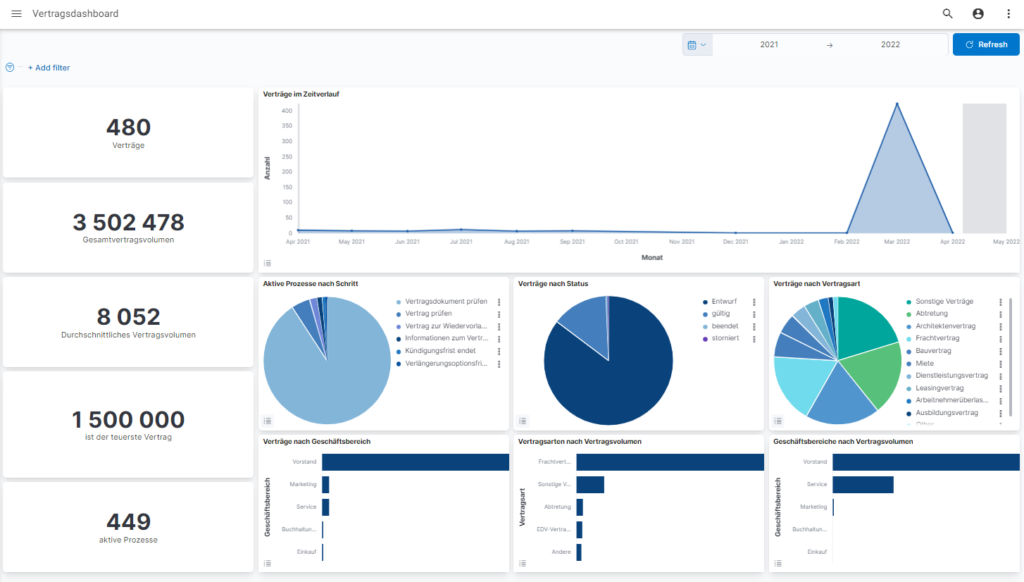
contract dashboard Alongside the invoice dashboard in ISR Accounts Payable Flow, the new version will also feature a contract dashboard for ISR Contract Manager. Here, you can quickly view and analyze information such as contract type by contract volume, the status of all contracts, or the number of contract types.
Figure 4: Contract dashboard in ISR Contract Manager | isr.de
's ISR software innovations across all products
In addition to the software-specific new features, there are also a few cross-product innovations. With the new version, the online help has now been adapted to the isr.de documentation and is available to customers via the Internet. This applies to both the German and English documentation.
In addition, our product development team has made several GUI improvements, including the implementation of a new header bar with the buttons "Search" (global search), "My account/Log out," and "3-dot menu." The navigation bar can now be shown or hidden and can be used when expanded.
It is now also possible to link files across products – this applies to all types of files throughout the company. Manual links between files can be added and deleted. The deletion of links is then noted in the file history.
Do you have any questions? Please feel free to contact us!
If you wish to learn more about ISR Software Products, please visit our website or contact us directly.
ISR INFORMATION OFFICE
Our software products optimize your organizational business processes.
Since 1993, we have been operating as IT consultants for Data Analytics and Document Logistics, focusing on data management and process automation. We provide comprehensive support, from strategic IT consulting to specific implementations and solutions, all the way to IT operations, within the framework of holistic Enterprise Information Management (EIM). ISR is part of the CENIT EIM Group.