SAP Datasphere offers a very straightforward method for managing data authorizations via Data Access Controls, which controls who can view which data content.
In projects, in addition to simple authorizations on dimension values, authorizations on hierarchy nodes are frequently required. Currently, this is not directly possible in SAP Datasphere. In our blog post, we demonstrate a method for assigning data authorizations to hierarchy nodes.
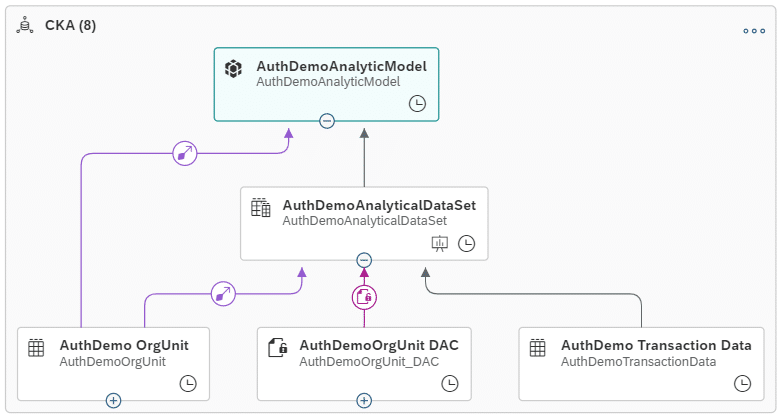
The diagram illustrates the very simply structured data model. It comprises a table with transactional data and an organizational unit dimension, which contains a hierarchy. This dimension is associated with the Analytical Dataset. Finally, an Analytic Model was created.
The Analytic Model contains key figures from the HR domain per organizational unit. Personnel data is a highly sensitive area, where it is crucial that not all employees are authorized to view all data. Consequently, data authorizations hold particular significance.
Naturally, in a straightforward example such as this, authorizations could be assigned for each individual organizational unit. For instance, if one is permitted to view all data of the IT Department, the IT Department and all subordinate organizational units would need to be manually authorized. However, this approach is not very practical.
Firstly, organizations typically possess a significantly larger number of organizational units, rendering maintenance excessively cumbersome. Secondly, organizations are subject to change. For example, if new organizational units are subordinated or existing ones are removed, this would necessitate manual updates, which is hardly feasible.
Therefore, a solution is required that enables the authorization of hierarchy nodes.
Solution Architecture
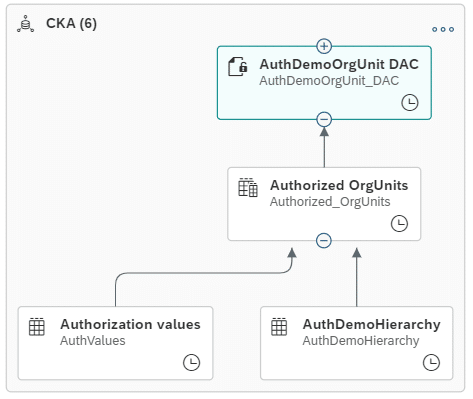
In our solution architecture, we leverage the standard functionality of Data Access Controls to restrict authorizations to organizational units. The diagram illustrates the structure in our simple example:
The Authorization Values table contains the actual authorization values. However, instead of maintaining individual organizational units in this table, our objective is to automatically authorize all subordinate organizational units as well.
We achieve this through the SQL View Authorized OrgUnits (SQL Script). This view identifies all subordinate organizational units; essentially, we are querying for all descendants within the hierarchy. This is facilitated by the following code snippet:
return
WITH LT_HIER_DATA AS (
select *
from HIERARCHY_DESCENDANTS (
SOURCE HIERARCHY (
source (
select
“OrgUnit” as node_id,
“ParentOrgUnit” as parent_id
from “AuthDemoHierarchy”
)
)
)
)
SELECT C.”UserMailAdress”, A.NODE_ID AS “OrgUnit”
FROM LT_HIER_DATA AS A
INNER JOIN LT_HIER_DATA AS B
ON a.”START_RANK” = B.”START_RANK”
INNER JOIN “AuthValues” AS C
ON B.NODE_ID = C.”OrgUnit”
AND B.HIERARCHY_DISTANCE = ‘0’
AND C.”Valid_From” <= current_Date
AND C.”Valid_To” >= current_Date;
The initial SQL statement retrieves all 'child' organizational units associated with an organizational unit within a hierarchy. The 'Start rank' parameter enables the assignment of these child nodes to their original parent node. This approach leverages a standard HANA hierarchy function. Further details are available here.
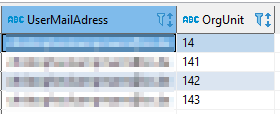
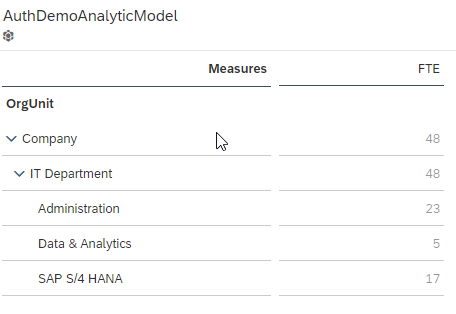
If we now restrict our authorization value to the IT Department (number 14), all subordinate nodes are automatically returned, and data access controls are consequently limited:
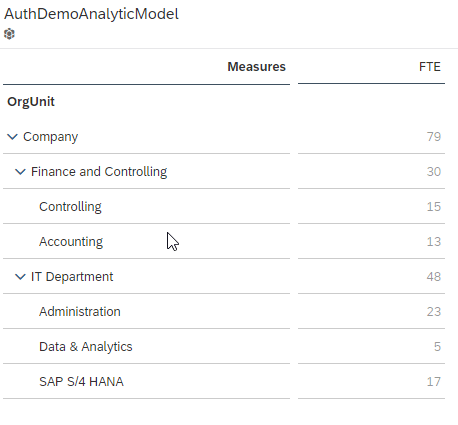
Within SAP Analytics Cloud, only the FTE (Full-Time Equivalents) for the authorized organizational units are displayed.
No such thing as 'cannot be done'.
SAP Datasphere provides customers with capabilities extending beyond graphical views and SQL functionalities. Leveraging the underlying HANA Cloud platform, a wide array of SAP HANA functions can be utilized. Our example illustrates the straightforward implementation of authorizations on hierarchy nodes. During development, it is crucial to consider the inherent functionalities of SAP HANA before embarking on the creation of entirely custom procedures or SQL scripts. The guiding principle here is often: 'No such thing as 'cannot be done'.
Has this piqued your interest?
Has this piqued your interest? As an esteemed SAP Gold Partner, we have successfully deployed SAP Datasphere (formerly SAP Data Warehouse Cloud) in various customer projects.
Operational Real-time Reporting with SAP Data Warehouse Cloud
SAP Data Warehouse Cloud is exceptionally well-suited as a self-service platform for business departments.
Since 1993, we have been operating as IT consultants for Data Analytics and Document Logistics, focusing on data management and process automation. We provide comprehensive support, from strategic IT consulting to specific implementations and solutions, all the way to IT operations, within the framework of holistic Enterprise Information Management (EIM). ISR is part of the CENIT EIM Group.