Support for IBM FileNet Content Manager 5.5.x will end in September 2026. For many companies, this creates an urgent need to take action. But what does this mean, specifically, for operations, security, and strategy? This article provides context and outlines the options that make sense right now.
The clock is ticking: A critical deadline is approaching for companies using IBM FileNet Content Manager 5.5.x. On September 30, 2026, official support for FileNet Content Manager 5.5.x (including IBM Content Navigator 3.0.x) will end—and with it, the last safety net for this version line.
1. Key Information About FileNet End of Support at a Glance
2. Which FileNet versions are affected by the end of support?
3. What exactly does “End of Support” mean?
4. What risks arise without manufacturer support?
5. How much time should companies set aside for a FileNet upgrade?
6. What options do companies have?
7. What are the benefits of upgrading to IBM FileNet Content Manager 5.7.x?
8. Application Management for Your FileNet Environments
9. Next Step: Assess the FileNet Environment and Plan a Strategy
In many organizations, the IBM FileNet Content Manager has been a stable and central component of the IT landscape for years. Document-based processes, archiving, compliance requirements, and integrations with line-of-business applications are closely intertwined with the platform. This is precisely why the end of support is perceived as a low priority. In practice, however, this creates a strategic need for action— especially for companies with business-critical document processes in regulated industries.
From our perspective , it’s not is not just a technical upgradeor or an isolateden version change. It is crucial to evaluate the FileNet environment in the context of enterprise information management, operations, compliance, integrations, and long-term platform strategy—from the initial risk analysis through implementation to stable operation.
The end of support creates significant risks and burdens that should be assessed early on:
- Increasing Security Risks due to missing patches and securityupdates
- Increased audit and compliance risks that could lead to financial and/or legal consequences
- Continuously rising operating costs, due to manual incidentresolution and the loss of manufacturer support
Even though support from internal service teams or external service providers can still be guaranteed, the end of support marks a significant shift in the underlying framework:
The manufacturer ceases active development and analyzes existing software bugs (bugs) to the same extent as before, and no new fixes or security updates for the affected version.
The result: problems persist, risks accumulate, and disruptions become potentially more expensive, more complex, and more critical for the business unit.

A system that is out of support is not automatically inoperable—but it can pose a serious risk to operations, security, and compliance.
Martin Dabergott
Managing Consultant | Service Application Management ECM
Key Information About FileNet End of Support at a Glance
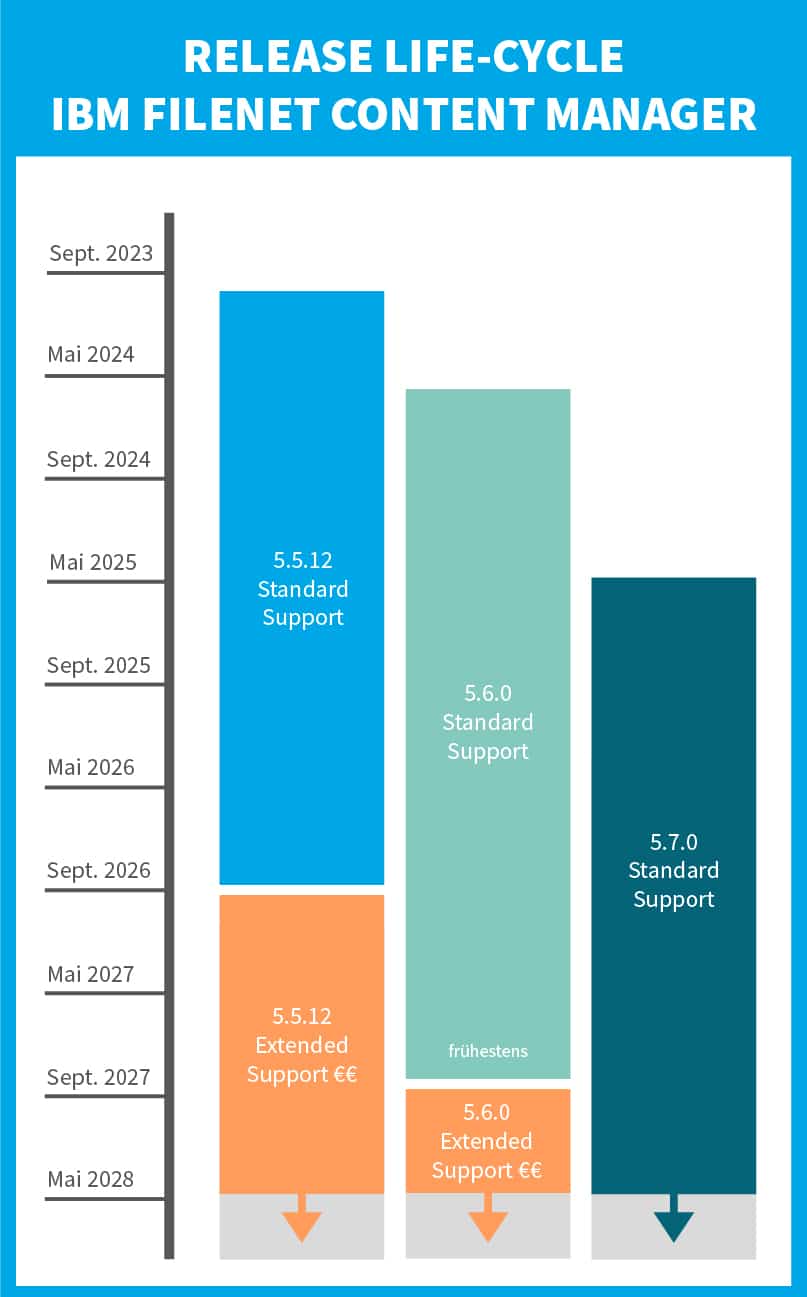
IBM FileNet Content Manager 5.5.x will reach the end of regular support on September 30, 2026. IBM Content Navigator 3.0.x is also affected. As of that date, key services provided by the manufacturer will no longer be available, including new fixes, security updates, and active development of this version line.
For companies, this means that security, compliance, and operational risks are increasing significantly. Organizations in regulated industries, in particular, should assess early on which version is in production, which applications and processes are business-critical, and which regulatory requirements are affected by a system that is “out of support.”
Possible courses of action include upgrading to a currently supported version, Extended Support, or a controlled freeze with clearly defined risk and operational measures.
Which FileNetversions are affected by the end of support?
IBM FileNet Content Manager 5.5.x and IBM Content Navigator 3.0.x are nearing the end of their regular support. For many companies, this is an opportune time to conduct a structured assessment of their ECM landscape and plan their next steps.
In this post, we’ll explain what that means in concrete terms and how to establish a solid foundation for decision-making regarding the platform’s future development.
According to IBM Support This results in the following (support cycles): )
| Version | Support Milestone | Date |
|---|---|---|
|
IBM FileNet Content Manager 5.5.12
|
End of Support | 30.09.2026 |
| IBM FileNet Content Manager 5.6.0 | End of Support | September 30, 2027, at the earliest |
| IBM FileNet Content Manager 5.7.0 | End of Support | September 30, 2028, at the earliest |
It is already advisable to clarify key issues:
Which version is currently in production? Which applications and processes are business-critical? What technical or organizational dependencies exist? Are there any regulatory requirements affected by a system that is no longer supported?
Important note:
This issue is particularly relevant for customers in regulated environments. Internal compliance guidelines, DORA, KRITIS, or other regulatory requirements may necessitate that a system with “out of support” status be evaluated not only from a technical perspective but also from organizational and legal perspectives.
What exactly does “end of support” mean?
IBM distinguishes between FileNet Content Manager:
End of Fix Support: No New Fixes or Security Patches
As of this date, IBM will no longer provide new bug fixes, security patches, or interim fixes for the affected version.
End of Usage Support: No longer receiving regular manufacturer support
As of this date, all support from IBM will cease completely. This includes, among other things, the processing of new support cases, technical assistance, and information regarding security vulnerabilities. For FileNet Content Manager 5.5.x, both support milestones fall on September 30, 2026. This means that as of this date, not only will the release of new fixes and security updates cease, but IBM’s regular manufacturer support for this version will also end.
It is crucial to distinguish between vendor support and service provider support. An external service provider can continue to monitor operations, analyze incidents, and provide assistance in the event of disruptions. However, in the case of software defects in the product itself, the vendor will no longer provide new bug fixes or security updates for the end-of-life version.
Particular care is required here: Companies should not rely solely on a service provider to resolve every issue in the event of an incident. If the cause lies in the product code, the options for action are limited without manufacturer support.
Extended Support: Saves Time, but Is No Substitute for Modernization
Beyond the regular support period, you have the option to purchase Extended Support. This service is provided by IBM and is expected to be available for version 5.5.12 until September 30, 2030. This extends the support period by up to four years. During the first year of Extended Support (Initial Extended Support), the following: support for usage as well as bug fixes for existing and new critical bugs, provided that they fall within the product lifecycle for the program or as otherwise announced by IBM. In years two through four of “On-Going Extended Support,” this includes assistance with usage as well as exclusively the resolution of existing bugs. No new security updates will be provided.
It is important to note that Extended Support is generally only available as a direct extension of standard support and is limited to a maximum of 4 years. Companies should therefore determine early on whether they need to enter into a corresponding contract well in advance of the end of standard support.
IBM provides both general lifecycle information and product-specific lifecycle data. (Source: IBM Software Support Lifecycle Policies ).
What risks arise? without manufacturer support?
- Security Risks
The most obvious risk is the discontinuation of new fixes and security updates. Potential bugs in the product code will no longer be fixed by the manufacturer. At the same time, the manufacturer’s third-level support will no longer be available. - Compliance Risks
The second risk relates to compliance. In regulated environments, operating a system that is no longer supported may constitute a compliance violation. This is particularly true when internal corporate policies or regulatory requirements—such as DORA or KRITIS—mandate that business-critical systems be supported by the manufacturer. - Operational Risks
The third risk concerns day-to-day operations. FileNet typically does not run in isolation but is integrated with archiving processes, compliance workflows, line-of-business applications, and customer and employee portals. As a result, disruptions or limitations can quickly impact downstream processes. - Technical Dependencies
The fourth risk is the increasing technical decoupling from current platforms. Operating systems, databases, web application servers, Java versions, and browsers continue to evolve. The longer companies wait to upgrade, the wider the gap becomes between their existing FileNet environment and the rest of their IT landscape.
How much time should companies set aside for a FileNetupgrade?
Upgrading the ECM platform is not a short-term project. Migrating to a current version of FileNet is a major release upgrade that must be planned carefully and systematically.
In many established system landscapes, however, simply installing the core upgrades is not the most time-consuming part of the process. The adaptation and migration of individual components, customer-specific developments, and integration-related enhancements are often significantly more challenging. Depending on the complexity, this effort can far exceed the time required for the actual upgrade of the core products.
ISR helps companies thoroughly evaluate their existing FileNet environment, develop a sound upgrade strategy, and ensure the reliable operation of business-critical ECM platforms.
Another important factor is the required downtime. In regulated or production-related environments, maintenance windows are often infrequent, strictly limited in duration, or require long-term planning. This creates additional planning and coordination needs.
Starting a project early reduces risks, provides planning certainty, and prevents companies from facing significant time pressure shortly before the end of support.
What options do companies have?
Companies generally have generally several options available. Which one makes sense depends on the current release status, the criticality of the system, compliance requirements, and the long-term ECM strategy.
1. Upgrade to the latest version
For systems that have been in use for a long time,, an upgrade is generally the most reliable option. It lays the foundation for continued vendor support, security updates, and a future-proof platform strategy.
2. Obtain Extended Support
Depending on the release status, customers can obtain Extended Support from the manufacturer. This can be useful if more time is needed in the short term. At the same time, it’s important to keep in mind that Extended Support involves financial costs and primarily buys time. A long-term modernization strategy is no substitute for Extended Support.
Whether and when Extended Support must be contractually agreed upon depends on the specific contract terms and licensing models. A reliable assessment should be made in consultation with the relevant sales representative.
3. Freezing and Isolating Systems
In certain scenarios, it may be an option to place a system in a “freeze” status and isolate it more thoroughly from a technical standpoint. This may be relevant, for example, when an application is no longer needed except for specific legacy processes. However, even in this case, risks, compliance requirements, and operational responsibility must be carefully evaluated.
| Option | Suitable for... | Advantage | restriction |
|---|---|---|---|
| Upgrade | FileNet will be used over the long term | Manufacturer Support and Future-Proofing | Project Effort |
| Extended Support | time is needed on short notice | Interim Solution | does not replace modernization |
| Freeze/Isolation | The system is now needed only for legacy processes | Controlled Continued Operation | Compliance and operational risks still need to be reviewed |
What are the benefits of upgrading to IBM FileNet Content Manager 5.7.x?
Upgrading to IBM FileNet Content Manager provides additional features and enhancements that improve the user experience.
Extension to Support IBM Content Assistant
The new add-ons make it possible to specifically prepare documents in the FileNet repository for use in AI applications and make them usable. This allows information to be accessed more quickly, analyzed more efficiently, and integrated directly into AI-powered business processes. In the future, documents, information, processes, and operations can be managed more securely, efficiently, and with greater AI capability.
The Persistent Text Extraction extension
automatically extracts document content and permanently saves it as searchable annotations. This makes it significantly easier to find relevant information and lays the foundation for further analysis and AI-based evaluations.
GenAI ExtensionConfiguring GenAI objects in the Object Store enables RAG-based document queries. This allows business users to understand complex content more quickly, obtain more precise answers, and make more informed decisions based on existing documents—all without the need for in-depth manual research.
Scaling the Content Collector for SAP with Multiple Instances in Container Deployments
This enhancement allows workflows to be separated by team, business unit, or client, while maintaining centralized platform management. Previously, only a single ICCSAP instance was supported by container deployments.
MCP Server (Model Context Protocol)
Through this interface, an AI agent can interact directly with a FileNet repository and perform a wide range of tasks. These include creating, updating, and deleting documents, as well as checking content in and out and maintaining document properties. In addition, natural-language queries can be used to find specific documents and folders. The MCP Server also supports the creation and management of folder hierarchies, as well as the structured storage or removal of documents. In addition, document classes, properties, and annotations can be efficiently managed, enabling comprehensive control and organization of content within the FileNet system.
New Search Extension Mechanism Using Virtual Tables
The new search extensionmechanism based on virtual tables provides a flexible way to optimize search queries in a targeted manner. Developers can use custom code to create virtual tables that contain only a relevant subset of data from logical tables of an underlying Content Platform Engine object class. This allows search results to be organized more efficiently and tailored to individual requirements, which offers significant added value—especially for complex data structures.
At the same time, IBM is strategically evolving the platform. Going forward, FileNet will increasingly be positioned under the name “Content Cortex.” For existing FileNet customers, this will not initially change anything regarding the operation of their environment. However, the new name underscores the platform’s consistent evolution toward AI-powered content management and intelligent information processing. The reasons behind the renaming and its resulting implications will be discussed in more detail in a separate article.
Application Management for Your FileNet Environments
Anyone planning to migrate to FileNet 5.7.x today is also laying the groundwork for the platform’s next stage of development. Under the name “Content Cortex,” IBM is consistently driving this development forward and systematically expanding FileNet with AI capabilities. These capabilities enable a more intelligent use, assessment, and analysis of corporate information.
To ensure that such a technological leap not only succeeds from a technical standpoint but also remains stable, secure, and predictable during ongoing operations, a reliable operational strategy is needed.
This is exactly where we can help you as an experienced IBM Platinum Partner: Upon request, we’ll take over the full operation of your FileNet infrastructure and ensure that your environment is professionally managed and continuously enhanced.
A dedicated Service Manager will serve as your primary point of contact and ensure transparent coordination and clear service processes. With comprehensive monitoring, flexible support models, and 24/7 on-call support, we help ensure the high availability of your business-critical documents and processes.
Customized service level agreements meet your needs—from change and patch management to rapid troubleshooting. This ensures that your FileNet environment is not only reliably maintained but also ready for the next stages of development.
Next Step: Assess the FileNet Environment and Plan a Strategy
Would you like to learn more about IBM FileNet Content Manager, upgrade your current system, or find out more about our managed services?
Contact us today. We’ll work with you to analyze your current situation, review your version and dependencies, assess risks, and develop a viable strategy for the further development of your FileNet platform.

Markus Thomaszick
Head of Application Management ECM
Application Management
markus.thomaszick@isr.de
+49(0)151 422 05 492