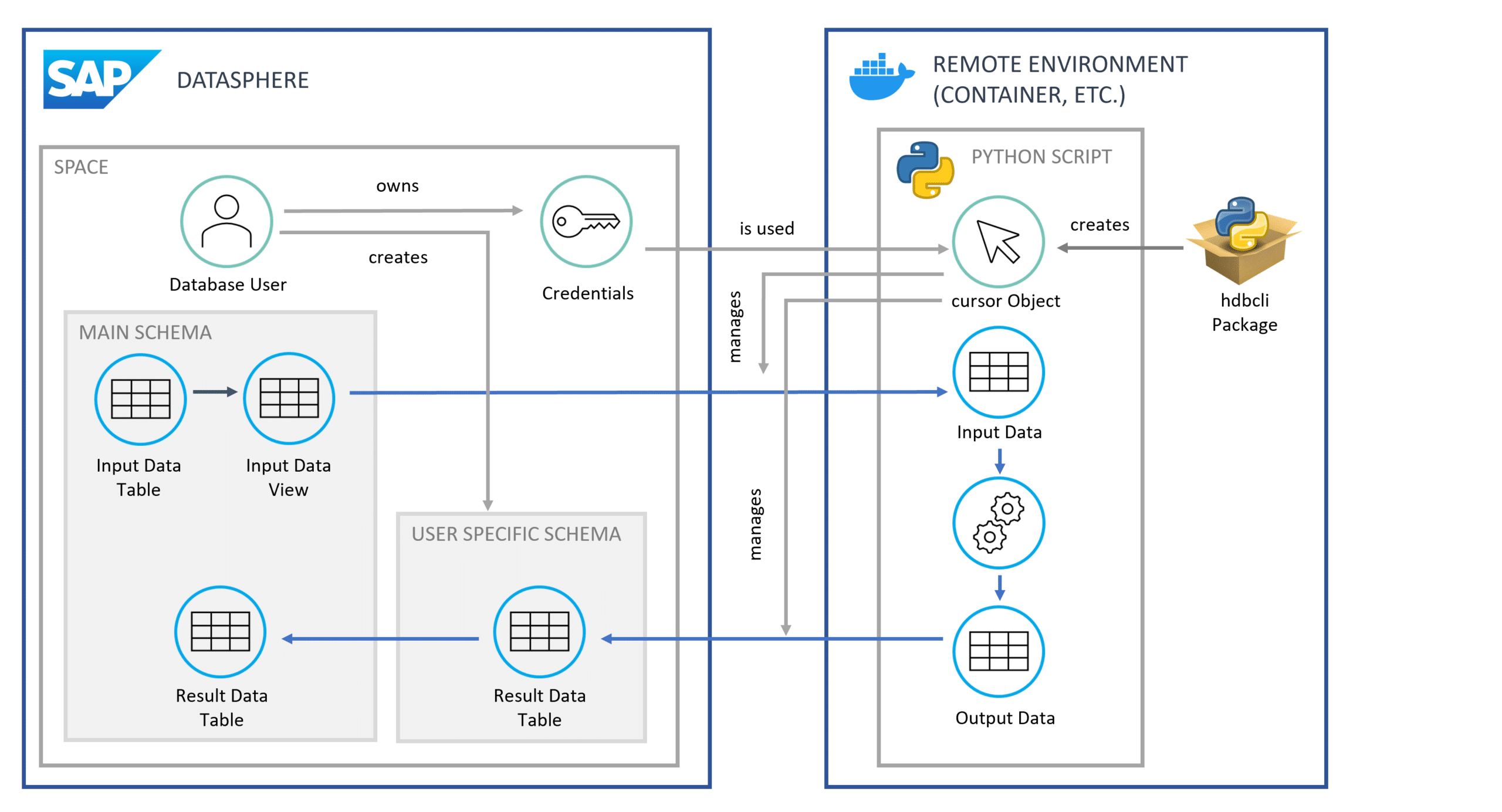
The Python package hdbcli facilitates access to data within SAP Datasphere, enabling the implementation of complex advanced analytics use cases. As the package is directly maintained by SAP, access is ensured to be license-compliant. Furthermore, Datasphere's interfaces allow for data access from other SAP source systems, including SAP ERP, BW, or HANA Db.
This article demonstrates how the Python programming language can be utilized to access data within SAP Datasphere. This capability extends beyond merely reading data, encompassing the execution of any database operations. Consequently, data can also be written back into Datasphere.
Python is a widely adopted programming language, primarily leveraged for data science and data analytics use cases. To achieve high flexibility, analyzing data from Datasphere with Python can therefore be advantageous. While Datasphere offers a means to utilize Python, its capabilities are somewhat restricted. This subsequent article serves as an introduction, focusing on SAP Datasphere and data access via the hdbcli package.
1. The Use Case
This article presents an example where a forecast is to be generated based on historical data. The relevant data is stored in SAP Datasphere and subsequently analyzed using Python. For data transfer, initial preparations are required within both Datasphere and the Python environment, which will be explained step-by-step in the subsequent section. This entire process will be demonstrated using a practical example.
In our example, historical business data is now residing within SAP Datasphere. Based on this data, a future forecast is to be generated. For this forecasting, specialized Python libraries for time series analysis are to be utilized, and the performance should be flexibly scalable.
This script leverages a range of Python libraries that extend beyond those supported by Datasphere, such as NumPy and Pandas. These could include, for instance, scikit-learn (sklearn) or, in the context of machine learning, TensorFlow or PyTorch.
Naturally, other use cases within the domains of data analytics and data science are also implementable.
2. Solution Scenario
A possible solution scenario involves establishing a separate Python environment. This environment can be a local machine or a cloud-based container solution. Within this environment, a script is executed to extract data from Datasphere and subsequently generate a forecast based on this data. Ultimately, the forecasted data is written back into Datasphere.
But how exactly does the connection between this Python environment and Datasphere function? We will delve into these questions in the following sections.
3. Preparations in SAP Datasphere
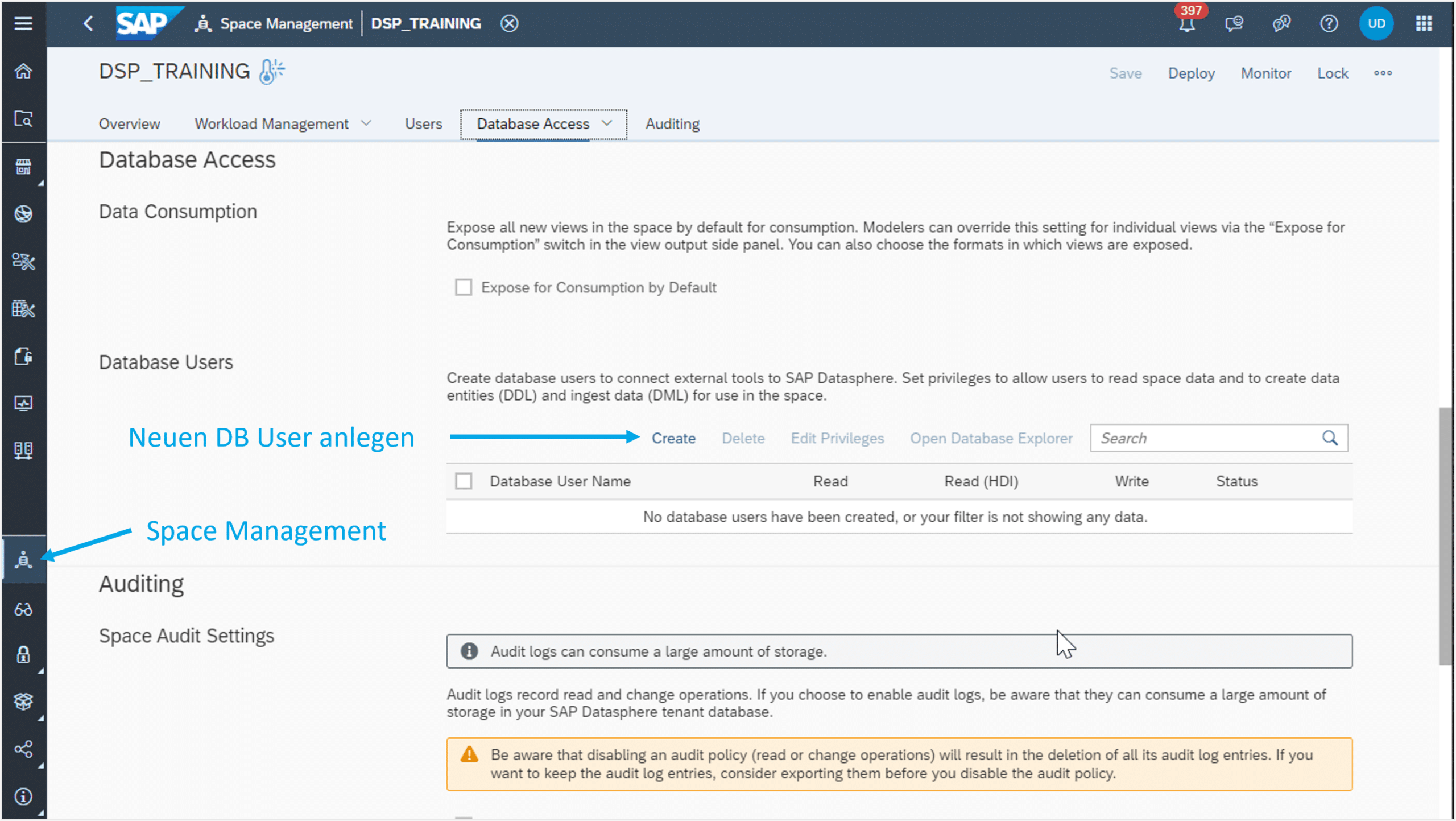
First, a database user must be created within Datasphere. This user can be created in Space Management, as illustrated in Figure 1.
Fig.1: Creating a New DB User | isr.de
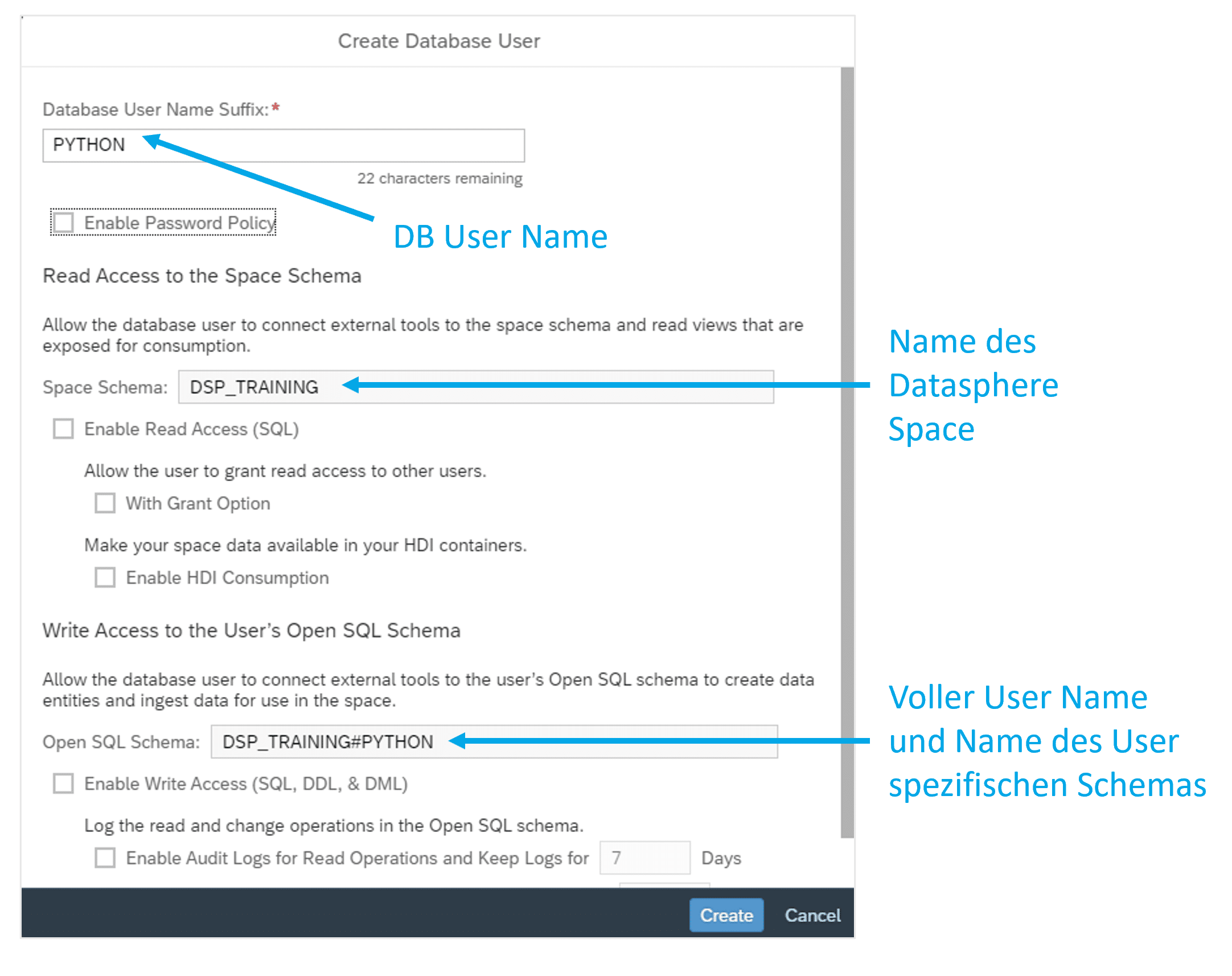
The user is always assigned a name derived from the technical name of the Datasphere Space, a hash symbol, and a freely selectable name. If the Space is named DSP_TRAINING, the user could be named DSP_TRAINING#PYTHON, as depicted in Figure 2. This name simultaneously serves as a database schema, which is automatically created.
Fig.2: Naming the New DB User | isr.de
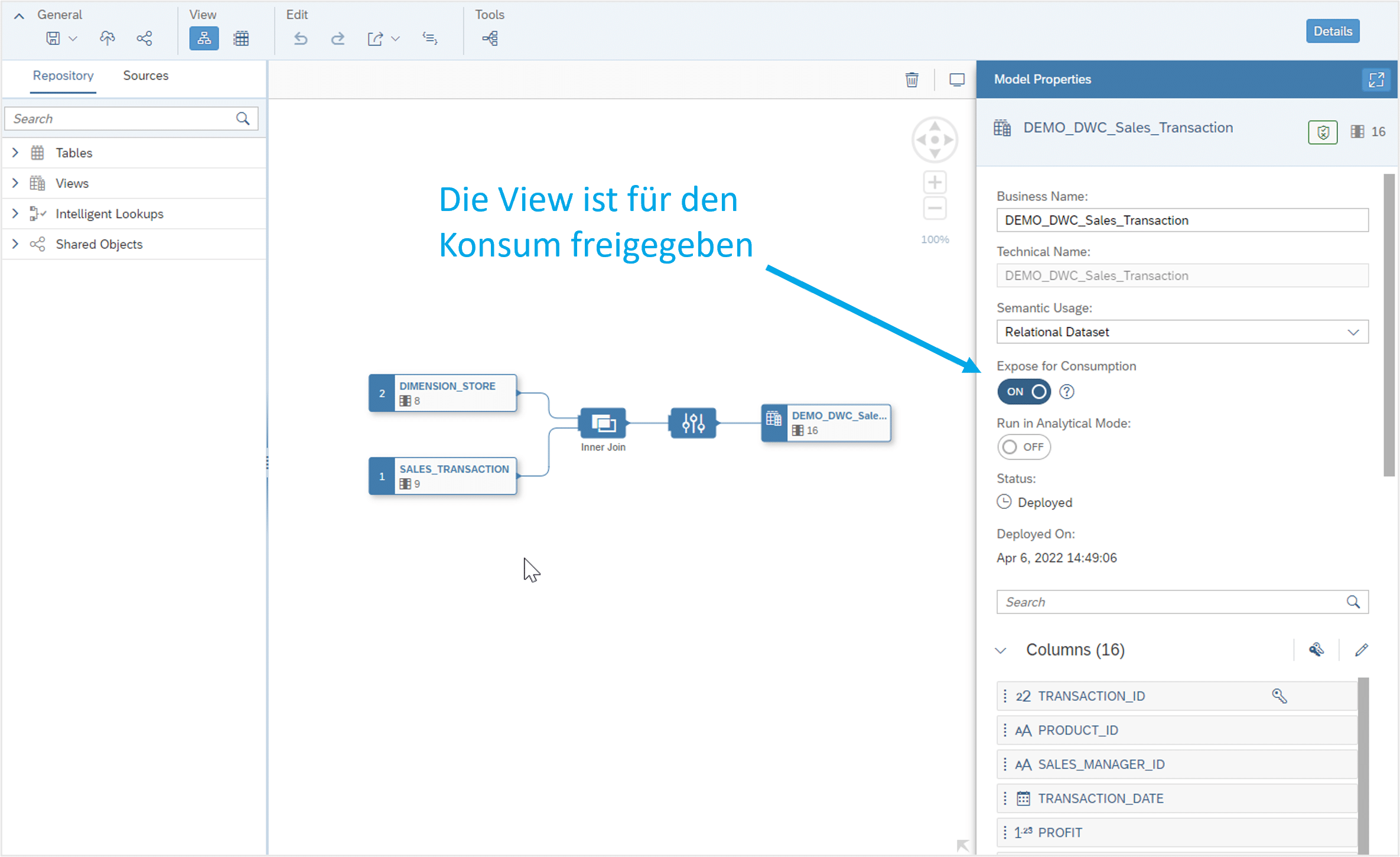
From the original database schema (in this case, simply DSP_TRAINING), the user can only access data within views that have been released for consumption (see Figure 3).
Fig.3: Accessing Data in Views | isr.de
Within their own schema, the user can access all data via Python and also write data back. Once a table has been created in the user's schema, it can also be imported into the original schema of the Space via the Datasphere user interface.
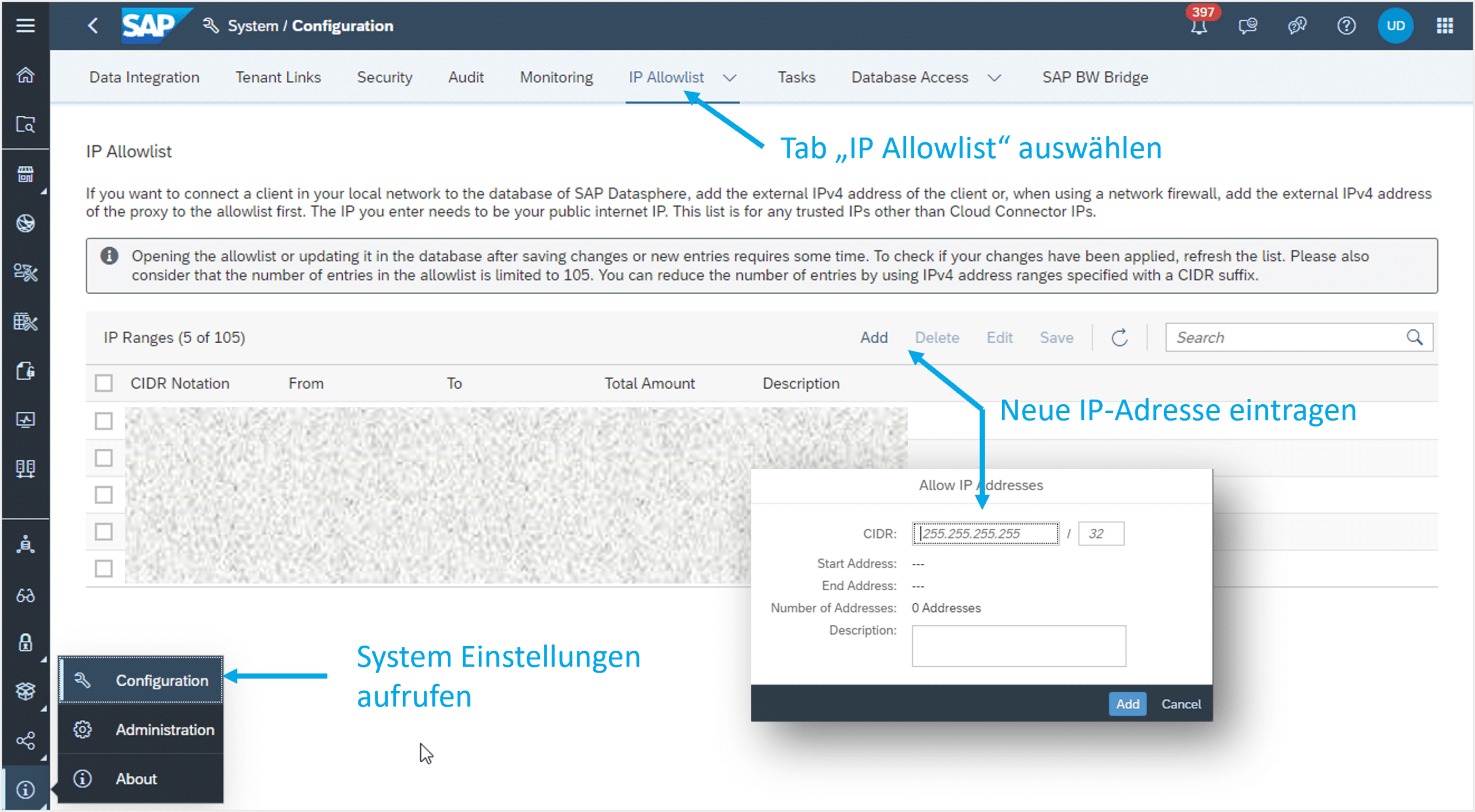
We will revisit this concept at the end of the article and illustrate it with the aid of a graphic (see Figure 5). To access the HANA database, the IP address from which access is initiated may need to be added to Datasphere's IP allow-list. Otherwise, the connection may be rejected, resulting in the following error message: “Connection failed (RTE:[89013] Socket closed by peer.”
To do this, the system settings must first be accessed. Under the 'IP Allow-list' tab, an IP address or a list of IP addresses can then be entered (see Figure 4). Subsequently, the changes must be saved to take effect.
Fig.4: Entering IP Addresses | isr.de
4. Accessing Python
To access Datasphere data from Python, the hdbcli package is utilized. If it is not yet present, it can be easily installed via the following command line:
pip install hdbcli
After installation, a connection can be established. This requires the credentials of the created database user, along with the address and port of the HANA database. The address and port can be viewed in Space Management by opening the details of the newly created user via the 'i' symbol on the right:
from hdbcli import dbapi
conn = dbapi.connect(
address=”<address>”,
port=”<port>”,
user=”<username>”,
password=”<password>”
)
cursor = conn.cursor()
After establishing the connection, a cursor object is created, which is used for communication with the database. SQL statements can be executed using this object. Below is an example of how data can be read from Datasphere:
import pandas as pd
cursor.execute(‘SELECT * FROM DSP_TRAINING.VIEW_INPUT’)
df_input = pd.DataFrame(cursor.fetchall())
The result, df_input, is a Pandas DataFrame that can now be used as usual. If data is generated within the Python script that needs to be written back to the database, a target table must first be created:
cursor.execute("CREATE TABLE DSP_TRAINING#PYTHON.RESULTS (ID INTEGER, MONTH INTEGER, VALUE DECIMAL)")
To write the results back, some preparations are necessary. First, the results must be converted from a Pandas DataFrame (df_output) into a list (list_output). Additionally, the SQL INSERT statement is prepared and parameterized with placeholders. Subsequently, the statement is executed, with the data provided as an argument:
Finally, Figure 5 below graphically illustrates the concept for you.
Fig. 5: Graphical Representation of the Concept | isr.de
5. Conclusion and Outlook
The hdbcli package provides the capability to access and write back data within an SAP Datasphere environment from Python.
This enables complex data processing beyond the native functionalities of Datasphere.
Furthermore, this method can serve as an interface to third-party systems. The straightforward integration of SAP Datasphere with numerous SAP systems, such as ERP or BW, provides a relatively simple means to utilize data from all these systems for advanced analytics and big data use cases. This integration is fully automated, eliminating manual activities such as CSV imports and exports.
The approach described above enables seamless integration of an SAP landscape into a modern cloud architecture.
Would you like to learn more? Then our Discovery Workshop is precisely what you need.
SAP Datasphere Discovery Workshop
Explore SAP Datasphere together with our SAP experts.
Since 1993, we have been operating as IT consultants for Data Analytics and Document Logistics, focusing on data management and process automation. We provide comprehensive support, from strategic IT consulting to specific implementations and solutions, all the way to IT operations, within the framework of holistic Enterprise Information Management (EIM). ISR is part of the CENIT EIM Group.