
Document Management System (DMS)
Document Management System
Our In-house Software Solutions
DMS Definition
What is a Document Management System (DMS)?
A Document Management System (DMS) is a database-driven software that companies utilize to efficiently manage and process (digital) documents.
The DMS supports a variety of document types – from project proposals, offers, and invoices to contracts and drawings. The DMS accompanies each document throughout its entire lifecycle: from capture, secure storage, and easy retrieval to usage, versioning, and integration into business processes. It also facilitates outgoing communication and ensures proper, legally compliant retention until the final deletion of information and documents. The functionalities of DMS systems therefore extend far beyond mere digital document storage.
The objective of a DMS is to optimize workflows, enhance productivity, and facilitate compliance with legal and operational regulations.
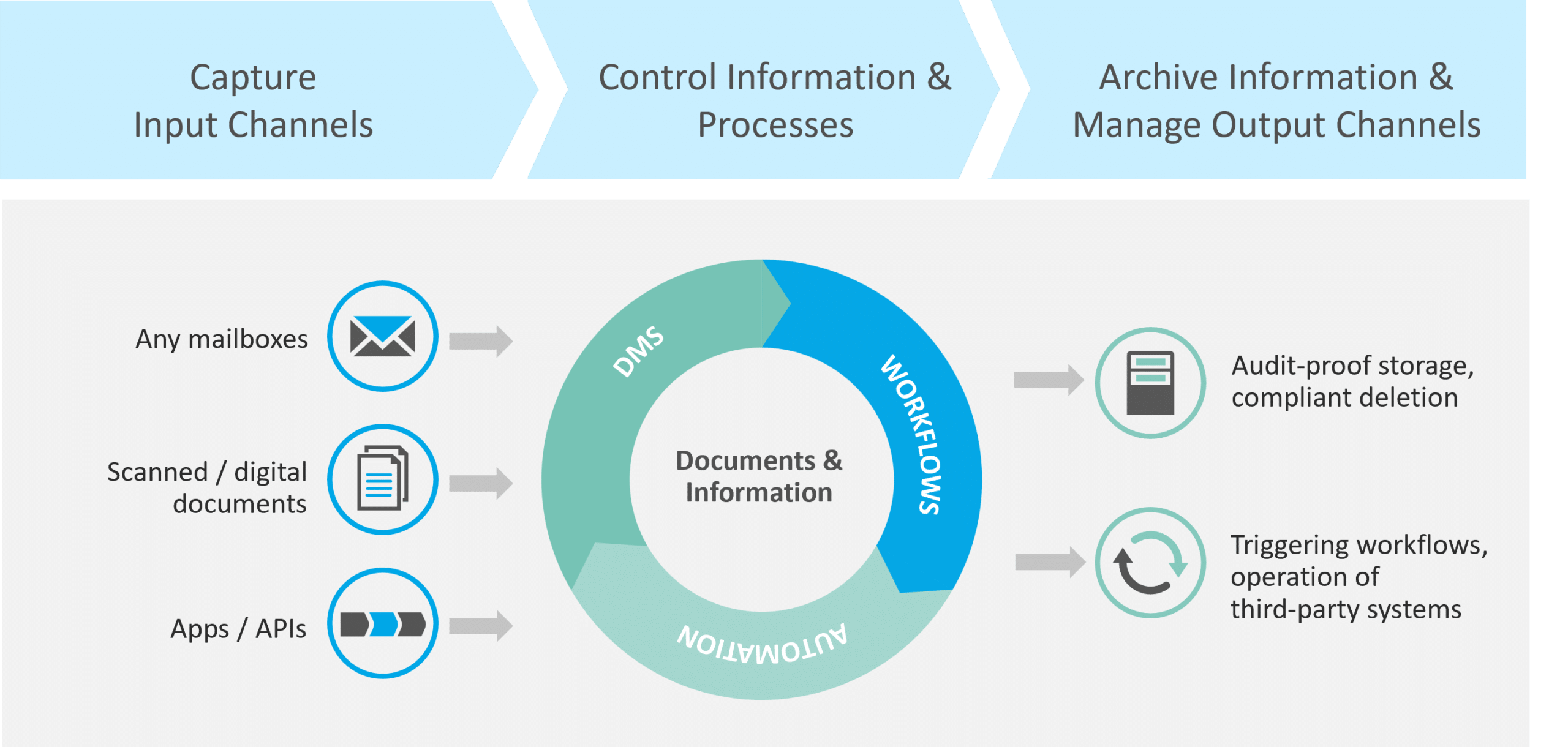
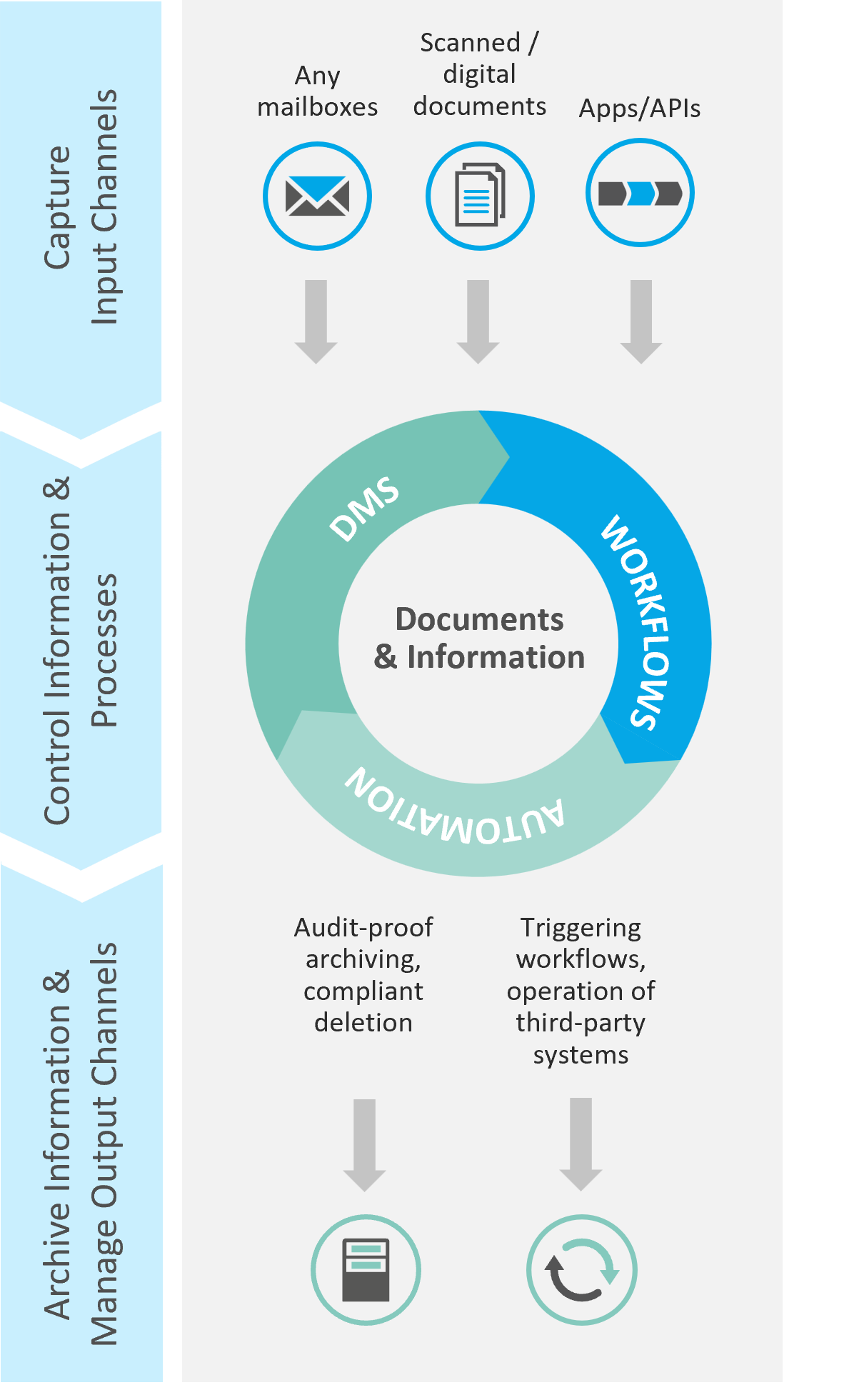
Figure 1: What is a Document Management System? | isr.de
The Six Most Important DMS Functions
Functions of a Document Management System
Document Management and Storage
Access Control and Security
Task and Process Management
Versioning and Tracking
Document Search and Indexing
Integration and Compatibility
Why is a Document Management System beneficial?
DMS Advantages
Implementing a Document Management System offers numerous advantages. These benefits materialize in the short term and also represent a strategic investment in the future.
Your advantages at a glance:
- Rapid Search: The centralized repository for documents and information enables fast and precise searching, particularly through document indexing.
- Location-Independent Work: You have access to all your relevant internal company documents anytime and from anywhere. This facilitates flexible and location-independent work.
- Compliance and Security: Achieve enhanced compliance and security through document access controls, digital backup-supported archiving, and adherence to GDPR, for instance, regarding retention and deletion periods.
- Productivity: Automations lead to improved productivity for document-driven business processes and operations, especially for routine tasks.
- Transparency: Benefit from enhanced transparency regarding documents and processes through the cross-location and parallel utilization of the DMS.
- Audit-Proof Archiving: Store your documents in an audit-proof manner and gain the ability to trace in the history who made which changes and when.
- Collaboration: Foster collaboration between teams and departments through shared document access.
- Improved Decision-Making: Make more informed decisions, as all relevant information is immediately accessible.


In the field of Document Management, we rely on these
TECHNOLOGIES



Whitepaper
Your Path to Efficient Document Management
Document Management System
Our References

Implementation of an electronic file including integration into the BPM process

MTU Maintenance: Implementation of e-File with Case Management
DMS Integration
How do we provide concrete support to enterprises?
Consulting services for the implementation and utilization of DMS solutions are a core component of our portfolio for document logistics.
With comprehensive consulting and profound software expertise, we assist you in implementing efficient document management solutions and optimized workflows. We offer both our proprietary software solutions and those from our partners to ensure tailored, high-performance systems.
Our team of experts supports you from the initial assessment and analysis of your requirements, through the setup and implementation of the solution, to continuous optimization and further development — ensuring your document-driven business processes run smoothly and efficiently.
We manage the operation of your software.
As a reliable partner for the IT operation and maintenance of your document management software solutions, ISR offers a holistic service that seamlessly follows our consulting and implementation phases.
Our objective is to ensure the stable and future-proof operation of your software solutions, so that your systems function smoothly and efficiently at all times. We handle all IT operational tasks for you, from monitoring to regular maintenance and adaptation of the software to new requirements. We provide a single point of contact for all these services: Our experts ensure the reliable operation of the software and support you long-term in continuously optimizing and keeping your document management systems up-to-date.
We are your experienced partner who not only ensures the operation and maintenance of your solutions but also flexibly addresses your individual needs – always with a focus on supporting your business processes and making them future-proof.
6 Frequently Asked Questions
Document Management System
A Document Management System (DMS) is designed to map and support the entire lifecycle of a document: from (1) the capture of a document, through (2) the structuring and (3) distribution of information and metadata, to (4) archiving and deletion. The lifecycle can therefore be divided into four phases, which are explained in more detail below.
1. Capture of Analog and Digital Documents
At the beginning of the lifecycle, analog documents must be converted into digital documents. This is achieved through a hardware-supported scanning process. An input management system then ensures that the unstructured data of a digital document is converted into structured data. These are then transmitted to the DMS solution.
2. Organization of Information and Metadata within the System
Within the DMS, documents, along with their information as metadata, are digitally stored and archived. Through metadata, the DMS can offer users various access paths to a document. For example, a master agreement can be found by searching for the business partner or by the year in which the agreement was concluded. Additionally, a master agreement can be located via free-text search using various keywords. Thus, modern DMS software provides multiple views of a document. Furthermore, numerous other administrative details can be derived from the metadata, such as confidentiality and authorization, associated filing structures, and retention and deletion policies.
3. Distribution and Processing of Information through Individual Workflows
Effective document management software is characterized by well-designed workflows for process control. Documents are routed through the company – for example, for processing, approval, or resubmission. The associated processes are centrally documented, ensuring that the history shows who was involved in the process and which changes were made when. This provides complete transparency regarding the document history. An additional advantage: the process data collected, which is also contained in log files, can be analyzed using process mining to identify optimization potential within the process.
4. Archiving and Deletion of Documents and Information
All documents and information can be stored and archived in an audit-proof and legally compliant manner. In terms of an end-to-end perspective, the relevant external communication occurs upon transfer to output management. Furthermore, a DMS monitors the defined deletion periods for each document type and controls the final deletion.
It can be concluded that the information contained within a document is of critical importance throughout its entire lifecycle.
When selecting a Document Management System, several important aspects must be considered. Our consultants will support you with these questions; the decisions are yours to make:
- Clarify Requirements and Goals: Identify your company's specific requirements and goals for your DMS, such as improving efficiency, ensuring regulatory compliance, or reducing costs. These should be regularly reviewed to ensure the current solution continues to meet your needs.
- User-Friendliness: The system should be easy and intuitive to use to ensure employee adoption. Interfaces should also be easily customizable and configurable, not just suited for a single use case.
- Data Security and Compliance: With increasing digitalization, the risk of cyberattacks also grows. Therefore, when selecting your DMS tool, you should ensure that strict access controls and encryption are implemented to protect sensitive information. Verify that the DMS complies with legal and regulatory requirements, such as GDPR.
- Integration: The DMS should seamlessly integrate into your existing IT infrastructure, including ERP, CRM systems, and email clients. Furthermore, the migration of existing documents and data into the new system should be carefully planned.
- Workflow Management: Utilize workflows and process automations to optimize routine tasks. Ensure that your DMS is flexible enough to be adapted to your company's specific business processes.
These aspects can vary between companies and have different weightings. Consider them carefully in advance. Defining objectives is one of the most crucial and fundamental elements in any project!
Fundamentally, all enterprises (whether SMEs, large enterprises, or corporations) can benefit from a Document Management System (DMS). The rationale is that every organization processes a wide variety of documents and manages them through internal processes. Consequently, implementing a DMS can significantly enhance a company's productivity and efficiency.
Traditionally, businesses process quotes, invoices, and contracts, archiving them for a specified period in accordance with legal and internal regulations. Furthermore, DMS systems, often closely integrated with a company's core processes, provide valuable support in other areas. Here are some examples:
- Legal files in law firms and corporate legal departments
- Loan files in banks
- Patient records in healthcare
- Project files in industry and manufacturing
- Personnel files in human resources departments
Taking loan files in banks as an example:
A loan file plays a value-adding role in banks' credit management by consolidating all relevant information pertaining to a borrower. For instance, submitted income statements, credit reports, assets, and liabilities are used to assess the borrower's creditworthiness. Based on this, credit risk can be accurately evaluated, and an informed lending decision can be made. Furthermore, the loan file serves as a comprehensive archive for all relevant transactions and decisions related to the loan. Historical data enables the bank to improve future lending decisions and optimize the quality of its credit portfolio. Moreover, the file acts as a central source of information for all decisions pertaining to the loan – including renegotiations and the granting of subsequent financing. Last but not least, the credit file also provides proof that proper credit counseling and risk assessment have been conducted, thus serving as an essential component for compliance in banks. Overall, the credit file is an indispensable tool for banks, as it significantly supports their core business and critically contributes to risk minimization and revenue enhancement.
The example of the loan file and its essential evidentiary function also demonstrates that the use of file servers or Microsoft SharePoint cannot replace a DMS, as these systems are designed with different core functionalities.
Before implementing a suitable Document Management System with various file types within your organization, you should carefully consider your specific requirements and coordinate with other departments. This approach ensures that the optimal DMS can be designed and implemented to meet your needs.
There are various ways to operate a Document Management System. The decision often depends on the company's IT strategy, its areas of application, and the available deployment models.
- On-Premises DMS: The DMS is installed and operated directly on your servers and within your IT infrastructure. These systems offer full control over your data and allow for customization to your specific business requirements. In this context, it typically makes no difference whether you operate a traditional, proprietary data center or utilize a private cloud.
- Cloud-based DMS: The DMS is hosted as Software-as-a-Service (SaaS) in the cloud. These systems enable access to your documents from anywhere, without each user requiring access to your local infrastructure. Scalability and updates are ensured by the DMS provider.
- Hybrid DMS: This refers to a combination of on-premises and cloud-based systems. It allows for the use of some components within your infrastructure and others in the cloud. An example could be the integration with an on-premises ERP system, for which an on-premises ERP-DMS connector is also used. However, data storage occurs in a cloud-based DMS.
These are the three most common options that our clients also utilize for their DMS. Each of these variants has its own advantages and disadvantages, and the selection of the appropriate model depends on the specific needs and requirements of the respective company. Feel free to contact us!
The term 'DMS workflow' is not a universally defined concept within document management. However, it is sometimes associated with workflows within DMS systems. Workflows refer to the digital processes within a Document Management System (DMS) that ensure documents are systematically guided through various phases of a process. This can include tasks such as approvals, releases, reviews, and notifications, which are automatically forwarded to the process participants.
Each document type (e.g., order, incoming invoice, contract) requires a specific procedure that can be configured and processed accordingly in the system as a DMS workflow. These workflows then define how documents are processed, reviewed, approved, and archived within an organization.
Example: Purchase-to-Pay Process:
A more complex DMS workflow example is straight-through processing within the Purchase-to-Pay process. Following a goods order, an order confirmation, invoice, and goods delivery with a delivery note are generated. These four document types can be processed through the DMS workflow up to automated invoice payment. Here, the DMS decides, based on the available documents and information (such as quantity, price, order number), whether an invoice can be automatically posted or not – without human review or verification. The workflow includes various verification steps and ultimately forwards the invoice document to an ERP system for posting before it is archived.
A DMS workflow is thus a powerful tool that assists organizations in optimizing their document processes, minimizing manual interventions, and ensuring adherence to business processes.
In the context of a Document Management System (DMS), a document is any type of (digital) file that contains relevant information and is stored, managed, and processed within the system. This can encompass a variety of file formats, such as text documents, PDFs, spreadsheets, presentations, emails, images, or scanned paper documents.
A document within a DMS typically possesses metadata such as title, creation date, author, and keywords, which aid in its categorization and discoverability. Furthermore, each document is integrated into a specific workflow where it is reviewed, edited, approved, and ultimately archived. The management of these documents within the DMS enables centralized storage, structured filing, secure access control, and complete traceability of all actions performed on the document.
Read more on the ISR Blog
Valuable content on DMS

Efficient Document Management: ECLISO and Accounts Payable Flow in the Spotlight!
Optimize your business processes with the aid of an effective Document Management System. Leverage the synergies for this purpose…

FileNet Content Manager: Dos and Don'ts in Usage

Document Management as a Source of Knowledge and Information within the Enterprise
We are all familiar with this persistent issue: we have an appointment, prepare for it, and …
Contact us now
We are ready to assist you!

Stefan Jamin
Head of Department
Document Logistics
stefan.jamin@isr.de
+49(0)151 527 45 157