Discover all new features of the latest release for Information Office, Contract Manager, and Accounts Payable Flow.
In the era of digital transformation, much is changing. Analog files are transforming into digital document management, entire stacks of paper are being stored in the cloud, electronic signatures are replacing manual signing, and AI systems are assisting with daily tasks.
1. digital records and Business Processes: ISR Information Office
2. Contract Management Made Easy: ISR Contract Manager
3. Invoice Verification with AI: ISR Accounts Payable Flow
4. What’s New: Updates Directly from Our Product Development
5. From Update to Feature: A Retrospective on ISR Software Features
digital records and Business Processes: The ISR Information Office
With the ISR Information Office, you can manage your files and processes clearly and securely in a central location. We collaborate to create a solution perfectly tailored to your needs, integrating all digital review and approval processes. With the new features, our software now streamlines your daily operations even further.
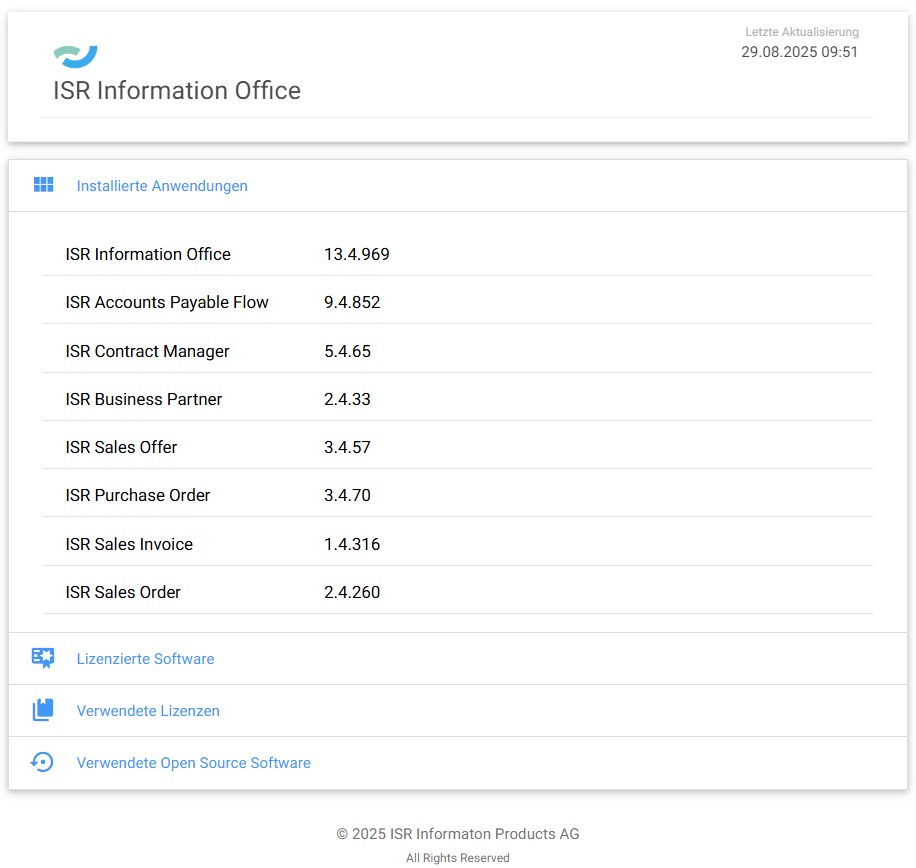
Figure 1: License Overview in ISR Information Office | isr.de
Contract Management Made Easy: The ISR
Contract Manager
The ISR Contract Manager, as professional software for digital contract management, ensures control over all contract data and processes within your enterprise.
Regardless of the device – you and your colleagues can securely access your contract data, terms, and documents from anywhere, at any time, protected by our robust authorization concept.
Furthermore, thanks to intelligent deadline management, you reliably keep track of all termination and renewal periods.
Invoice Verification with AI: ISR Accounts Payable Flow
Manage your invoice receipt process entirely digitally and intuitively. Through clear dialogues, our software comprehensively supports you in handling invoices, adhering to discount/payment deadlines, and automating approval processes. Thanks to the intelligent algorithm based on our proprietary AI (Buildsimple), our software assists you with the correct accounting of invoices.
The automatic assignment of G/L accounts and cost centres to invoice items saves time and reduces the error rate, as manual assignment largely becomes redundant. Invoice processing made simple, fast, and intuitive!
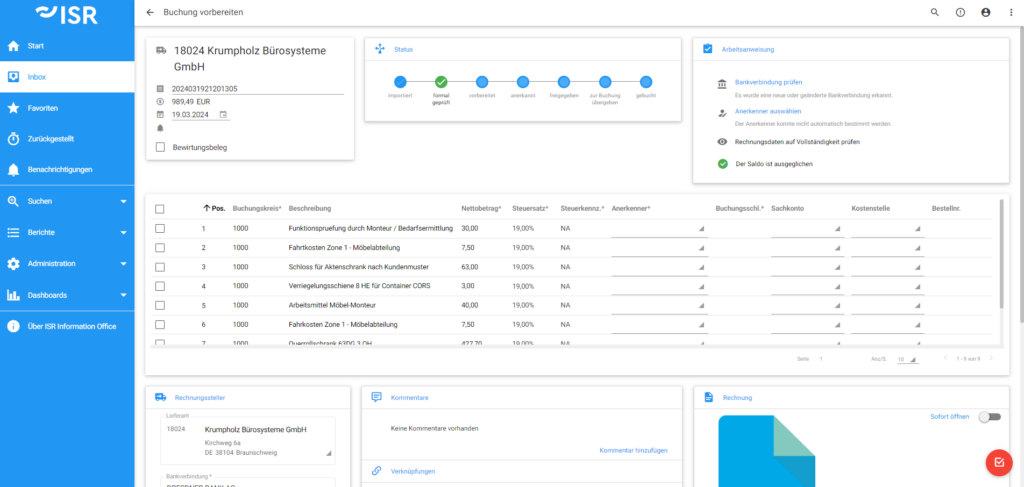
Figure 2: Easily prepare and process postings in Accounts Payable Flow | isr.de
What’s New: Updates Directly from Our Product Development
For digital records and processes, particularly in contract and invoice management, we have been providing our ISR software to clients for 20 years. To ensure you maintain full digital control in the future, we continuously enhance our software products.
For All ISR Products
With the new releases Information Office 13.4, Accounts Payable Flow 9.4, and Contract Manager 5.4, we have added numerous features that ensure greater transparency, security, and automation. The focus is on improvements in permissions and approvals, new capabilities for invoice receipt, and additional convenience functions that significantly streamline daily operations.
The following section will detail the innovations in Information Office, Accounts Payable Flow, and Contract Manager.
What’s New: ISR Information Office
Version 13.4 | Released on 05.09.2025
Outgoing Invoices
With the new Outgoing Invoice Module, invoicing is completed swiftly, either automated via the Job Manager or specifically for individual orders. All important information, documents, and links are clearly organized in the outgoing invoice file. This module extends the Sales Order process in Information Office to include the creation and management of outgoing invoices – from order processing to posting.
File Permissions
More clarity, less chaos: Role-based permissions precisely define who is authorized to do what. Existing read permissions from legacy file migration are automatically adopted, and new permissions immediately apply to all existing and new files. The display of permissions within files is now significantly more transparent: existing rights are visible from a central location. This ensures your data remains protected and your teams operate without impediments.
Approval Management
Our approval management receives an upgrade: Effective immediately, approvals can be centrally assigned to users and roles, e.g., for accounting, purchasing, or project teams. This results in fewer clicks, clearly defined responsibilities, and fast, transparent approval processes. Every change is automatically logged, allowing you to track who granted or adjusted which approval, and when. Efficient, flexible, and transparent, exactly as digital processes should be.
What’s new: ISR Accounts Payable Flow 9.3
Version 9.4 | Release on 05.09.2025
Matching Service
Our intelligent Matching Service ensures that every invoice is automatically assigned to the correct company code and vendor. Two steps suffice: first the invoice recipient, then the invoice issuer. With the new configuration option, starting from Version 9.4, you can flexibly control the matching accuracy, ensuring reliable assignment even with similar names.
E-Invoice
With the new version, incoming ZUGFeRD or XRechnungen are displayed directly as readable PDFs. The integrated conformity check immediately warns of discrepancies, allowing errors to be detected and corrected early. Everything is clearly organized in the invoice file – including supporting documents and audit logs.
Simple Document Inbound Channel (SDE)
New in Version 9.4: With the Simple Document Inbound Channel (SDE), invoices can be processed directly in Accounts Payable Flow – without a separate input management system. Invoices received via email or file are automatically stored in an empty file. Subsequently, you manually enter the necessary content, and the invoice then proceeds through the proven workflow from acknowledgment to approval and posting. Fast, flexible, and transparent – ensuring a smooth process.
What’s new: ISR Contract Manager
Version 5.4 | Release on 05.09.2025
Add Main Document
With the new version, contracts (as well as offers or order documents in Information Office) can be directly designated as the main document in a file – in just one step. All documents, comments, and links are clearly bundled, and existing read permissions are automatically adopted. The function can be flexibly configured and adapted to your individual processes. This saves time, reduces clicks, and ensures clearly structured, transparent contract processes.
"Problems are best overcome by anticipating them. In Application Management, our team of specialists continuously works on improving our ISR software and is already developing optimizations for future versions."
Joachim Wrzeciono | Head of Product Development Application Management
ISR Information Products AG
Update Becomes Feature: A Look Back at ISR Software Features
In the continuous development of our software, we always strive to integrate innovations and improvements to offer our users the best possible experience. This means that all features once newly added to our software as additional enhancements are now permanently integrated into our applications as standard features. Here is a brief overview of these features and the software versions in which they were introduced. We begin with Information Office.
Information Office: The Command Center
The following features have been permanently integrated into Information Office and all future versions since their release:
License Tool
With Version 13.3, Information Office 13.3 features a License Tool, and let's just say: your specialized administrators will love it! It performs a small but very important task. It significantly streamlines and simplifies license upgrades/downgrades. Through the ability to import/export licenses, current license information can be generated using a license key. This information can then be easily exchanged between us and your responsible administrator. The new license key, containing adjusted or new license information, can be imported easily without deployment. Done!
Work Instruction Texts (Offer Module)
The work instruction texts in the description area of an offer can now be individually configured in the system – depending on the offer type. This means the respective specialized administrator can now independently perform configurations via the administration interface, without requiring a deployment.
User Notifications (Active Messages)
With version 13.3, administrators can deactivate messages for users and reactivate them as required. Recurring messages do not need to be re-authored; instead, they can be easily updated with new information and activated for all users. Accidentally dismissed a message too quickly after opening Information Office? No problem: users can now easily recall and view all active messages via the navigation bar.
Compatibility
With Update 13.3, we have further expanded the compatibility of Information Office, now supporting, among others, SAP JCo 3.1.8, IBM FileNet Content Manager (formerly P8) 5.5.11, and OpenOffice version 4.1.15. The compatibility with established software versions is particularly crucial, offering the advantage of ensuring stability, compatibility, and planning reliability for your IT environment.
Single Sign-On via SAML v2.0
With the update to version 13.2 of Information Office, we are introducing the integration of Single Sign-On via Security Assertion Markup Language version 2.0 (SAML v2.0). SAML Single Sign-On is a mechanism that enables users to log into multiple web applications after authenticating with an identity provider. This single login process facilitates a faster and more secure user experience.
Intelligent License Verification during User Import
No more license conflicts during automated user import! Thanks to the new license check, users will no longer be imported if no free licenses are available. This ensures you always maintain an overview of existing and available licenses, thereby preventing potential under-licensing.
Direct Master Data Management
Furthermore, starting with version 13.2, it is now even easier to create and modify master data. This can now be done directly within Information Office, eliminating the need for the previous master data import process.
Offer Creation (Offer): An offer approval process now enables offers to be created centrally and clearly within the offer file. This file serves as a central repository for all relevant information and documents. Furthermore, an automatic link between the offer file and the order process allows for the direct generation of orders from offers.
Order Process (Sales Order): Enhanced transparency and efficiency in the creation, search, and execution of orders. Output management with automated order confirmation dispatch is also available. The linking of offer and order files enables the direct creation of orders based on existing offers.
Purchase Order Process (Purchase Order): Automation of order processing and the ability to store important information in the purchase order file. Automated order dispatch and direct file linking with Accounts Payable Flow are also integrated.
Business Partner File (Business Partner) Module: A comprehensive summary of all documents and information related to a customer, supplier, or partner. This file also contains the business partner's master data and can be linked with other files to ensure a holistic overview.
SmartLinks: Various functions are directly accessible from the Information Office homepage. Active tasks and favorites can be viewed and edited; furthermore, enterprise-wide searches are available, and dashboards can be accessed directly.
Enhanced Inbox: A more compact overview of pending processes in the Inbox. Each entry is displayed on a single line without field headers, which are now shown via tooltips, significantly saving space. This allows more processes and information to be visible at a glance.
Active Tasks: A single click directly opens the editing dialog if the assigned user is processing the task or is included in the role of the current processor.
Accounts Payable Flow: Accounting, simple & efficient!
The following features are integrated into all subsequent versions of Accounts Payable Flow:
Rejections from the Approval Step
Your accounting department can now also initiate rejections! While this is a somewhat condensed and simplified explanation, starting with version 9.3, rejections in the approval step can be configuratively forwarded directly to the accounting department. This functionality is essentially similar to what experienced Accounts Payable Flow users already know from other review steps, such as the factual review (acknowledgement). The previous standard rejection process continues to be supported.
Tax-Free Invoices
Last but not least: With the new update, Accounts Payable Flow now also supports the posting of tax-free invoices within the SAP context. In this context, 'tax-free' explicitly means tax-free, not tax-exempt.
Automated Data Exchange between DATEV & Accounts Payable Flow: Automatically exchange and post DATEV master and booking data between Accounts Payable Flow and DATEV. This saves time, reduces manual effort, and ensures higher accuracy in your accounting.
Targeted Configuration of Approval Authorizations: Assign users authorizations for various types such as cost centres, G/L accounts, and WBS elements, and automatically assign these as rules to their user profiles.
Currency Exchange Rates via API:
Scheduled import of Bundesbank currency exchange rates via API. Easily and precisely import currencies for configurable options into the currency master data. Keep your financial data consistently up-to-date and benefit from automated updates.
Interface Update:
Buildsimple
Buildsimple extracts incoming documents and makes them available for digital processing. Buildsimple thus provides the foundation for Accounts Payable Flow and digital invoice processing, among other functionalities. The interface between Artificial Intelligence and Accounts Payable Flow is enhanced with new capabilities in this release. For instance, the invoice client can now be configured. This allows for the adoption of individual invoice items from incoming FI invoices processed by Buildsimple, or their combination/merging with existing items.
Datev
This release introduces a standard Datev interface for Accounts Payable Flow. Booking data is transferred to the Datev system via this interface. Feedback from Datev is automatically processed, and booking data (including booking number) is reported back.
CENIT ECLISO
Also new is the integration of Accounts Payable Flow invoices into Ecliso. This enables reliable synchronization of information such as status, invoice number, and vendor name from cost (FI) and purchase order (MM) invoices as document properties into an IBM FileNet Content Manager. Based on this data and parameters, Ecliso creates an invoice record.
AI-based Enhancement of SmartKoding:
The approver is determined based on historical values using a frequency analysis. Additionally, up to 5 approvers (per item) are displayed in the history, each with their respective percentage probability.
Fully Automated Posting
With the new version, fully automated posting becomes possible by default. Exceptions can be specifically defined via administration, for example, based on a certain gross amount, company codes, cost centres, G/L accounts, or vendors.
AI-based Invoice Extraction
With the new standard interface to Buildsimple as a cloud platform for separating, classifying, and extracting your documents, ISR offers a complete solution for up to 100% automated invoice extraction. Regardless of whether it's paper, email, ZUGFeRD, or XRechnung.
Contract Manager: Keep track of all contracts!
The following functions are integrated into all subsequent versions of the Contract Manager:
Design and Layout
All views and interfaces have been optimized in this update to improve information discoverability and ensure a clearer structure for views. As of Version 13.3 (Information Office), Version 9.3 (Accounts Payable Flow), and Version 5.3 of the Contract Manager, this layout adjustment eliminates unwanted blank spaces. This results in a clearer and more organized structure (e.g., in the header data within the file view).
Entry Template:
Do you have recurring offers, contracts, or orders? With this update, contracts and offers in the Contract Manager, and orders in Accounts Payable Flow, can be recorded based on existing objects (contracts, offers, or orders). These entry templates save time and optimize the process of adding new objects by automatically providing existing information. With just a few clicks, users can now create new processes without repeatedly entering the same information.
Configuration of Notification Settings:
As of this update, you can initiate notifications, such as 'Information to Contract Owner,' directly from the Contract Manager. Each user can individually configure notification settings within their respective user profile. This ensures that all stakeholders are always up-to-date. This innovative feature not only saves time but also enhances communication among all parties.
Flexible Configuration of Process Start Times:
It is now possible to select individual configurations for process start times for termination, renewal, resubmission, and information deadlines. While the default value is 06:00, you have the flexibility to adjust the start time according to your individual requirements.
GUI Enhancements:
The display on mobile devices (including tables) has been optimized to enhance readability on smaller screen sizes. Furthermore, the design and clarity of email notifications have been revised.
Digital Signature Process
Within the signature process workflow, digital signatures can now be created and utilized with a single click. To facilitate this, a selection list of internal signatories and the 'Contract Coordination' role will be established, empowering them to initiate the signature process and access the contents of the signature process inbox.
File View in Folders:
The contract file now includes a second tab, allowing documents to be displayed in an extensive tree structure. Users can create, rename, or delete new folders. Documents can be stored within these folders and moved between them.
Contract Dashboard
In parallel to the Invoice Dashboard within ISR Accounts Payable Flow, the new version will introduce a Contract Dashboard for the ISR Contract Manager. This feature will enable rapid viewing and analysis of metrics such as contract type by volume, the status of all contracts, or the total count of contract types.
At ISR, we are committed to ensuring that our software consistently delivers an exceptional user experience to our clients. Therefore, we will continue to regularly inform you about our latest developments and enhancements in this blog article. Stay tuned to remain up-to-date and benefit from our innovations.
Do you have any questions? Please feel free to contact us!
If you wish to learn more about the ISR Software Portfolio, please visit our ISR Software Website or contact us directly.


Joachim Wrzeciono
Head of Product Development
Application Management
joachim.wrzeciono@isr.de
+49(0)151 422 05 462