We are all familiar with this tiresome issue: we have an appointment, prepare for it, and gather the necessary information.
We know for sure that the information we urgently need right now, e.g., about the content of the previous meeting, is available. It's in a document somewhere. We either filed it there ourselves or saw it when we read it. But where is that document right now? And is it the current (often referred to as the "final") version?
A document management system can provide quick and accurate answers to all these questions! In addition, the DMS can provide valuable infrastructure services for process automation. It ensures that all decision-makers are referring to the same version of the same document. And only those people who are currently "on the ball" can work on the document.
Thanks to their event architecture, DMSs can ensure that changes to the status of documents, or even new documents, automatically trigger follow-up processes.
Document management: more than just boring filing
Document management systems are often used to store a large number of documents in "final" status. This is justified—but it is by no means all that an intelligent DMS can do!
Documents are a very flexible tool for storing and sharing information. They combine text with numbers and images. This makes them a very powerful and easy-to-use tool for storing information. The weak point here is structured access to this information. Unlike in classic database-supported applications,document content stored in a file system cannot be easily accessed via a quick, database-supported search query.
The good news is that there is a remedy for this. Document management systems store metadata for each document. This can include, for example:
- fiscal year
- Customer or product
- Document type (meeting notes, presentation, draft contract, invoice, etc.)
Document management: Access structures quickly lead to the goal
With the help of this information (in this case metadata), dynamic access structures can be created that closely resemble those of a BI system. By narrowing down search terms—for example, searching for a document that is assigned to a specific customer, is from the current fiscal year, and is of the "presentation" type .
This is the major advantage of these systems over a traditional file server. With a file server, users are bound to a hierarchical access structure—often referred to as a tree structure. With the help of a DMS database, documents can be displayed simultaneously in different structured hierarchies. This makes it possible to access the same information in completely different ways. Depending on the perspective of the person searching, a stored process or document can be accessed either via the fiscal year, the customer context, the product context, or even the document type (in our example, "presentation"). Since all of these categories are attribute fields in the DMS database, these access paths can be configured as desired.
Smart document management using the example of personnel files
Over time, this form of dynamic document structure has proven itself in our DMS projects. To this end, we have developed a type of file template based on FileNet from IBM, which can be easily used for various "document cases."
The following two screenshots show personnel documents. These can be viewed either in the context of an employee or in the context of a fiscal year, for example, to enable cross-comparisons. Each document is only available once. We have marked the respective contexts in yellow.
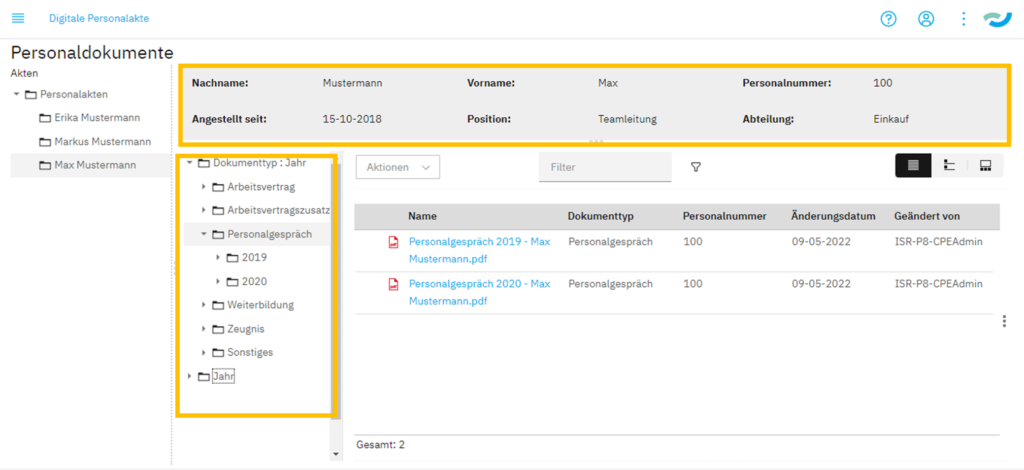
Figure 1:Document management shows various access options for personnel documents, for example | isr.de
Instead of the bracket "Person" (gray box), you can also imagine another bracket—such as:
- a customer
- a product
- a supplier
- a project
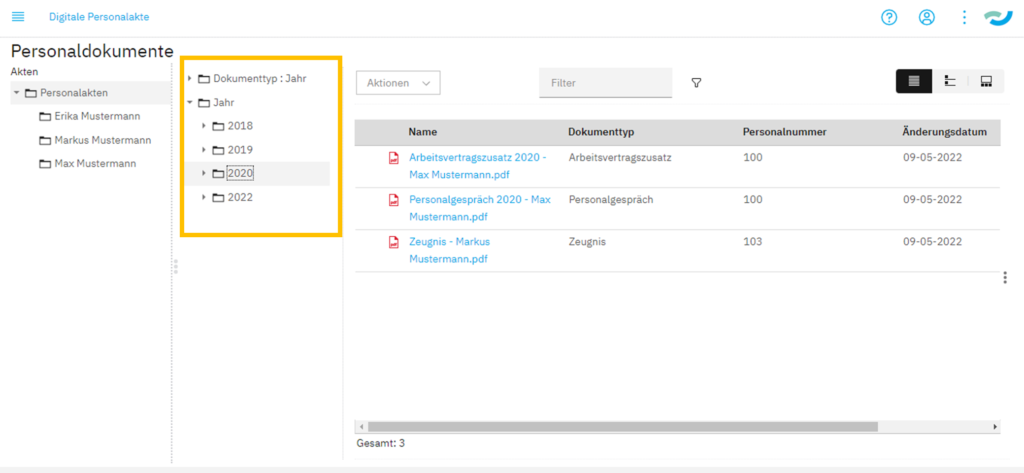
Figure 2: Same document, different access path: document management makes it possible | isr.de
Want to learn more about personnel files? Then check out our on-demand webinar, "Digital Personnel Files: Optimally Structuring Documents."
What can be done within the document management web interface can also be done from other applications.
Dynamically generated links allow such file views to be displayed as needed from other applications (e.g., a personnel management system or a CRM system). Depending on the user rights, these can then either be read or edited. Adding further documents to a process or topic is easy using the context menu.
An additional option is to use the full-text index. Our experience shows that accessing information stored in documents works most effectively when both access methods are combined. First, perform a rough search using metadata, then use the full-text search to find the desired information in the list of results. Combining both methods effectively makes accessing the knowledge stored in documents within the company easy, fast, and transparent.
Many paths lead to the right document – an example
For example, you are looking for a feature that you promised a customer for a product. The feature can only be found using a full-text search. In this case, it makes sense not to search for the feature in all documents, but to first narrow down the search using the metadata "customer" and "product." This makes the search much faster and the list of hits to be processed significantly shorter. This makes searching fun!
Document management—there's still room for improvement...
Another interesting step could be to enable activities linked to documents to be carried out in the same system. Our webinar series on the topic of "digital records" will continue next fall. Here, we will show you how to create follow-ups (for specific documents) and how to quickly implement small approval processes without the need for large IT and workflow projects.
In our example of personnel documents, this could be a follow-up to check the success of an agreed measure six months after a development meeting with the employee, or simply to approve and document proposed changes in the simplest possible way. These process structures are common and universal. Think of the approval of a customer-specific offer by experts in technology, pricing, and contract design. Or the resubmission of the offer two weeks after it was sent to the customer to inquire about the order.
If you would like to learn more about what we offer in this area, please contact us.

Cihan Klingsporn
Senior Account & Marketing Manager
Business Process Automation
cihan.klingsporn@isr.de
+49(0)151 422 05 471