
digital record
digital record
Software Solutions from ISR
Definition
What is a digital record?
A digital record is an electronic software solution for the storage, management, and organization of documents and information, which replaces and extends traditional paper files.
It centrally stores data in digital format and enables rapid access from various devices. Through features such as full-text search, versioning, and automated workflows, a digital record system enhances the efficiency of work processes and reduces manual effort. Access rights, encryption, and backups ensure data protection and security. The digital record system is flexibly adaptable and can be seamlessly integrated into existing systems like ERP or CRM. Furthermore, it facilitates compliance with legal requirements, for instance, through audit-proof archiving and audit trails.
It serves as a central building block for digitalization within enterprises, fostering a transparent, structured, and paperless work environment.
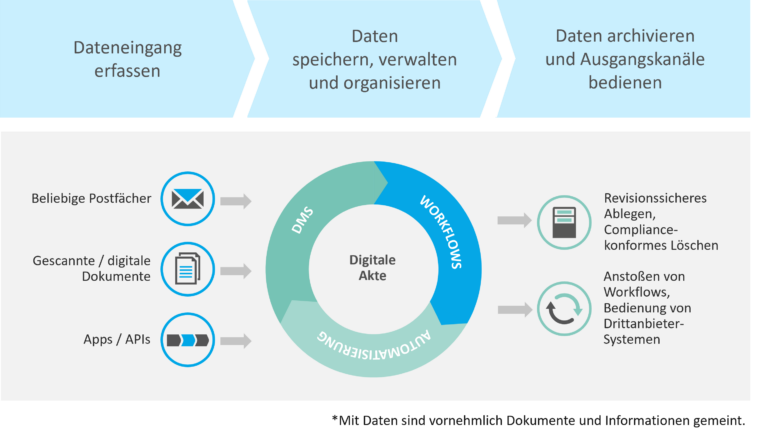
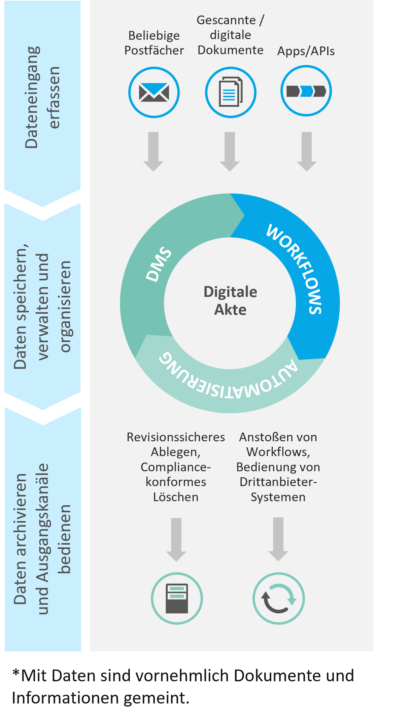
Figure: The digital record as a Central Hub for Documents and Information within the Enterprise | isr.de
What then is the distinction from DMS systems?
A Document Management System (DMS) provides the infrastructure and tools necessary to efficiently create and manage digital records. The digital record, in this context, is a structured, user-friendly representation of the documents stored within the DMS, tailored to specific requirements such as customer or project management. In essence, the digital record should be regarded as an integral component of the DMS.
The Six Most Important
Functions of a digital record
Document Management
Access and Permissions
Search Function
Data Security
Archiving
Through digital record management, your documents and information are stored permanently and in an audit-proof manner. This facilitates better monitoring and adherence to legal retention periods (e.g., GDPR, GoBD). Unlike file servers or SharePoint, this ensures the highest level of security and compliance.
integration
Integrating the digital record system into existing systems maximizes its utility. By connecting to ERP or CRM systems, data can be seamlessly exchanged, and redundant storage can be avoided. Furthermore, email integration enables the direct archiving of emails and attachments.
Advantages of a digital record
Why a digital record Provides Value
digital records offer numerous benefits for enterprises by efficiently organizing, managing, and making information accessible. Here is an overview of the key advantages:
- Enhanced Efficiency: digital record management is highly efficient. Documents are instantly accessible, eliminating the need for time-consuming searches. Furthermore, workflows (such as approvals and reminders) reduce manual effort. Information organization is made more structured through the use of metadata.
- Cost Reduction: Working with and collaborating on documents becomes cost-effective: there is no need to print paper, search for physical folders, or sift through file servers. Administrative overhead is minimized. This optimizes your processes, which in turn saves labor time and resources – ultimately leading to cost savings.
- Enhanced Collaboration: digital record management fosters collaboration with colleagues (including cross-departmental) and external partners. Documents can be directly shared and edited, while communication is facilitated through comments and annotations within the file. Simultaneously, multiple individuals can work on the same documents in parallel.
- Flexibility and Mobility: digital records enable location-independent work, whether from a home office or abroad. Documents and data can be accessed and processed at any time – often via a user-friendly web interface. This interface is typically responsively designed, ensuring optimal usability on mobile devices.
- Data Security and Compliance: Your data within the digital record is secured through access rights, encryption, and regular backups. Furthermore, it fulfills legal requirements for retention periods and ensures complete traceability via audit trails for maximum compliance.
- Transparency and Control: A digital record centralizes all documents and information, making them easily retrievable. With just a few clicks, you can access the latest information pertaining to a case, gaining a transparent overview.
- Scalability: The digital record system is applicable for small, medium, and large enterprises, scaling with the organization's requirements and data volumes. It can be easily extended to include additional relevant file types.
Examples of digital records
Which types of files can be managed with a digital record system?
Contract File
Project File
With the digital project file, project status, to-dos, and progress are centrally accessible and viewable at any time. All project-related documents – such as plans, reports, and protocols – are stored in a structured manner in one location. This ensures that an overview is maintained even for complex projects, and collaboration is facilitated.
On-Demand Webinar 'Digital Project File': Watch now!
Customer File
Policyholder File
Loan File
Personnel File
Personal information and documents – such as employment contracts, salary data, and absence records – are managed securely and in compliance with data protection regulations within the digital personnel file. Access can be granted through various methods, either by document type or by employee name.
On-Demand Webinar 'Digital Personnel File': Watch now!
Electronic File (E-File)

In the realm of digital records, we rely on these
TECHNOLOGIES



digital record: Organize Workflows Effectively and Efficiently
Client Projects in the digital record Domain
Our References


Interfaces for digital records
Examples of interfaces in the context of digital records include:
- Automatic transfer of accounting data or orders from the ERP system into the digital record.
- Direct linking and exchange of customer data between the CRM system and the digital record.
- Automatic archiving of emails and attachments in the corresponding digital record.
Interfaces are indispensable in our client projects, primarily because they enable automation across system boundaries, ensure data consistency, and save valuable time for employees by reducing manual tasks.
How do we provide concrete support to enterprises?
As an IT consultancy, we support companies in the digitalization and automation of document-driven processes – particularly through the implementation and optimization of digital records. We offer tailored consulting, recommend suitable software solutions, and manage their implementation. Following a successful go-live, we support you with the gradual expansion to include additional digital records and, upon request, also provide operational support and maintenance for the solution. Together, we transform your processes – for a more efficient and contemporary digital work environment.
We manage the operation of your software.
To ensure your digital record solution operates smoothly and securely at all times, ISR offers comprehensive IT operations and application management services.
Our goal is to design your digital record solution to be stable, efficient, and future-proof, thereby optimally supporting your business processes. Whether on-premise or in the cloud, our experts ensure that your system not only runs reliably but is also flexibly adapted to your individual needs.
With ISR, you have an experienced partner who combines technical expertise with operational services. This allows you to focus on your core business while we ensure the seamless operation of your digital record system – today and in the future.
5 Frequently Asked Questions
digital record
digital records are an integral component of a Document Management System (DMS). In this context, the DMS serves as the technical platform for managing documents throughout the enterprise. The digital record represents a topic-specific or case-oriented compilation of documents based on the DMS. It maps specific contexts, such as a process, customer, employee, or project, thereby enabling a structured, user-friendly view of relevant information.
To further elaborate, here are some DMS functions that support digital records:
- Storage and Structure: The DMS ensures central and secure storage of documents that are consolidated within digital records.
- Search Functions: Full-text search and metadata functions of the DMS facilitate the rapid retrieval of documents within digital records.
- Automation: Workflows within the DMS support automated processes within digital records, such as approvals or reminders.
The primary distinction between digital records and electronic files (E-files) lies in their functional scope and application. E-files primarily focus on the digital storage and static management of documents, often for audit-compliant archiving and adherence to regulatory mandates. digital records, however, extend beyond this, offering dynamic functionalities such as workflows, automations, and integrations with other systems (e.g., ERP, CRM). They are more flexible and enhance efficiency through real-time access and process-centric utilization. A further distinction is found in terminology: 'E-file' is more prevalent in public administrations, whereas 'digital record' is commonly used within enterprises.
The digital record, also known as an E-file, serves as a centralized digital platform for managing documents and processes within public administrations and enterprises. Documents and data are digitally stored, structured, and enriched with metadata to ensure rapid retrievability. Authorized personnel can access content remotely via defined access rights. Automated workflows, versioning, and audit-compliant archiving streamline processing and ensure adherence to legal stipulations.
It is evident that digital records offer significantly greater security than physical filing cabinets in offices or traditional file servers. Documents within the digital record archive are safeguarded by a range of security protocols. Access controls ensure that only authorized individuals can access the data. Encryption technologies protect documents from unauthorized access, while routine backups mitigate data loss. Furthermore, audit trails guarantee the traceability of all modifications and fulfill compliance mandates.
Enterprises process sensitive and confidential information and data. Consequently, an increasing number of organizations are pursuing information security certifications (e.g., ISO 27001) to assure clients and business partners of secure data handling practices. A crucial aspect is the Clean Desk Policy, a corporate guideline mandating that sensitive information and data must neither be left unattended nor made accessible to unauthorized individuals. This implies that upon vacating a workstation, paper-based documents must be securely stored to uphold information security standards. To mitigate such risks proactively, companies are increasingly adopting DMS systems with integrated digital records, which facilitate paperless processes and secure management of business transactions.
Read more in the ISR Blog
Valuable insights on digital records

Digital Personnel File: Structuring and Managing Documents

digital record: The Simple Entry into Digitalization
Your Paperless Office: Nightmare, Myth, or Reality?
Contact us now
We are ready to assist you!

Angelina Jordan
Account & Marketing Manager
Document Logistics
angelina.jordan@isr.de
+49(0)151 422 06 942