In addition to creating a planning model as a 'Classic Account Model,' SAP Analytics Cloud has also offered the option to create a model as a 'New Model' since mid-2021. With the 'New Model,' data can be prepared differently than with the 'Classic Account Model.'
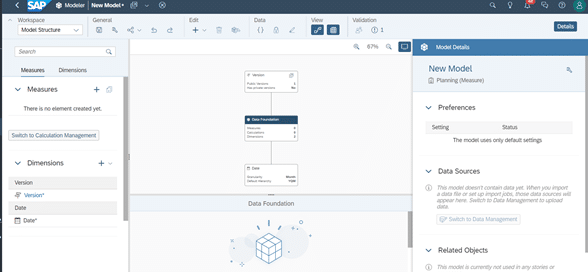
The new model is not a replacement for the 'Classic Account Model'; rather, the model types in SAP Analytics Cloud assume distinct roles.
Table of Contents
1. Date Dimension
2. Measures
3. Data Management
4. Conclusion
In this blog post, we will delve into some specific features of the 'New Model'. Following this, we will outline the steps involved in importing datasets into a 'New Model' in SAP Analytics Cloud and highlight the necessary considerations.
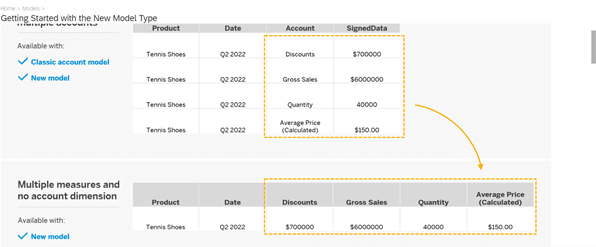
In contrast to the 'Classic Account Model', the 'New Model' includes a mandatory 'Date' field, which is automatically generated and cannot be removed. All files loaded into the model require a 'Date' entry; otherwise, the model cannot capture the data. Furthermore, Measures must also be created. These key figures essentially replace the old Account Dimension. A planning scenario created as a 'New Model' in SAP Analytics Cloud can only be saved after at least one Measure has been established.
Date Dimension
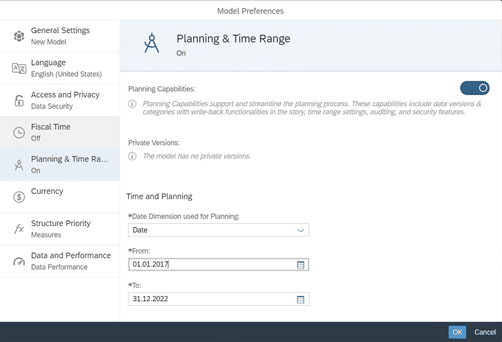
The date range for data subsequently imported into the dataset must be configured in the Model Preferences, accessible under 'General' in the Model Structure view, prior to import (e.g., from 01.01.2017 to 31.12.2022).
Measures
The measures essentially replace the old Account Dimension.
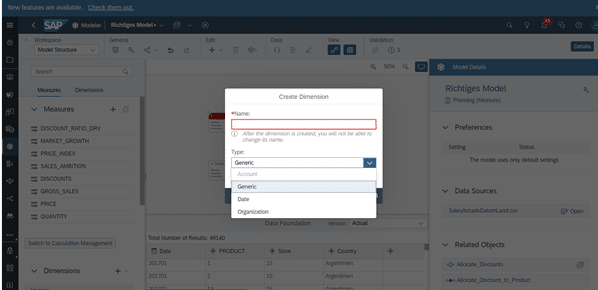
Measures intended for use in the SAP Analytics Cloud model can be created individually, similar to dimensions. Once created, Measures cannot be easily renamed or deleted; all 'Private Versions' and data within the model, as well as Data Actions, must first be removed. The name of a Measure must not contain umlauts. Generic dimensions behave as they did in the previous model.
In the new model, Generic, Date, and Organization are available as dimension types. The Account Dimension is grayed out but remains available as an option in principle.
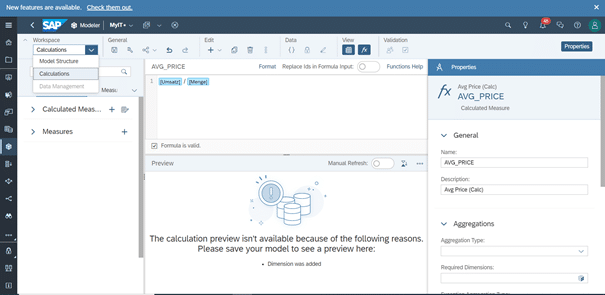
By switching the workspace to the Calculations view, one can create Calculated Measures in addition to standard Measures. These can also be deleted and renamed as required.
Data Management
The Data Management of the 'New Model' is structured identically to the 'Classic Account Model' type up to the import step. However, the import step involves three distinct sub-steps.
A) Prepare Data
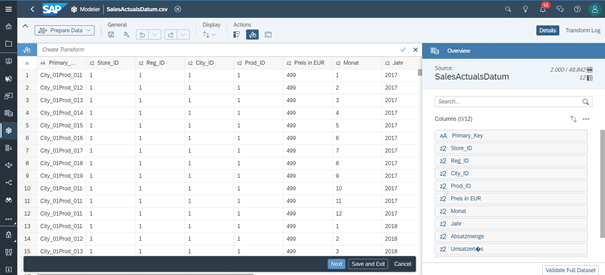
When importing data in the Data Management view, the initial option is to prepare the data. Here, individual 'Errors', such as unrecognized umlauts, are already highlighted. However, making significant changes at this stage can be cumbersome, hence it is advisable to prepare the data prior to upload.
B) Map to Target
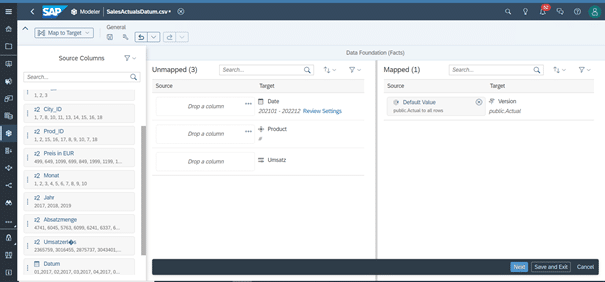
In the subsequent mapping step, dimensions and at least one Measure from the model must receive an assignment from the uploaded source dataset. 'Actual' is selected as the default version. Unassigned data will not be further considered. Other versions cannot be selected within the model.
Since 'Date' is always predefined by the model, each dataset must also contain a corresponding column with date values (e.g., month and year).
C) Review Import
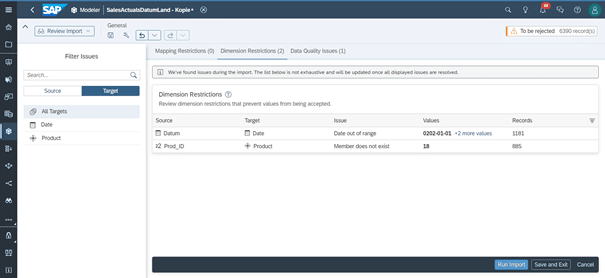
Subsequently, an import review is conducted, during which any potential mapping issues are highlighted.
A variety of mapping issues can arise, most frequently when the assignment has not been performed correctly. In the present example, issues occurred during the mapping of the Date Dimension and the generic Product Dimension. Additionally, problems may arise when mapping umlauts, even if they are stored in the appropriate dimension. If dimensions are created after data has already been loaded into a model, these dimensions will be populated with '#' in the already imported data.
Conclusion
This article serves as a brief overview of the 'New Model' type in SAP Analytics Cloud. This model type offers the capability to prepare data differently and with greater flexibility compared to the old model. SAP itself cites flexible model structures, precise aggregations, explicit data types, and the optional Account Dimension as further advantages. Consequently, the 'New Model' is expected to establish itself as the new standard for current and future planning scenario implementations in SAP Analytics Cloud.
Valgeir Saevarsson
Managing Consultant
SAP Information Management
Valgeir.Saevarsson@isr.de
+49 (0) 151 422 05 422