SAP HANA SQL Data Warehousing offers high flexibility regarding the use of various tools.
The SQL approach, particularly within the framework of the applied DevOps philosophy, enables the use of many well-known (open-source) software development tools. Furthermore, the SAP HANA platform itself provides several important tools for developing the native SAP HANA SQL Data Warehouse. In this blog, we will briefly introduce these and provide an overall overview of the tooling for SAP HANA SQL Data Warehousing.
Table of Contents
1.1 Data Integration
1.1.1 Enterprise Information Management
1.1.2 Smart Data Access
1.2 SAP HANA XSA
1.3 SAP Web IDE
1.4 SAP HANA Cockpit
1.5 SAP HANA Database Explorer
3.1 Git
3.2 CI/CT/CD
3.3 Issue Tracking
1 SAP HANA Tools
The SAP HANA platform provides various tools for its administration and development. These tools are essential for establishing a native SAP HANA SQL Data Warehouse.
1.1 Data Integration
For a data warehouse, integrating data from various source systems is a core task. While traditional Extract, Transform, and Load (ETL) dominated this area of data warehousing for many years, the current trend is increasingly towards virtually transferring data into the data warehouse. Furthermore, new NoSQL database technologies and Big Data play a greater role and must interact with an enterprise data warehouse solution. The SAP HANA platform, serving as the foundation for native SAP HANA SQL Data Warehousing in this context, offers numerous solutions that enable demand-driven and scalable data integration. For simple loading processes, the SAP Web IDE development environment (see 1 SAP HANA Tools) is sufficient, allowing tables from source systems to be populated graphically based on SQL commands. For more complex scenarios, the packaged solution Enterprise Information Management (EIM) and the SAP HANA Smart Data Access (SDA) service are available for data integration.
1.1.1 Enterprise Information Management
Enterprise Information Management has been a distinct discipline within information technology for several years, focusing on consolidating the management of structured and unstructured information within an enterprise context. Under this name, SAP has accordingly consolidated specific data management and data integration solutions. For data integration, these include the tools SAP HANA Smart Data Integration (SDI) and SAP HANA Smart Data Quality (SDQ). SDQ is an extension of SDI and cannot be used independently. SDI is the universal ETL tool of the SAP HANA platform, enabling connection to a wide range of data sources and allowing data, potentially after transformation, to be loaded into the SAP HANA database. Standard connectors include, among others:
- ABAP
- SAP Business Warehouse (SAP BW)
- Database Management Systems (e.g., IBM DB2, Oracle, Microsoft SQL Server, Teradata)
- SOAP and OData
- JDBC
- Apache Hive
- Microsoft Office
- Files (e.g., Microsoft Excel)
- Facebook and Twitter
SDI is fully integrated into the SAP HANA platform and can be managed via the SAP HANA Cockpit. For its use, only a Data Provisioning Agent needs to be installed on the source system and connected with the appropriate adapter (Figure 1.1). Through the SAP Web IDE, for example, so-called flowgraphs can then be created for data replication tasks. SDQ assists in this process with data cleansing, enabling easy definition of data formats, identification of duplicates, and implementation of other specific rules to improve data quality.
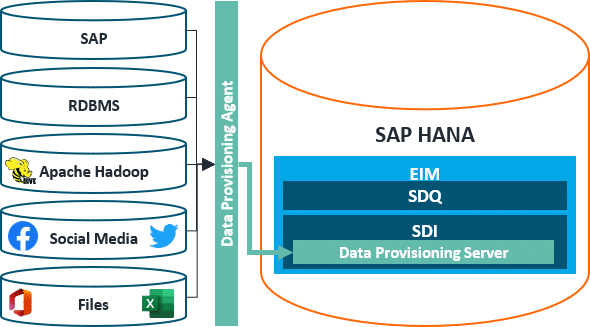
Figure 01: Data Provisioning with Enterprise Information Management
1.1.2 Smart Data Access
SAP HANA Smart Data Access (SDA) is the tool that enables data virtualization and renders persistent replications on the SAP HANA database obsolete. In the context of SDA, SAP therefore refers to it as a data federation technology, as the data remains in the source systems, allowing for the establishment of a distributed data landscape with central access. SDA is primarily based on the ODBC (Open Database Connectivity) database standard, which means that essentially all databases supporting this standard are eligible for SDA connections. In addition to all common database management systems, this currently includes Google BigQuery, Apache Hadoop, and Apache Spark. Once a connection is established in this manner, data can be retrieved in the SAP Web IDE development environment within virtual tables that adopt the metadata of the source tables. This provides the same functionality as persistent tables, with the ability to create synonyms, functions, and procedures.
1.2 SAP HANA XSA
SAP HANA Extended Application Services Advanced Model – XSA for short – is the integrated application server of the SAP HANA platform, providing both the development and runtime environment for HANA applications. As the name suggests, it is an evolution of the original SAP HANA XS variant, which was added to the product two years after the SAP HANA database's release, initiating its transformation into a platform. The fundamental concept has remained unchanged since then. On the SAP HANA platform, the XSA application server and the SAP HANA database reside in close proximity. This not only creates a development environment but also brings data processing closer to the data within this architecture. This approach avoids the mass transfer of data between the database and application layers, thereby mitigating potential performance disadvantages. The SAP HANA platform thus represents a paradigm shift from the prevalent three-tier architecture to a two-tier architecture, where complex calculations are also handled by the database layer, thereby enhancing performance and efficiency. SAP HANA XSA is therefore crucial for the tools described below, as the application server establishes the structural prerequisites for the tool functionalities. Compared to its predecessor, SAP HANA XS, the key difference lies in XSA's seamless integration with the Cloud Foundry architecture of SAP Cloud Platform. This enables on-premise development and immediate deployment of these developments in the cloud.
1.3 SAP Web IDE
SAP Web IDE is a browser-based development environment that enables the creation of full-stack applications, including user interface (UI), application logic, and database artifacts. In this end-to-end development process, the entire lifecycle of an application can be managed with SAP Web IDE, and the environment supports not only development but also debugging, deployment, and testing of software. SAP Web IDE runs on-premise on the SAP HANA XSA application server or is part of SAP Cloud Platform. Therefore, no further installations are required for its use. For building the SAP HANA SQL Data Warehouse, SAP Web IDE is the central tool for developing database artifacts. The development environment includes a suite of graphical editors that facilitate the easy preparation of models, data logics, and data flows, such as SAP HANA-specific Calculation Views (Figure 1.2), Flowgraphs, or Core Data Services. In addition to graphical preparation, there is also the option for direct coding in the SAP HANA database language SQLScript.
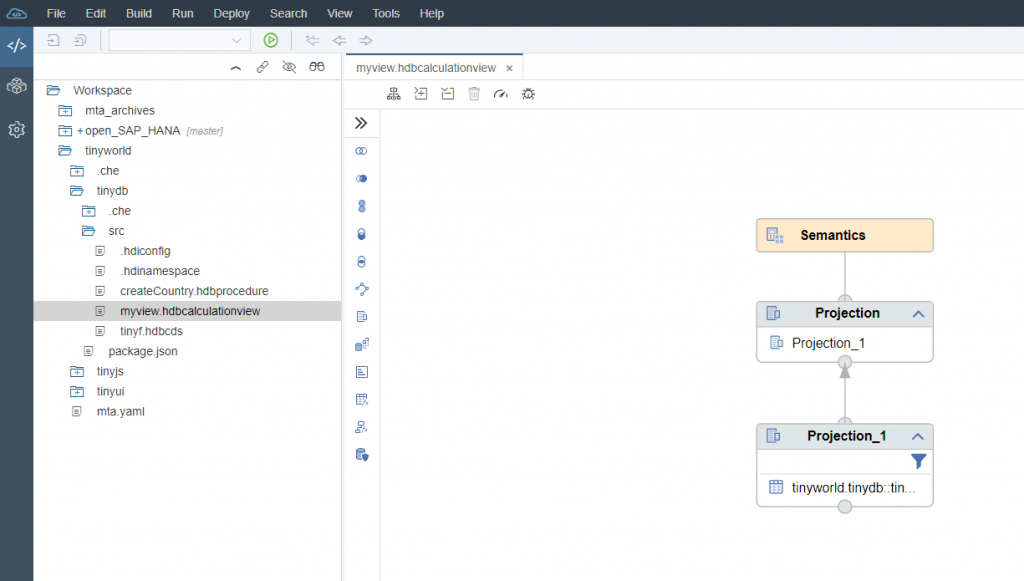
Figure 02: SAP Web IDE with Calculation View
1.4 SAP HANA Cockpit
The SAP HANA Cockpit is the web-based administration tool for the SAP HANA platform, enabling the execution of classic management tasks for the platform. This includes configuring and monitoring the entire SAP HANA system landscape, as well as individual systems such as tenant databases or HDI containers. System configuration encompasses the management of resources, services, and performance. Another crucial aspect is the administration of security measures. The SAP HANA Cockpit allows for settings related to encryption, system alerts, and backups. Furthermore, a sophisticated role and user management system is available.
1.5 SAP HANA Database Explorer
The SAP HANA Database Explorer links elements of interest from both developer and administrator perspectives. It is therefore integrated into both the SAP HANA Cockpit and SAP Web IDE. The Explorer features the database catalog in a tree structure, allowing users to explore the contents of various schemas or HDI containers on the database, as well as import and export content (Figure 1.3). Additionally, an SQL Console is available for performing data queries, and there are options for debugging and reviewing log files.
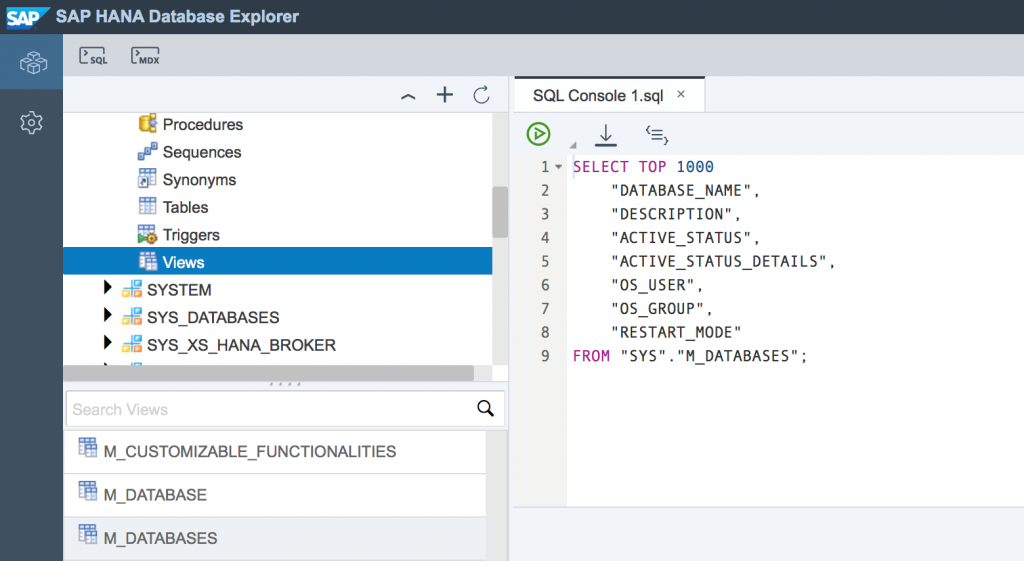
Figure 03: SAP HANA Database Explorer
2 SAP PowerDesigner
SAP PowerDesigner is a computer-aided software engineering (CASE) tool, focused on designing and implementing software applications with maximum automation through the use of IT-supported tools. SAP PowerDesigner provides solutions for the graphical analysis and modeling of business processes and their conversion into various data models. SAP HANA SQL Data Warehousing heavily relies on corresponding modeling processes and places them at the core of building data warehouse structures. SAP PowerDesigner is therefore an important tool within model-driven SAP HANA SQL Data Warehousing, even though it is not part of the SAP HANA platform scope and requires separate licensing. The functional scope of SAP PowerDesigner is generally divided into data, information, and enterprise architecture. However, for SAP HANA SQL DWH, the data architecture domain, with its various data modeling techniques such as conceptual, logical, and physical data modeling, is particularly relevant (Figure 2.1). Of particular significance is the full integration of different models and model types through the so-called Link-and-Synch technology. This feature, summarized under the term Data Lineage, makes it possible to perform impact assessments of changes across various models and to make the entire data modeling process transparent. Updates to the database architecture are thus immediately reflected in the corresponding upstream data models and vice versa. Accordingly, both a forward-looking development, leading from conceptual considerations to the physical data model of the database, and a reverse process are possible.
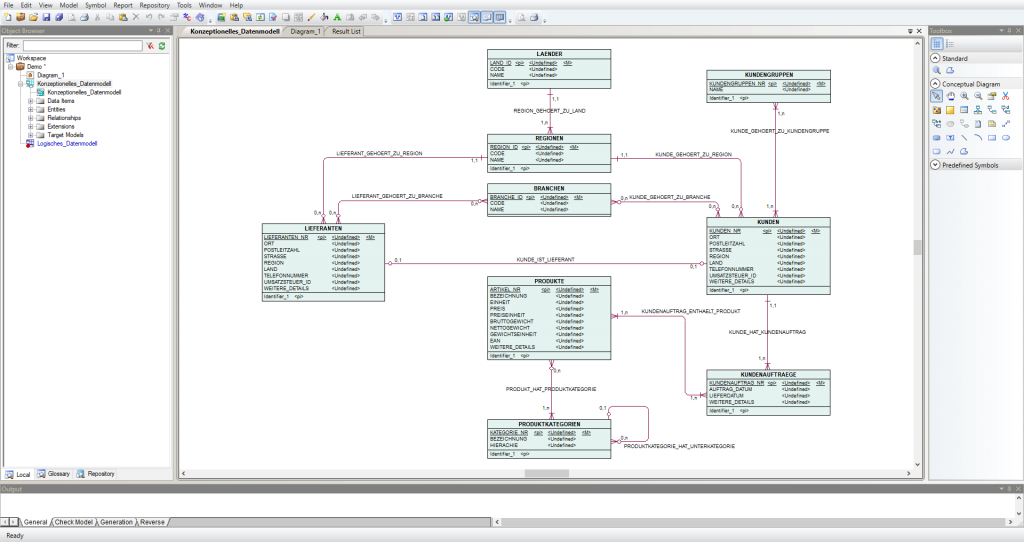
Figure 04: Conceptual Model in SAP PowerDesigner
3 DevOps Tools
Figure 3.1 illustrates the typical phases of a DevOps cycle, connecting the Development/Design-time and Operation/Runtime domains, along with overarching continuity processes. These processes specifically aim for the highest possible degree of automation in operations. Specific DevOps tools support this, which we present to you in an overview, particularly for SAP HANA SQL Data Warehousing.
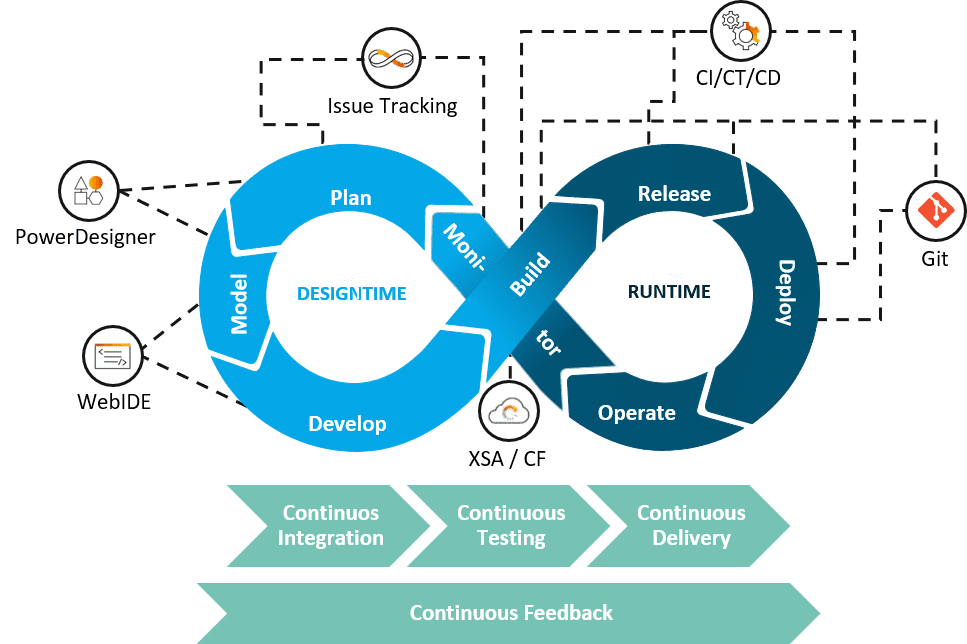
Figure 05: DevOps Tools for SAP HANA SQL Data Warehousing
3.1 Git
Git is a distributed version control system, widely regarded today as the industry standard in agile software development for collaborative source code management by development teams. Such a repository is also of central importance for the DevOps philosophy, encompassing Continuous Integration, Continuous Testing, and Continuous Delivery processes. Git technology is offered by various commercial providers, such as GitHub, GitLab, or BitBucket. All these variants are easily integrated into SAP Web IDE and can be utilized for building the SAP HANA SQL Data Warehouse. Both pure cloud and on-premise solutions are possible.
3.2 CI/ CT/ CD
Continuous Integration, Continuous Testing, and Continuous Delivery (CI/CT/CD) are core processes of the DevOps philosophy that seamlessly transition into one another. Within the DevOps ecosystem, there are numerous tools supporting these processes on the path to a higher degree of automation in software development, or in our case, a data warehouse. These tools typically interact extensively with the aforementioned Git repository. The availability of Git, combined with the universal SQL standard of the SAP HANA platform, ensures that there are fundamentally no restrictions regarding the selection of specific tools. In our projects, we have gained positive experience with common tools like Jenkins or Bamboo when establishing automated deployment pipelines.
3.3 Issue Tracking
Another category that provides tools for the successful practice of DevOps is Issue Tracking. These tools are used for problem tracking throughout the software development lifecycle. An issue or problem can encompass anything relevant, such as bugs, errors, or even specific functionalities and features that are not yet fully mature. Issue Tracking tools allow these problems to be recorded, evaluated, and assigned to individuals. In some cases, this can even be automated in conjunction with CI/CT/CD tools. In DevOps, this work holds significant importance under the keyword Continuous Feedback. Specifically, user feedback must be continuously integrated into the development lifecycle and thoroughly processed. Here, too, a range of suitable tools is available, and again, there are fundamentally no restrictions.
4 Conclusion
In this blog, we have provided an overview of the essential tools for SAP HANA SQL Data Warehousing. In addition to several native SAP HANA platform tools, a selection of third-party tools is also available. Particularly for supporting DevOps processes, the array of assisting tools and automation promises is extensive and can initially be confusing, especially for users who, due to their previous work in data warehousing, have had limited exposure to DevOps and agile software development methodologies. Consequently, you will soon find additional informational blogs on this topic on our website. Should you have any questions in the interim, please do not hesitate to contact us.
Author: Martin Peitz

Marius Wimmers
Service Manager
SAP Information Management
marius.wimmers@isr.de
+49 (0) 151/42205-434