
Microsoft Power BI
Intelligent Data Utilization
Achieve Success with Microsoft Power BI
Are you seeking a solution to efficiently analyze corporate data and maintain a constant overview of critical key performance indicators?
Microsoft Power BI assists you in this endeavor, enabling rapid identification of changes and targeted responses. Power BI allows you to analyze vast datasets from diverse sources, facilitating the formulation of forward-thinking and data-driven decisions. Independently create insightful dashboards and reports to maintain an overview of relevant KPIs, or flexibly adapt them to your evolving requirements.
Power BI provides a comprehensive suite of tools to maximize the value derived from your data.
What is Microsoft Power BI? A Definition
Microsoft Power BI stands as a premier self-service Business Intelligence tool, empowering users with data analysis capabilities to extract actionable insights. A key differentiator is its versatile connectivity to diverse data sources, enabling seamless integration into your existing systems. As a Self-Service BI solution, it empowers users to independently create and customize reports and dashboards, fostering greater agility and flexibility. Its integration with other Microsoft applications allows your team to collaborate on existing reports in real-time via Microsoft Teams, or to export data and visualizations to Excel or PowerPoint for further refinement. Depending on the governance model, data, models, and analyses can be created and distributed entirely decentrally, or centrally and standardized via an enterprise-grade infrastructure. As a component of the Microsoft Fabric suite, Power BI is also applicable for extensive data management projects.
Key Features of Power BI
Self-Service BI
Familiar Microsoft interface and intuitive operation. Few BI tools rival Power BI in terms of user-friendliness and accessibility for beginners. This enables even novice users to rapidly construct and customize dashboards, facilitating more agile responses to evolving requirements.
Diverse Data Integration
By integrating a multitude of data sources into Power BI, you can consolidate your data in a central repository to derive robust insights. From existing Excel spreadsheets and Azure Storage to cloud-based and on-premise databases, Power BI seamlessly adapts to your current systems.
Data Modeling
Data modeling is a crucial step in data preparation, preceding the analysis itself. In Power BI, various datasets are structured and linked to ensure consistent data utilization. This process eliminates redundancies and significantly streamlines analysis across diverse dashboards and reports.
Interactive Data Visualization
To derive truly valuable insights for your enterprise from your data, insightful visualizations are essential. Power BI facilitates this by offering a wide array of charts and filtering capabilities, enabling you to create interactive dashboards swiftly.
Versatile Data Sharing
Power BI offers diverse capabilities for sharing analyses and insights across various channels. Its deep integration with Microsoft Teams enables your team to collaborate more closely on ongoing projects, facilitating interactive adjustments to dashboards and reports. Granular access rights allow for targeted sharing, ensuring the secure handling of sensitive information.
Seamless Integration
Power BI can access a vast array of data sources, including local files such as Excel or CSV, databases like Snowflake or MongoDB, standard applications, services, APIs, events, and diverse cloud services across AWS and Azure.
Direct integration with Microsoft Office and Teams facilitates work within your familiar daily environment and enables collaborative utilization in cooperative processes.
Frequently Asked Questions
Microsoft Power BI
Yes, in addition to the desktop application and cloud-based service, Power BI offers dedicated apps for iOS and Android devices. These can be easily downloaded from their respective app stores, ensuring you always have access to your dashboards and reports.
Yes, Power BI is a suitable solution for large data volumes, contingent on the available hardware, the utilized cloud environment, and the internet connection. By employing direct database queries via Direct Query, only the query results need to be loaded into Power BI.
The rapid integration of existing data sources and the intuitive user interface facilitate a quick and accessible entry into Power BI, particularly when compared to other BI tools.
The actual costs are contingent on the license type and the number of users; however, Power BI is competitively priced, especially concerning initial investment, compared to other BI tools. A local version, offering a significant portion of the functionality, is frequently included within enterprise-wide Office 365 licenses.
A Look at the Tool
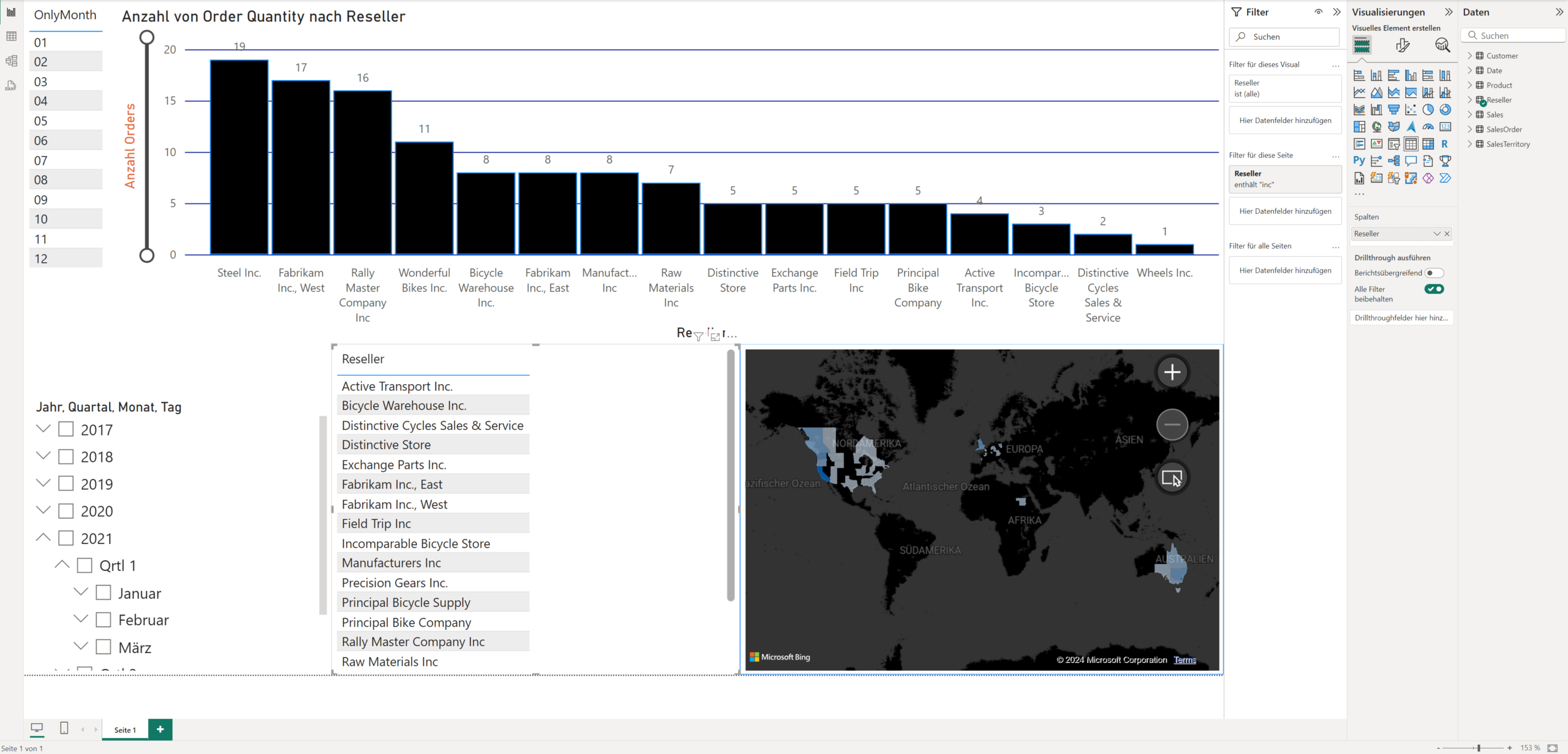
Dashboard Creation: Made Easy
Leveraging the intuitive user interface, data sources can be linked and visualized in interactive charts effortlessly. All accomplished simply via drag & drop!
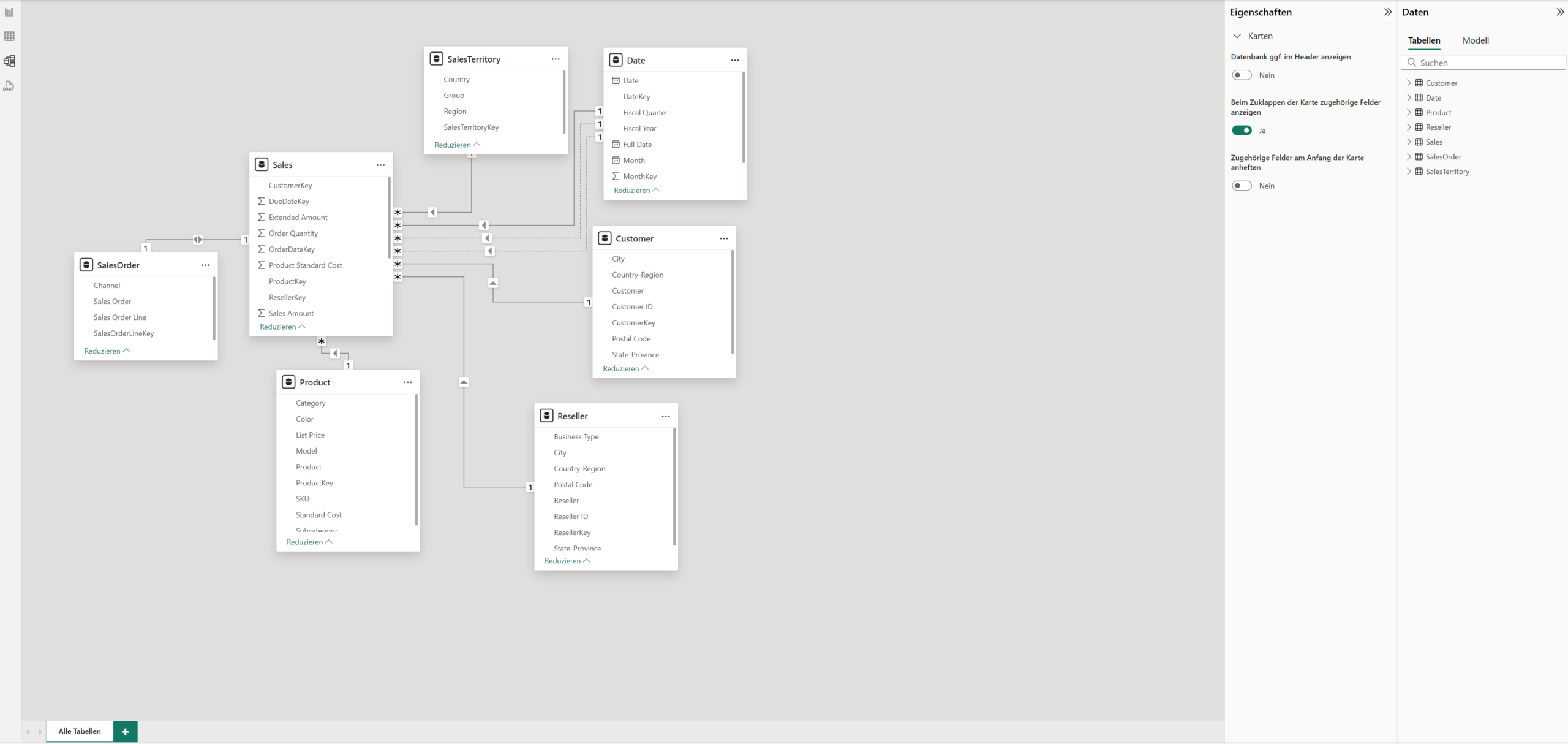
Data Modeling: Intuitive & Effortless
With Power BI, you can effortlessly visualize and manage the relationships between your data sources, optimizing their linkage for comprehensive analysis.
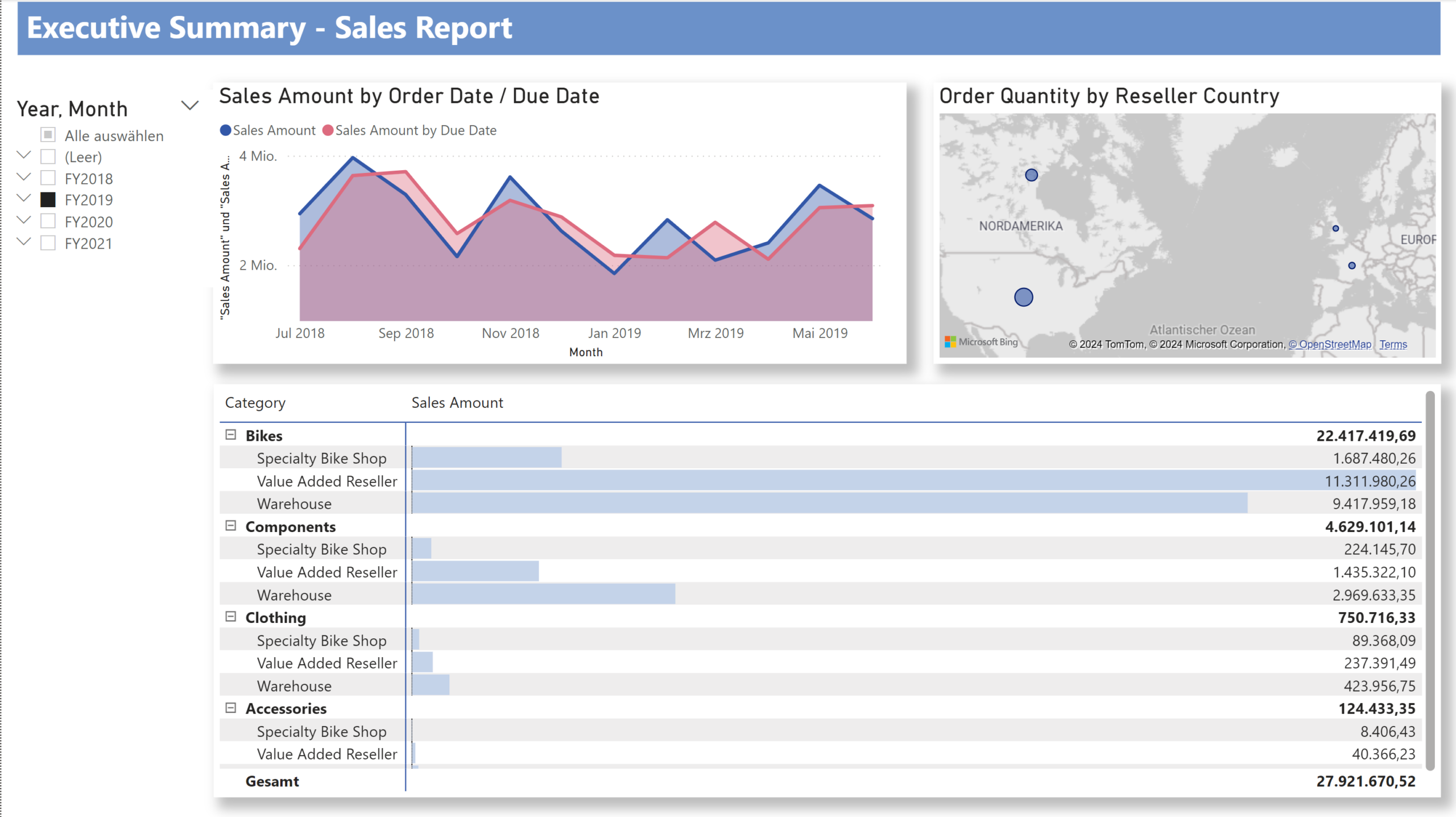
Data Visualization: Efficient & Insightful
Power BI provides a wide array of charts and visualizations, enabling you to effectively extract insights from your data.
What Makes Microsoft Power BI
ATTRACTIVE TO OUR CUSTOMERS?
- Rapid, Intuitive Onboarding to the Technology
- Support for a wide range of data sources
- Extensive visualization options and a marketplace for even greater customization
- Low initial costs compared to other BI tools
- Rapid path from problem definition to results
- Tight integration with other Microsoft tools
- Support for cloud and on-premises solutions
- Supported by integrated Artificial Intelligence
Support for on-premises solutions
With Power BI, in addition to pure cloud architectures, on-premises solutions and hybrid architectures can also be implemented. This is particularly relevant for companies that need to process information locally due to data protection regulations or already possess their own server infrastructure.
The Power BI Report Server is deployed on these servers, managing data and continuous reporting much like the cloud-based Power BI Service. To achieve this, reports and dashboards are first created in the Power BI Desktop application and subsequently published on the Power BI Report Server. From there, they become accessible to all end-users and are regularly updated with new data – entirely on-premises.
Similar to the cloud-based Power BI Service, reports from the Power BI Report Server can also be viewed from anywhere via Microsoft Office and mobile applications.
One of the primary distinctions between cloud and on-premises solutions lies in infrastructure management. Both the Windows server infrastructure and the Report Server databases require administration and monitoring. Our experienced BI experts are pleased to undertake this task for you, ensuring the secure and reliable operation of your systems even after the initial setup.
Furthermore, some AI functionalities are only partially available compared to the cloud version, meaning, for instance, that automatic data models cannot be created. Additionally, real-time collaborative work is fully usable only within the Power BI Service.
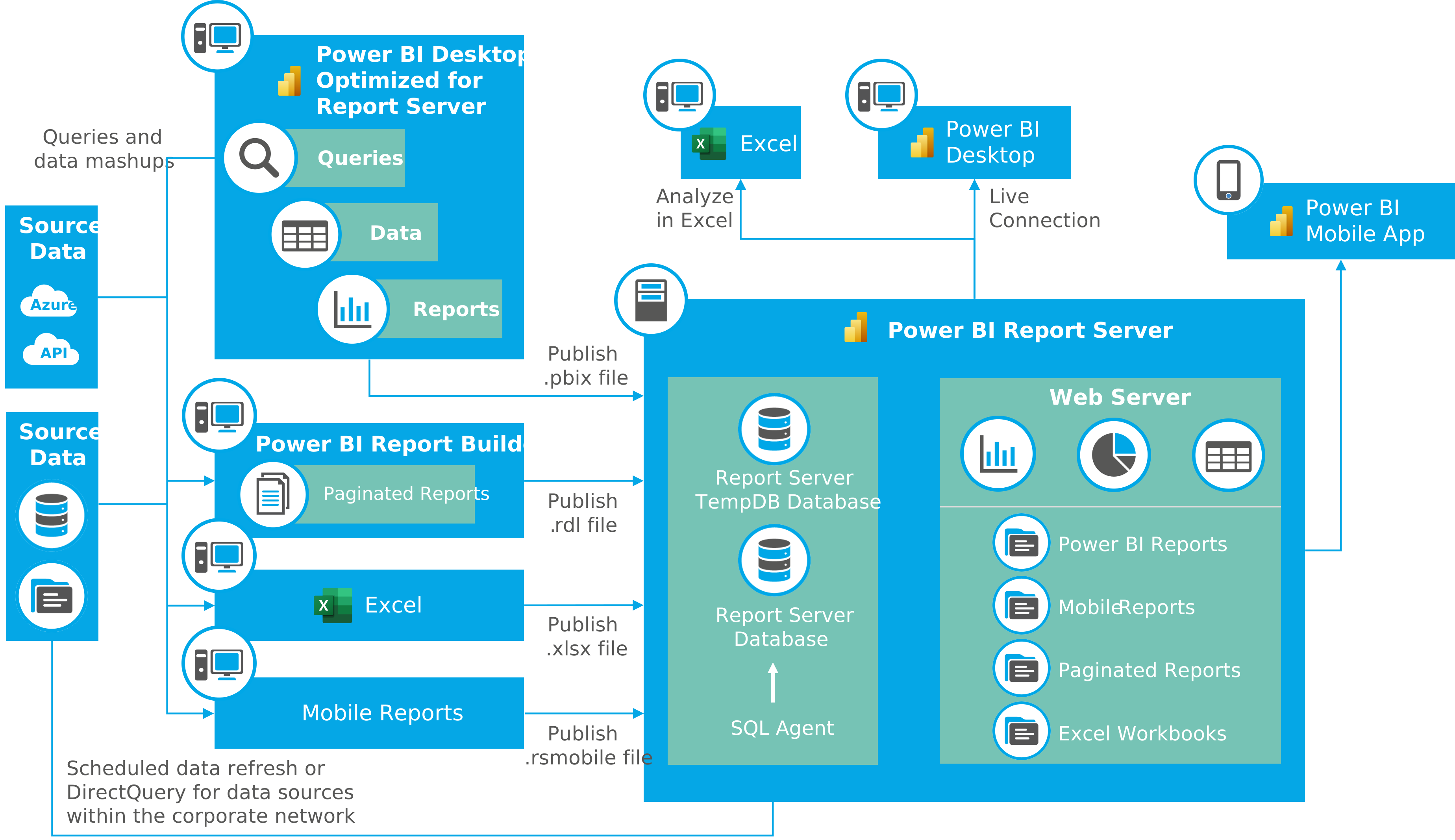
Diagram of a Power BI Report Server. Based on Microsoft Whitepaper “Planning a Power BI Enterprise Deployment“
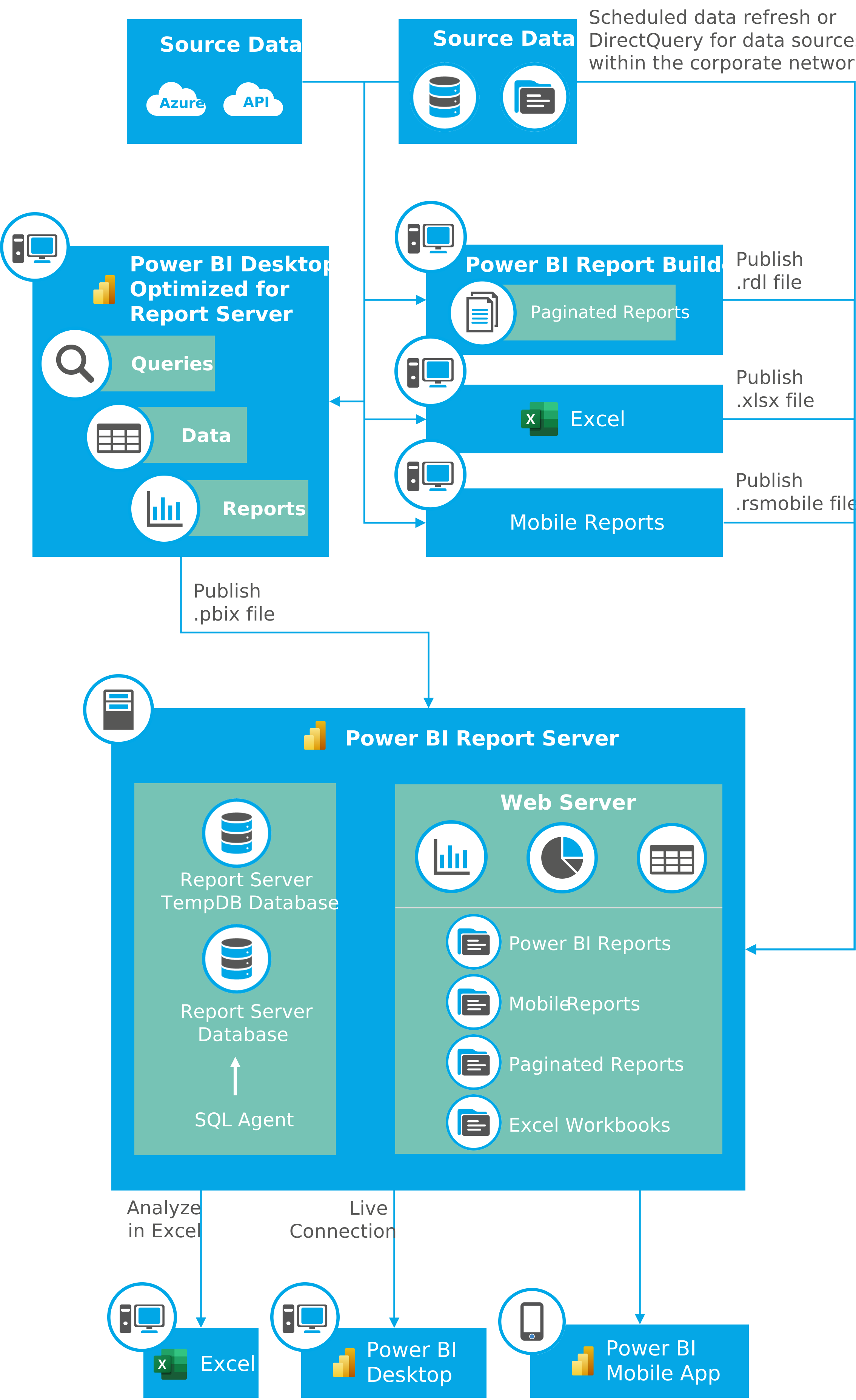
Diagram of a Power BI Report Server. Based on Microsoft Whitepaper “Planning a Power BI Enterprise Deployment“
Our Services
IT Operations for Your Power BI Data Environment
Our service portfolio extends beyond mere Power BI implementation. We act as a strategic technology partner, providing holistic support for your data analytics. In addition to continuous maintenance of your Power BI environment, we ensure that your solution remains stable, secure, and consistently adapted to your current business requirements.
We manage your technological BI infrastructure, regardless of whether your systems operate in the cloud or on-premises. Through our comprehensive and flexible service portfolio – comprising, for example, monitoring, adaptable maintenance, and proactive optimization – we enable you to fully concentrate on your core business processes.
Our objective is to provide you with a Power BI solution that not only functions but genuinely propels your business forward.
Data as a Strategic Success Factor
Our Power BI Expertise for You
Microsoft Power BI is (once again) one of the key technologies for data-driven decision-making. This is further affirmed by the current Gartner Magic Quadrant for Analytics and Business Intelligence Platforms 2024, which once again positions Microsoft in a clear BI “pole position.” Benefit from our extensive Power BI experience and over 50 successful projects. Our consultants are not only technology experts but also collaborate with you to develop tailored Business Intelligence solutions, supporting your company in transforming its data into strategic decision-making foundations. We accompany you through every phase of your Business Intelligence project – from initial conception and strategic implementation to continuous support and optimization.
Our Expertise with Microsoft BI Software:
59
13
59
Mastering with ISR Power BI
We empower you for your data analysis!
Do you wish to create impressive reports and dashboards tailored precisely to your needs in the shortest possible time? With Power BI, this can be achieved effortlessly! Whether it concerns establishing your platform, precisely defining key performance indicators, or selecting appropriate visualizations – contact us, and we will support you in fully leveraging the capabilities of self-service BI to achieve independent success!

Christoph Schmid
Senior Manager
Data & Analytics
christoph.schmid@isr.de
+49(0)151 422 05 418