Although IBM FileNet Content Manager has been in reliable use for almost 20 years, we encounter customers who struggle with the system. Why? Our investigation into the causes provides insight in a series of informal blog posts.
The IBM FileNet Content Manager System is one of the most powerful document management systems on the market.
It is used in small and medium-sized businesses as well as large organizations as a reliable, fast, and highly scalable document storage solution. It supports a wide range of operating systems and hardware platforms. In addition, it can be designed for high availability and backed up online. From a technical perspective, it allows for dynamic changes to document permissions depending on the respective editing or release status. But enough of the praise!
Despite all the advantages mentioned above, we repeatedly encounter customers who are dissatisfied with their system. Naturally, we ask ourselves "why" and have compiled the most common causes of potential dissatisfaction with IBM FileNet Content Manager below.
FileNet Content Manager: The authorization concept as a basic building block
There is hardly any authorization scenario that cannot be mapped with a FileNet system. With its ObjectStores construct, the system offers a wide range of options for logically and physically self-sufficient sub-archives.
But it starts right from the moment you create a new ObjectStore: the default values are not particularly useful. In the area of permissions, for example, inconsistencies and unwanted access rights can quickly arise. Without a smart concept in advance, things can only go wrong. Subsequent changes are technically possible, but usually very time-consuming!!! Therefore, it is best to avoid them. Consequently, the emphasis should be on a permission concept that should be developed in advance.
In our numerous FileNet Content Manager projects, we have made it a rule that each ObjectStore has its own administration group. If an external operator is involved or is planned for the future, it is a good idea to consider dividing the administration groups into a technical group and a specialist group. This allows you to deny the technical group access to document content and, on the other hand, ensure that the functional administrators do not do anything in the technical settings of the storage level or the technical administration of the full-text index that could disrupt central system functions. An access group to the ObjectStore is defined at the same level. We use this group for nothing other than access to the sub-archive. It is not used under any circumstances to enable access to documents. This would be impossible to separate retrospectively.
FileNet Content Manager: Permissions for documents and document classes
One level deeper, we deal with permissions for document classes and documents within these classes.
With regard to permissions for document classes, we believe that particular care should be taken with permissions for creating new instances. This setting can be used to effectively protect classes that are not intended for use by end users. In this way, we effectively protect the base class "Document" from accidental use. When setting permissions for new instances in a class, special care must be taken with the "default instance owner." On the one hand, this setting is well hidden and can only be found by scrolling down persistently, and on the other hand, the default is a placeholder. If you leave it as it is, any random user who stores a document in a class will have the inalienable right to change the permissions for this one instance at their own discretion.
Can you still follow? Here is a small example to illustrate:
Imagine a workgroup of five people who store documents in the FileNet Content Manager system as part of their daily work. In this scenario, a random employee would have special privileges for each document. That person cannot delete the document at first, but can grant themselves deletion rights at any time. This undermines the well-known and indispensable dual control principle for deleting documents. Not so good...
Finally, we recommend two rules to help you manage permissions for your document inventory in a stress-free manner over the long term.
Rule #1
Documents are not private property! Therefore, personal user IDs should never be used in permissions, only groups. These come from the company directory and reflect the organizational structures.
This means that individual users are granted permissions based on their assignment to an organizational structure. If they leave this structure, they also relinquish their permissions to the documents.
Rule #2
Documents receive their permissions through system mechanisms or program components that are controlled by the DMS event architecture.
This creates a set of permissions that is easy to maintain and can easily withstand the critical eye of an auditor.
Those folders again—they're a must-have in FileNet Content Manager too.
We all know them from the file system of our file server: folders! What was one of the greatest advances in the file system between MS-DOS 1 and MS-DOS 2 (the older ones among you will remember) should be viewed rather critically in a DMS. Folders and folder hierarchies are the only truly efficient means of organization on a traditional file server for storing documents in a structure.
A DMS takes a completely different approach here. In addition to the file name, a DMS allows other technical attributes to be assigned to a document and stored in a database for efficient searching. Like most DMS systems, the FileNet Content Manager system also allows folder structures to be created.
What seems sensible and obvious at first glance turns out to be a stumbling block for innovation upon closer inspection. Anyone who has ever adapted the filing structure of a file server to new circumstances in the course of restructuring a company knows what we are talking about.
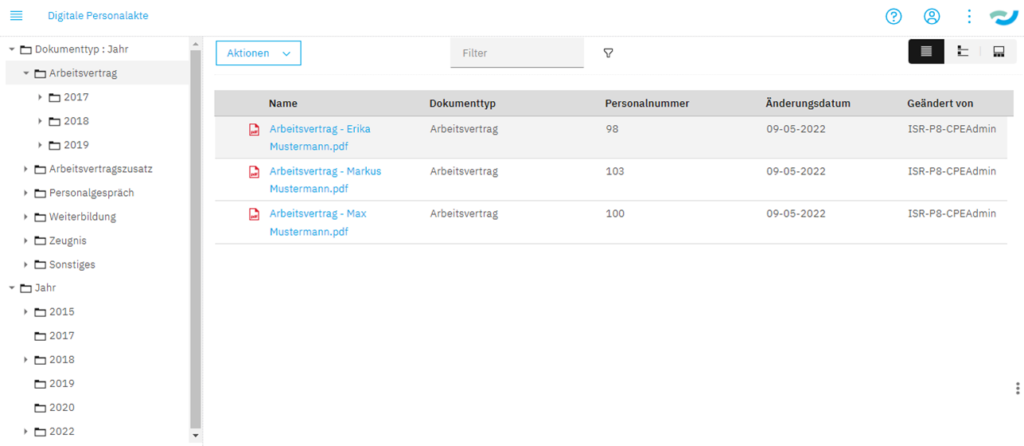
Figure 1:The dynamic folder hierarchy allows a folder hierarchy to be displayed based on document attributes without the need for a fixed folder structure. In the example of the digital personnel file, all documents with the document type "employment contract" are displayed. | isr.de
In a DMS such as FileNet Content Manager, folder structures can be built dynamically based on the attributes of the documents. This gives users the familiar access via an apparent folder structure, but gives the company the freedom to rearrange hierarchies by simply changing a configuration. It is also possible to display the same document in multiple hierarchy views.
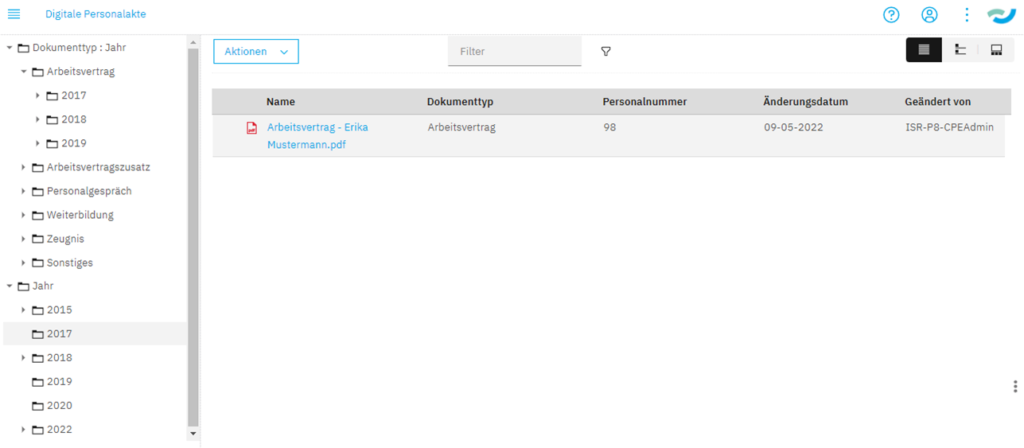
Figure 2:Accessing the document from Figure 1 via a different access path – by year instead of by document type. Restructuring simply means creating new views of the existing document inventory. Parallel application-related access paths are easy to implement. | isr.de
A positive side effect is that users can select a suitable hierarchy depending on their search requirements.
This functionality can significantly increase user acceptance. It cleverly avoids the need to get used to database queries in order to access a document.
Does any of this sound familiar?

Cihan Klingsporn
Senior Account & Marketing Manager
Business Process Automation
cihan.klingsporn@isr.de
+49(0)151 422 05 471