A switch from IMAP and SMTP to OAuth is required by October 1, 2022, in order to continue retrieving email data from Office 365 users from other systems.
What to Expect Here – An Overview
1. Office 365 and OAuth: The problem
Cloud services – a blessing and a cure!
We like to use cloud services in our projects—they save us a lot of work. But be careful: interfaces change and are sometimes shut down. This is currently the case with token-based authentication with Microsoft 365. Office 365 will disable simple sign-in for IMAP and SMTP on October 1, 2022.
We faced the same challenge with our digital file solution, the ISR Information Office. This is because email services such as Outlook are almost always found in file solutions or as part of process control. During our short development journey, however, we noticed that some Google searches and documented solutions did not lead to the desired result. In most cases, there was a snag at some point. With the help of our step-by-step guide, we will show you how to proceed correctly.
Office 365 and OAuth: The problem
Many applications use IMAP and SMTP to work with emails. Office 365 is also a widely used cloud service. Microsoft communicates changes at an early stage – as was the case here. We have therefore taken steps to change the login procedure within our "ISR Information Office": moving away from simple login and toward token-based authentication when we use IMAP and SMTP.
There are many instructions on how to do this with Java, both online and from Microsoft itself. However, it is striking that every article is immediately followed by a comment saying that it does not work.
The problem: when these articles were written, AzureWhat is Azure? Azure is a cloud computing platform from Microsoft. It... More probably had different permissions than it does now.
As a result, the instructions usually no longer work. If you follow the instructions, the attempt ends with an error message. This message does not provide any added value, as "Login failed" does not describe the cause. Or you may find that the permissions are no longer available. What now?
Office 365 and OAuth: The solution
It took a little while, but with some trial and error, the solution is (in hindsight) simple. You just have to figure it out.
For a successful transition, it is best to use the instructions provided by Microsoft (availablehere ). Follow the instructions step by step. However, please note the following:
In step 1, register your application with Azure AD. When applying, you must use the "new" permissions in Azure. We have shown these in the screenshot.
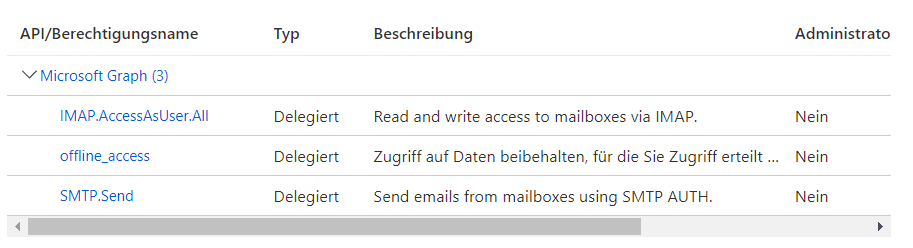
Figure 1:The new permissions in Azure | isr.de
However, you must not do this when retrieving an access token from a token server. In this case, you must continue to use the "old" permissions (scope). Here is the link to the old scopes: https://outlook.office365.com/SMTP.Send and https://outlook.office.com/IMAP.AccessAsUser.All.
If you follow these two instructions in the official Microsoft guide, everything will work fine with the changeover.
Office 365 and OAuth: Resolved from now on
Using cloud services is always a good idea. But here too, you have to maintain the software that uses cloud services and respond to changes. And hope that the manufacturer provides good documentation. Then everything will be fine.
If you are still experiencing issues with the Office 365 SMTP server with authentication login, please feel free to contact us.

Michael Dirks
Managing Professional
Business Process Automation
michael.dirks@isr.de
+49(0)151 422 05 435