SharePoint is ostensibly a good tool for managing documents: one can create folders, save documents, and collaborate on them. However, it lacks core functionalities of a DMS system. Here, you will learn what these are and for whom SharePoint is suitable as a DMS.
Table of Contents
1. Introduction: SharePoint as a DMS – An Overview
3. SharePoint Advantages – Where SharePoint Excels
4. SharePoint Disadvantages – Where SharePoint Falls Short
5. SharePoint vs. Classic DMS Solutions – A Comparison
6. For Whom is SharePoint Suitable as a DMS – and For Whom is it Not?
7. Conclusion: When SharePoint is Practical – and When a Dedicated DMS is Preferable
Introduction: SharePoint as a DMS – An Overview
According to a representative study of the Nielsen Company, approximately 85 percent of companies in Germany utilize Microsoft Office — an impressive market share! Do you use it too? Consequently, also widely adopted is Microsoft SharePoint as an integral component of the Office ecosystem.
Many companies utilize SharePoint for file storage and collaboration, often mistaking it for a full-fledged Document Management System (DMS). While the functionalities appear similar at first glance, a closer examination reveals significant differences, particularly concerning archiving, compliance, structured storage, and long-term traceability.
Furthermore, a practical issue familiar to many arises: SharePoint can quickly become disorganized. Documents are created, edited multiple times, saved in various versions (xyz_final_v2_final_neu.docx), and shared with numerous colleagues. Naming conventions are inconsistent, storage structures grow haphazardly, and ultimately, no one knows where the final version resides or which one is even valid. What might be clarified with a colleague today can become a significant problem in a few years: crucial, business-relevant information will then be nearly impossible to locate. This can become particularly problematic, especially concerning legal or regulatory matters.
In this blog article, we will demonstrate how SharePoint is utilized as a DMS, outline its limitations, and explain the specific implications for your company's document management.
What is SharePoint?
SharePoint is a web-based platform from Microsoft that assists organizations in sharing and managing content (e.g., Word, Excel, PPT files), knowledge, and applications. This facilitates collaborative work on topics and projects, acting as a true booster for teamwork!
SharePoint is tightly integrated into the Microsoft 365 environment, enabling the storage of documents, collaborative editing, and task coordination (e.g., via comments in Word documents). SharePoint can be operated both in the cloud (SharePoint Online) and on-premises and is particularly popular due to its seamless connectivity to Office applications such as Word, Excel, or Teams.
SharePoint Advantages – Where SharePoint Excels
- Team Productivity and Collaboration: Multiple users can work simultaneously on a single document, with changes synchronized in real-time and immediately visible to all participants. The tight integration with Microsoft Teams significantly enhances collaborative capabilities and distinguishes SharePoint from traditional DMS solutions.
- Seamless Integration into Microsoft 365: SharePoint is fully embedded within Microsoft 365 applications such as Word, Excel, Outlook, and Teams. This facilitates continuous workflows within a familiar and regularly updated environment, complete with several data protection and compliance features.
- High User-Friendliness: The interface is intuitively designed and requires minimal training, especially for users already familiar with Microsoft products. This lowers the entry barrier and promotes adoption within the company. Presumably, you would also prefer to work with a solution you already know rather than having to fully learn a new system.
- Ideal Entry-Level Solution for DMS: SharePoint is particularly well-suited for companies already utilizing Microsoft 365 and looking to take their first steps in digital document management. The platform is integrated into the familiar Office environment, enabling centralized storage, collaborative editing, and straightforward workflows. This allows for practical experimentation with document management before investing in specialized DMS solutions.
SharePoint Disadvantages – Where SharePoint Falls Short
Beyond SharePoint's strengths, there are several notable weaknesses, particularly concerning certain missing functionalities specific to DMS solutions. Here is a list of the primary disadvantages:
- Information Sprawl (Content Sprawl): Digital content and documents are often stored redundantly and without structure across various teams, frequently resulting in different versions and disorganized storage structures. This leads to significant data chaos, complicates retrieval, and jeopardizes adherence to governance requirements. Furthermore, it impairs efficiency and hinders legal proof obligations.
- Lack of Archiving Mechanisms: SharePoint does not offer true audit-proof archiving and fails to meet many legal requirements. Critical 'Records Management Functions'* (such as legally compliant retention or structured deletion concepts) are absent, which significantly complicates adherence to compliance guidelines.
- Opaque Access Rights: It is often unclear precisely who is authorized to access which document, or whether colleagues might inadvertently view more than they should. Since each folder or file can have its own permissions, the situation quickly becomes disorganized. A central overview is lacking, and with sensitive content, a sense of unease often persists – especially when no clear team policy is in place.
- Challenging Version Control: Anyone collaborating on a document with multiple colleagues is familiar with the ensuing chaos: multiple versions quickly emerge with similar filenames such as 'Contract_final_new_v3.docx,' and ultimately, it remains unclear which version is valid and where it has been stored. While SharePoint offers versioning, it requires deliberate setup and utilization.
- Limited Workflow Capabilities: SharePoint is primarily suited for straightforward daily business automations using Power Automate. For more complex business processes, additional third-party components must be integrated, which increases implementation effort and costs. This is regrettable, as even complex scenarios could be effectively supported by underlying technical processes. Unfortunately, the full automation potential is not leveraged in this regard.
- Limited Integration Capabilities: The integration of critical business applications (such as your enterprise-wide ERP system) is not available by default and must be implemented via third-party tools. This complicates seamless processes and increases integration effort. Unfortunately, cost-saving measures are often applied here, leading to unnecessary time spent copying information from one system to another.
These are some reasons illustrating why SharePoint may not improve your document organization.
* Records Management refers to the structured administration of business-relevant documents (records) throughout their entire lifecycle – from creation and utilization to archiving or final deletion.
SharePoint vs. Traditional DMS Solutions – A Comparison
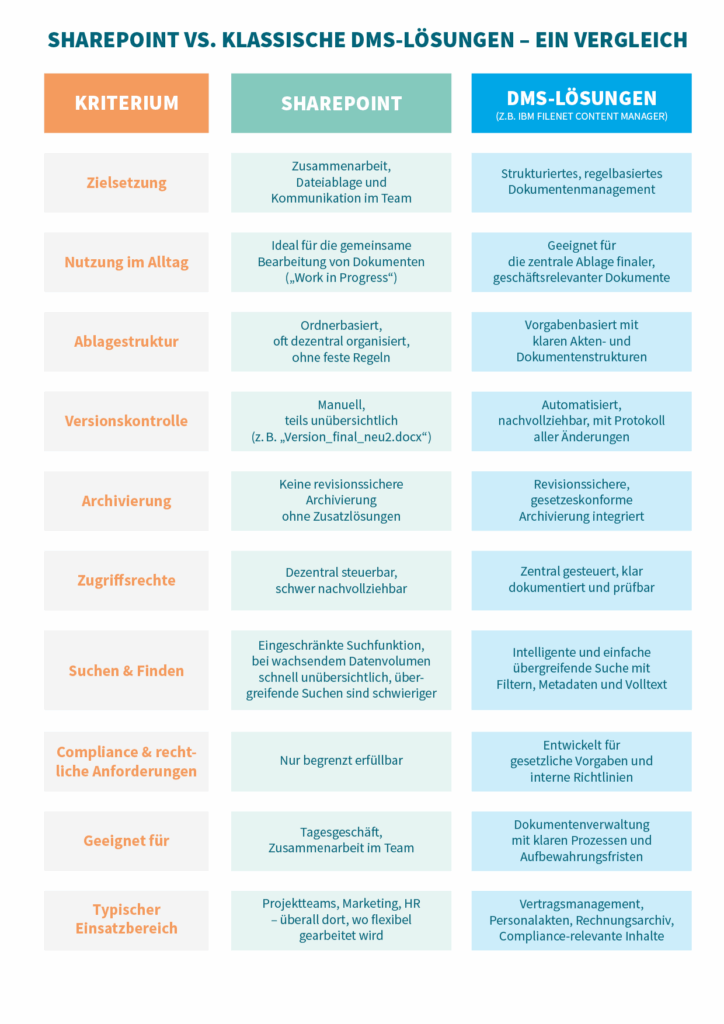
The table clearly demonstrates: SharePoint is ideal for daily collaboration and flexible teamwork but reaches its limits when it comes to structured, secure, and legally compliant document management. Traditional DMS solutions offer significantly more functions and control in this regard, particularly concerning archiving, traceability, and compliance. Combining both optimally leverages their respective strengths.
For Whom is SharePoint Suitable as a DMS – and For Whom Not?
SharePoint is particularly suitable as a DMS for organizations already operating within the Microsoft 365 ecosystem and seeking a straightforward solution for document storage, collaborative document editing, and integration into Microsoft 365. It is well-suited for smaller organizations or departments with manageable document management requirements, lacking stringent compliance or archiving obligations.
SharePoint is not suitable for organizations with high demands on document security and compliance. These include, for instance, audit-proof archiving, legally compliant retention periods with automatic deletion, complex workflows, or structured file management. For such use cases, SharePoint's functionalities are insufficient – a specialized DMS is absolutely essential. Especially in highly regulated industries or when dealing with sensitive data, a professional DMS solution should definitely be deployed – ideally in combination with SharePoint.
Whether SharePoint is a sensible DMS solution for you therefore heavily depends on the specific use case and your requirements.
Conclusion: When SharePoint is Beneficial – and When a Dedicated DMS is Preferable
SharePoint
SharePoint is excellently suited for collaborative daily work – for instance, for co-authoring documents, project communication within teams, or creating 'work in progress' content.
Document Management System (DMS)
However, SharePoint is not a full-fledged Document Management System (DMS) – a fact that quickly becomes apparent in daily operations. Those who regularly work with confidential or legally relevant documents require more than just a central repository. Features such as audit-proof archiving, automatic retention periods, or clear file structures are either absent in SharePoint or can only be implemented with significant effort. Particularly when handling contracts, personnel records, or officially relevant documents, it becomes clear that a solution is needed that not only stores documents but also manages them traceably, legally compliant, and in a structured manner. In such cases, a specialized DMS provides a significantly more reliable foundation – it establishes order, ensures security, and relieves employees in their daily work with information.
Hybrid Approach
In many companies, a hybrid approach has proven effective, where SharePoint and a traditional DMS system are strategically combined. And for good reason: Microsoft 365 and its products are firmly established in the German corporate landscape – the platform facilitates daily collaboration, has been in use for many years, and is therefore established and familiar within many teams.
SharePoint can be utilized for document creation, editing, and cross-team collaboration. A specialized DMS system can additionally assume the role of a central, reliable repository ('Single Point of Truth') for final, archive-worthy, or particularly sensitive documents – including advanced functionalities such as Records Management, structured file management, and legally compliant retention.
By enabling the direct transfer of content from SharePoint to the DMS, the strengths of both systems can be optimally combined. The result is a modern, flexible, and simultaneously compliance-compliant solution that meets the diverse requirements of digital document management.
Whitepaper
Your Path to Efficient Document Management
Technologies for Your Success
Buildsimple – Cloud platform for intelligent processing of incoming documents using AI
IBM FileNet Content Manager – DMS for the storage, management, and archiving of business-relevant documents
ECLISO – Tool for managing digital records based on IBM FileNet Content Manager
Retention Solution – Solution for managing document retention, including deletion
Learn more on our product page “Easily Manage Documents”.
Contact us now – We would be pleased to assist you.

Angelina Jordan
Account Manager
Business Process Automation
angelina.jordan@isr.de
+49(0)151 422 06 942