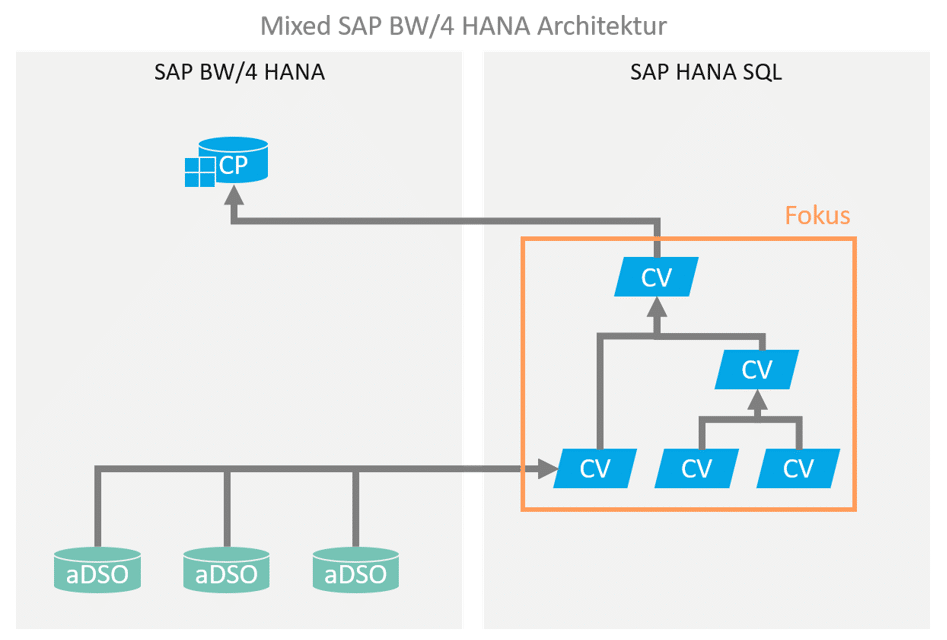
In the context of hybrid or mixed modeling for an SAP BW-based data warehouse, portions of the data modeling are executed using HANA SQL / native capabilities. This modeling is predominantly performed via HANA Calculation Views.
It is therefore very important to understand how HANA Calculation Views work in order to integrate them correctly into an SAP BW-driven data warehouse.
Calculation Views prove to be very flexible in modeling and often much more powerful than classic BW transformations with ABAP routines. However, precisely because processing using graphically modeled CalcViews is so easy, suboptimal and underperforming processing can easily occur. The join between unfiltered base tables, each with millions of entries, then causes long runtimes on the HANA side and extremely high RAM memory consumption, which can easily lead to the misconception that such a hybrid architecture with virtual processing is not suitable for the use case.
However, through optimal modeling and a design that takes data volume and processing time into account from the outset, it is often possible to find a solution that leverages the advantages of virtualization to offer an acceptable solution without redundant persistence.
Wisdom of software development
“The best optimizer is between your ears” – Michael Abrash
“Software is getting slower more rapidly than hardware
becomes faster.” – Wirth's Law
service
Conceptual aspects
Before simply building a calculation view to implement business logic, it is helpful to consider the following conceptual aspects in order to derive a design for the calculation view:
- What does theconceptual data modellook like? (→Relational ER model)
- Whichdata sources(tables, views) are required, and how do they relate to each other?
- Whatlevel of granularitymustthe resultshave? For example, orders at header level (one result record per order, with already aggregated key figures if applicable), or individual order items (i.e., at detail level, with non-aggregated key figures)?
CalcView Design Aspects
In a relational model, many paths lead to the same destination—but not all paths are equally efficient.
HANA is an efficient, high-performance, column-based in-memory database. However, the execution engine cannot work miracles. If the execution plan for a CalcView query is inefficient, even HANA can result in waiting times of several minutes and, even worse, runtime memory consumption of many GB of RAM.
HANA & RAM
Approximately 50% of the total available (licensed) memory is available for data persistence ("hot" area, in-memory). In addition to pure user data, this also includes all meta and administrative information from BW and HANA.
The other 50% of the memory is reserved for in-memory processing of queries. If too many parallel queries with extremely high runtime memory consumption occur, this causes HANA to temporarily move persistent data from the hot area to the warm area (on disk). Such an overload can cause the overall system performance to drop dramatically and should therefore be monitored continuously and avoided in advance if possible.
Based on the requirements and the conceptual data model, the following design aspects are therefore essential:
- If possible, select the smallest possible amount of data for further processing in the lowest step of CalcView. To do this:
- Select anappropriate source tablein terms of granularity. Instead of going directly to order items, it may make sense to first select a relevant subset of the order headers and then join this (much smaller) set with the corresponding order items.
- Push filters and selectionsdown as far as possible, i.e., apply them as early as possible, ideally already in the lowestprojection node of the CalcView.
The HANA Execution Engine is quite efficient at pushing filters down to the database as far as possible, but you should not rely on "magical abilities" and instead support the system with a clever design. - Tables and views used in a CalcView should first be placed in a Projection node consumed, and not used directly in a union or join. The advantages of providing these via a projection include:
- Option to filter the data volume directly in the Projection Node.
- Option to select the required fields directly in the projection node.
- Ability to reuse the projection node for multiple joins with the same data source.
- Use small, modular,nested CalcViews.
Technically, it usually doesn't matter whether a large CalcView with many joins is created or several nested CalcViews with fewer joins are created.
However, it can be much easier and more efficient for the execution engine at runtime if several nested CalcViews are used.
If these are designed to be as modular as possible, the positive side effect is also better clarity, maintainability, and reusability in the overall architecture. - Avoid calculations thatrequirethe processing of detailed data,such ascountersat a granular level, wherever possible.
Of course, it is not always technically possible to avoid these calculations.
In this case, calculations should at least be consolidated in one place as far as possible and not "scattered" across various processing steps in multiple CalcViews.
This allows the execution engine to aggregate the result set in the next steps after performing the calculations based on the granular data, if necessary.
Technical aspects
In addition to good design of the calculation views, there are also some purely technical optimization options:
- Join type used – The following options are available: inner join, referential join, left join, right join.
- In general, inner joins and referential joins offer the best performance (and produce the smallest result set).
- Referential join may only be set if referential integrity is truly ensured.
- Left join (or right join) should only be used if there are technical reasons for doing so, such as transaction data for which there are not necessarily master data values.
- Join optimization – Referential join and left/right join offer the option of setting the "Optimize Join" flag.
- However, this requires that thejoin cardinalityis specifiedcorrectly. An incorrectly set cardinality with active join optimization can lead to incorrect results!
- The optimization does not work miracles, but rather functions in a simple manner: the join is optimized (not executed) if it is not necessary for the result. In the case of a left join, this occurs when no field from the right table was requested for the result set. Since this is a left join, the left table alone determines the result set, and the join can be ignored without any issues.
- HANA offers functions that prevent the optimization of joins or result sets by declaring a specific granular feature as non-optimizable (non-aggregatable). These functions areKeep FlagandTransparent Filter. These functions should therefore be used with caution – although they are sometimes necessary for technical reasons, they have a corresponding impact on runtime performance and memory requirements!
Return
Example
The following example illustrates how redesigning a CalcView according to the above principles can significantly improve performance.
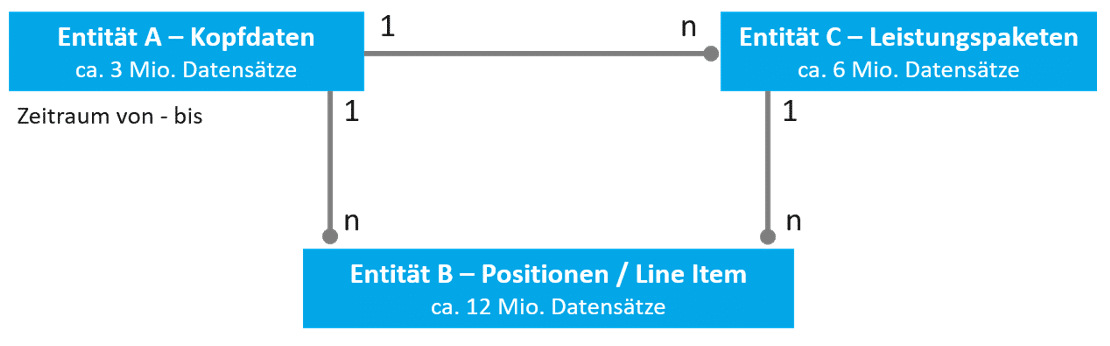
Given a data model with the following entities and relations:
- Entity A has a 1:n relationship with entity B. A represents header data (approx. 3 million entries), B represents line items (>12 million entries).
- Entity A also has a 1:n relationship with entity C, which represents an intermediate granularity (e.g., service packages). There are approximately twice as many entries as A, at just under 6 million.
- Entity C therefore also has a 1:n relationship with entity B.
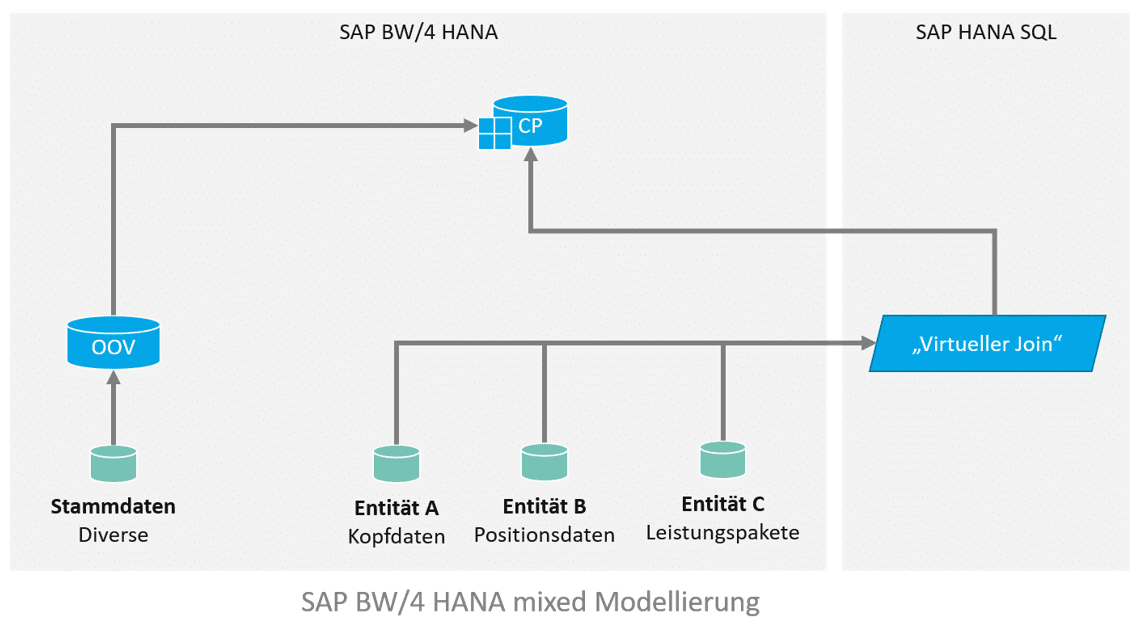
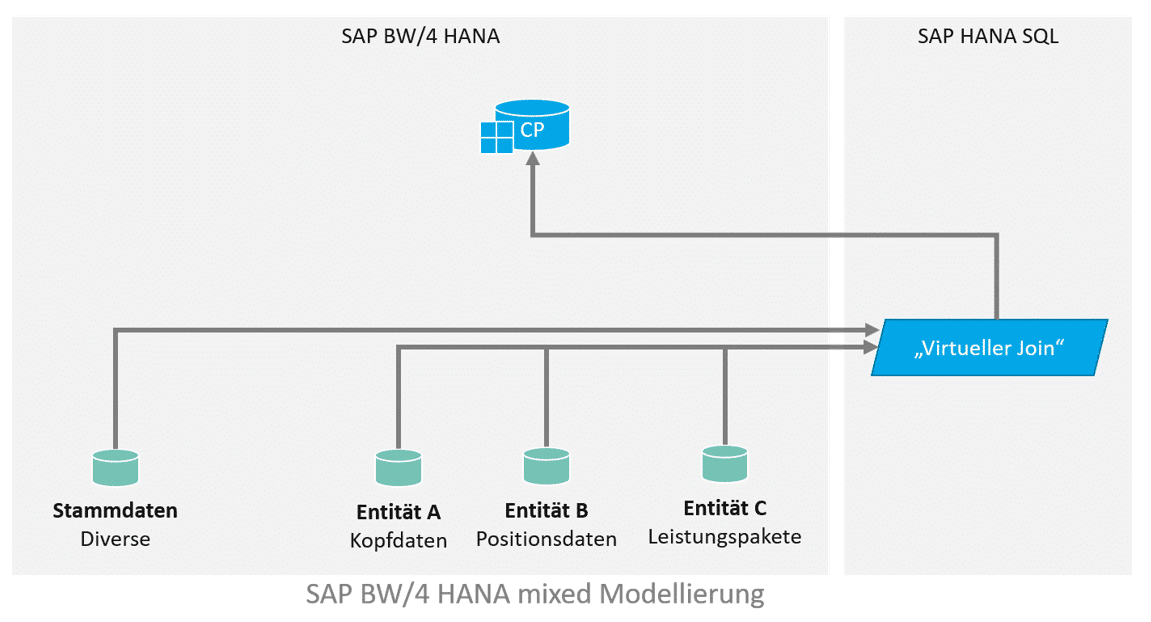
Für die Implementierung sollen alle Line Items und Leistungspakete ausgegeben werden, die in einem bestimmten Zeitraum liegen. Das Datenmodell sieht in etwa so aus und sieht einen virtuellen Join zwischen den Entitäten vor, welcher in einen Composite Provider aufgenommen wird. In dem Composite Provider gibt es weitere Assoziierungen. Die gewünschte Filterung des Zeitraums kann über Input Parameter erfolgen, welche auf die Felder “Von” und “Bis” in Entität A filtert, via eigener Filter Expression (“Von” <= SELEKTIONSZEITRAUM_ENDE and “Bis” >= SELEKTIONSZEITRAUM_ANFANG).
A first naive implementation of a CalcView looks like this:
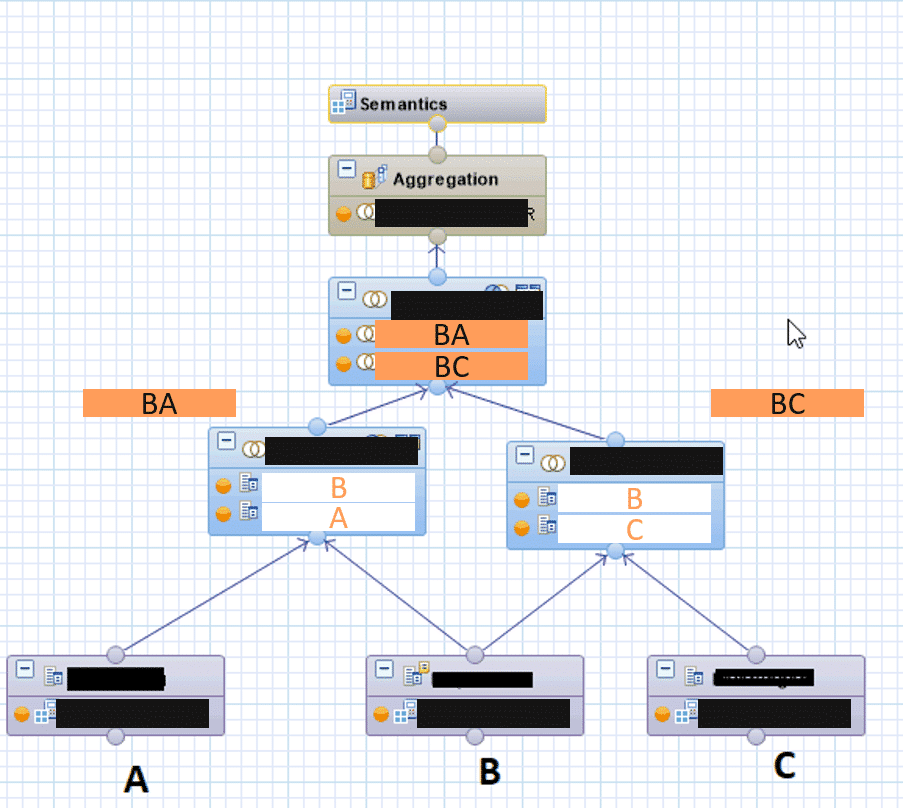
- All existing joins are performed via left join.
- The partial result sets are also merged using a join (left join).
- The filter expression is defined on the resulting total result set.
- The link to additional master data is established in the BW Composite Provider via association.
- Additional master data is only read later (via association with an OpenODS view) on the BW side in the composite provider.
data model
This results in the following CalcView:
performance
CalcView is operational and delivers technically correct results.

However, HANA PlanViz shows that the executed execution plan is far from optimal:
- The execution time is several minutes.
- Memory usage exceeds 200 GB RAM
This means that CalcView cannot be used productively.
Optimization
The main optimization is to fundamentally redesign CalcView with performance aspects in mind.
The following considerations are made in this regard:
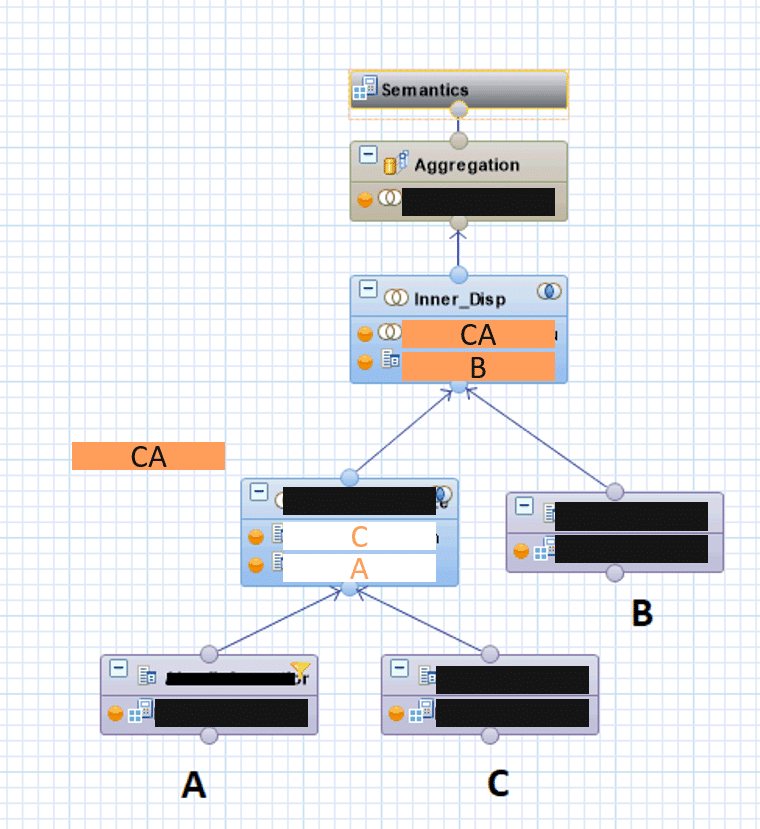
- The result set should be restricted as early as possible. The lowest node in CalcView should therefore be a projection onto entity A, which only contains the primary key and the From and To fields. These are restricted directly at the lowest level using the filter expression (with the input parameters).
- This minimal result set is supplemented with a join on entity C, the next level of detail.
- Only in the third step does the join with the largest and most detailed set B, the line items, take place.
- By using inner joins, all data that is not relevant to the task at hand is eliminated, while at the same time keeping the result set as small as possible (due to the intersection).
If this were not possible for technical reasons, left joins would continue to be used, but this time with cardinality (1:n) set and join optimization activated.
In the best case scenario, the execution plan could then even omit the join with the line items. - In addition, the BW master data association in the composite provider was omitted, and instead a direct join was performed with the master data A*.
For modularization and reuse, this join is outsourced to a separate CalcView.
data model
This results in the following nested CalcViews:
The internal CV connects the result set (from coarse granularity to line items) and filters the result set as early as possible.
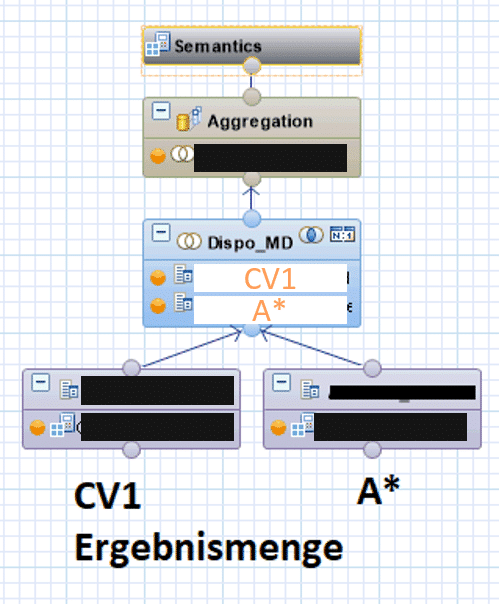
The "external" CalcView takes this result set and performs the join with the additional master data A*.
Since referential integrity is ensured in this case (there is no transaction data without master data), a high-performance inner join can also be used.
Tip
This optimization is also available for associations in a composite provider – setting "User confirmed referential integrity"
(See also:https://wiki.scn.sap.com/wiki/display/BI/HCPR%3A+Referential+Integrity)
This results in the following outer CalcView (which generates the final result set):
Performance after optimization
The nested CalcViews deliver the same results as the first solution in terms of content.

However, the execution plan carried out in this case is significantly more optimal:
- The execution time is now just over 10 seconds.
- Memory consumption is less than 10 GB RAM.
CalcView is therefore not only pleasant for end users to use, but system stability is also guaranteed when deployed in production (and used by multiple users simultaneously).
Game, set, and match
A consistent redesign that took performance aspects into account reduced resource consumption during runtime by a factor of 20. In total, the corresponding redesigns took barely a day to complete, but they brought considerable benefits for the overall architecture.

Christopher Kampmann
Head of Business Unit
Data & Analytics
christopher.kampmann@isr.de
+49 (0) 151 422 05 448