The Power BI SAP HANA connection quickly reaches its limits. The ISR Connector enables Power BI to function as a reporting tool within the SAP landscape.
Accessing large data volumes has become a daily routine for many of us. It is not new that we wish to retrieve data from various sources. Sometimes this works better, and sometimes the available options are somewhat limited.
It becomes particularly challenging when operating in hybrid scenarios. This occurs, for instance, when tools from different vendors are used as both source and target. However, such scenarios are common in the current landscapes of many enterprises.
For example, SAP systems are frequently utilized for data processing and retention. For consumption in the form of reports, numerous alternatives exist alongside SAP solutions. These include, for instance, Tableau, Qlik, or, of course, the market leader Microsoft Power BI.
Requirements for a Live Connection between Power BI and SAP HANA
This article will focus precisely on the scenario where data from an SAP HANA database is connected to Power BI via a live connection for consumption. Such a HANA database can be either on-premiseWhat does On-Premise mean? On-premise refers to infrastructures that are physically... More, a HANA Cloud database, or the database underlying an SAP Datasphere.
From the user's perspective, several challenges need to be addressed:
- Access must be as performant as possible.
- The connection must be encrypted.
- A straightforward login procedure should be available.
- Data should not be duplicated in both the HANA database and Power BI.
The Limitations of the SAP Standard Connector
The solution appears straightforward, as Power BI includes an SAP standard connector. However, a closer examination reveals several limitations. The standard connector offers two modes: Direct Query Mode and Import Mode. These two variants present the following limitations, among others:
Direct Query Mode
- No data transformations are possible.
- Only a single view can be displayed per Power BI report; visualizing multiple views is not supported.
- Generally, only Calculation Views can be connected, not other view or table types.
Import Mode
- Data must first be stored locally. This significantly complicates, or potentially renders impossible, the processing of large data volumes.
- While data transformations can be performed, they are applied locally to the data and not pushed down to the database.
- Similar to Direct Query Mode, only Calculation Views are supported.
The Solution: The ISR Power BI Connector for SAP HANA
To overcome these limitations, ISR has developed its own connector. This software package extends Power BI's standard functionality, thereby enabling enhanced access to SAP HANA databases.
A high-performance live connection to an SAP HANA database is established using the HANA ODBC driver. This live connection ensures that no data is physically stored within Power BI, offering positive implications from both performance and data governance perspectives.
Any pre-processing, such as aggregation, filtering, or similar operations, is pushed down to the database and executed there. This reduces data transfer, leading to lower latency. This so-called push-down is essential for processing large data volumes, particularly in Big Data scenarios.
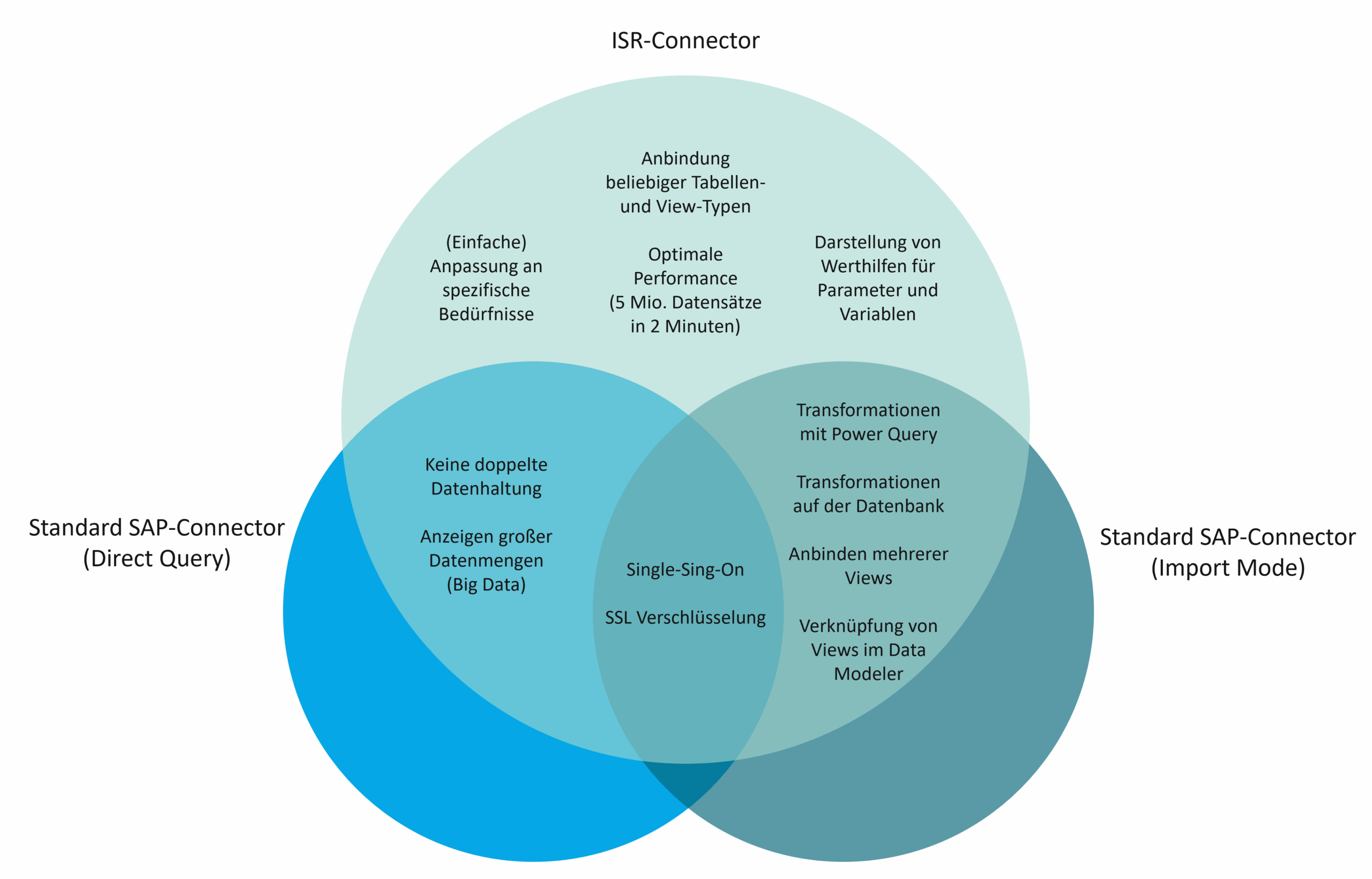
Furthermore, the ISR Connector enables additional transformations in Power BI through the use of Power Query. While this is possible with the standard connector in Import Mode, it is not available in Direct Query Mode. Similarly, the ISR Connector allows for connecting multiple views or tables, which can then be further linked within the Data Modeler.
The aspects of simplified login via Single Sign-On and encryption via SSL are already provided by both modes of the standard connector. Nevertheless, it is important to note that these two points are also covered by the ISR Connector.
It is thus clear that the ISR Connector combines the best of both worlds offered by the standard connector. Furthermore, the ISR Connector includes features not supported by either mode of the standard connector.
For instance, it is possible to select all potentially displayable view and table types as a source, not just Calculation Views. Additionally, value help is provided for populating parameters and variables. Moreover, the availability of the underlying code enables straightforward customizations, allowing for company-specific customizing or branding, for example.
In conducted tests, the ISR Connector demonstrated superior performance, surpassing the benchmark of the standard connector. Access to 5 million data records was achieved in just 2 minutes. The ISR Connector is usable in both Power BI Desktop (client) and Power BI Service (cloud), making it a versatile tool.
Conclusion: Why the ISR Power BI Connector is the Optimal Solution for SAP HANA Reporting
While a standard SAP connector exists for accessing data in an SAP HANA database with Power BI, its functionality is severely limited. The proprietary ISR Connector, developed in-house, provides a remedy by not only integrating all features of both standard connector modes but also introducing numerous entirely new functionalities. It excels through its ease of use and robust performance, positioning it as a crucial component within a hybrid, modern data landscape.
Do you also wish to leverage the benefits of the ISR Connector?
Your Point of Contact

Carl Stegat
Professional Business Development
SAP Information Management
carl.stegat@isr.de
+49 (0) 15142205480