Transactional data typically contains master data keys that represent various manifestations of an entity, such as a product. The texts (short/medium/long) for these products, along with their attributes and hierarchies, form the master data associated with the characteristic.
In classic SAP BW, this information is typically stored in InfoObjects. InfoObjects offer a convenient capability within (SAP) reporting tools to toggle between displaying texts or keys/IDs, or to show both simultaneously. Furthermore, SAP BW/4HANA introduces the option to model texts using Open ODS Views.
Table of Contents
2. Modeling Texts with InfoObjects
3. Modeling Texts with Open ODS Views
4. Creation of the Open ODS View (Texts)
5. Interim Result for 1:1 Usage of Open ODS View Texts
6.1 Modeling Open ODS View with “Text Attributes”
6.2 Creation of Reporting Calculation Views and Labeling
8. Conclusion
Depending on the technical object utilized for master data modeling and the method of frontend access to SAP BW data, specific functional limitations or characteristics may arise. This blog post provides an overview of various modeling approaches and their implications from a frontend perspective. Our investigation was performed using SAP BW/4HANA 2.0 SP03 with Analysis Office serving as the frontend.
Types of Access
For our analysis, we consider four scenarios for how a frontend accesses SAP BW data:
- Composite Provider via BW Server
- Query via BW Server
- Calculation View based on the Composite Provider
- Calculation View based on the Query
Modeling Texts with InfoObjects
In our first scenario, we utilize an InfoObject to model the product texts.
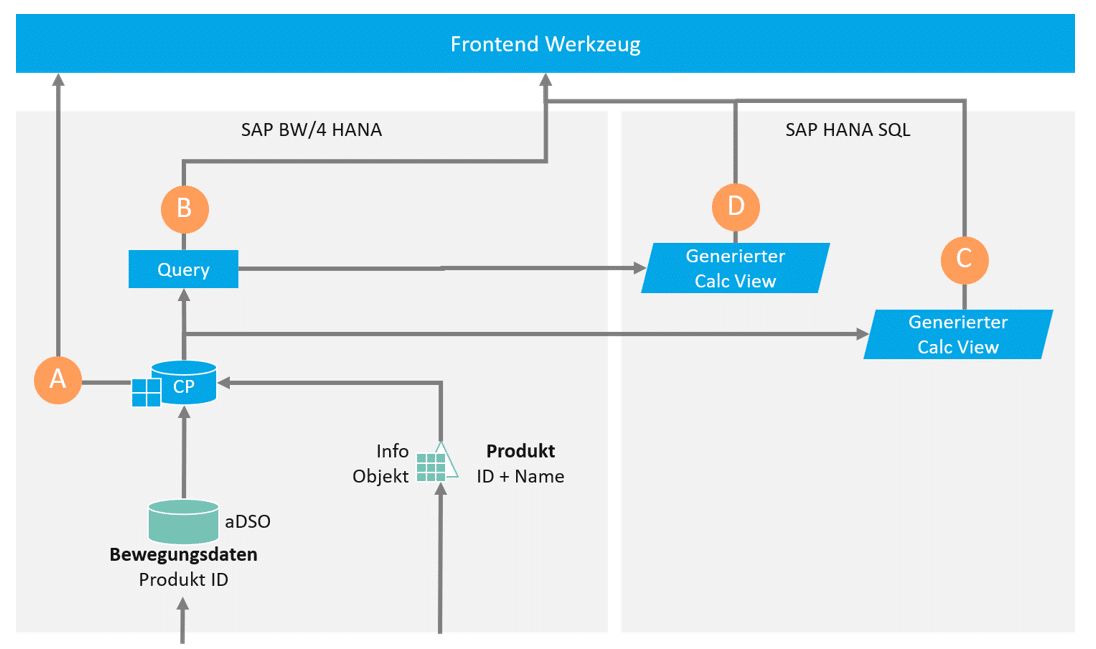
Our analysis indicates that in this configuration, no limitations arise for the use of texts in frontends:
| Short Title | Object for Frontend Access | Texts Available |
|---|---|---|
| A | Composite Provider / ADSO with associated InfoObject (including texts) | ✔ |
| B | Query on the Composite Provider A | ✔ |
| C | Generated Calculation View on the Composite Provider of A | ✔ |
| D | Generated Calculation View for the Query of B | ✔ |
| Legend | |
|---|---|
| ✔ | The frontend tool receives the typical Key/Text semantics of an InfoObject |
| ✖ | The frontend receives only keys |
Modeling Texts with Open ODS Views
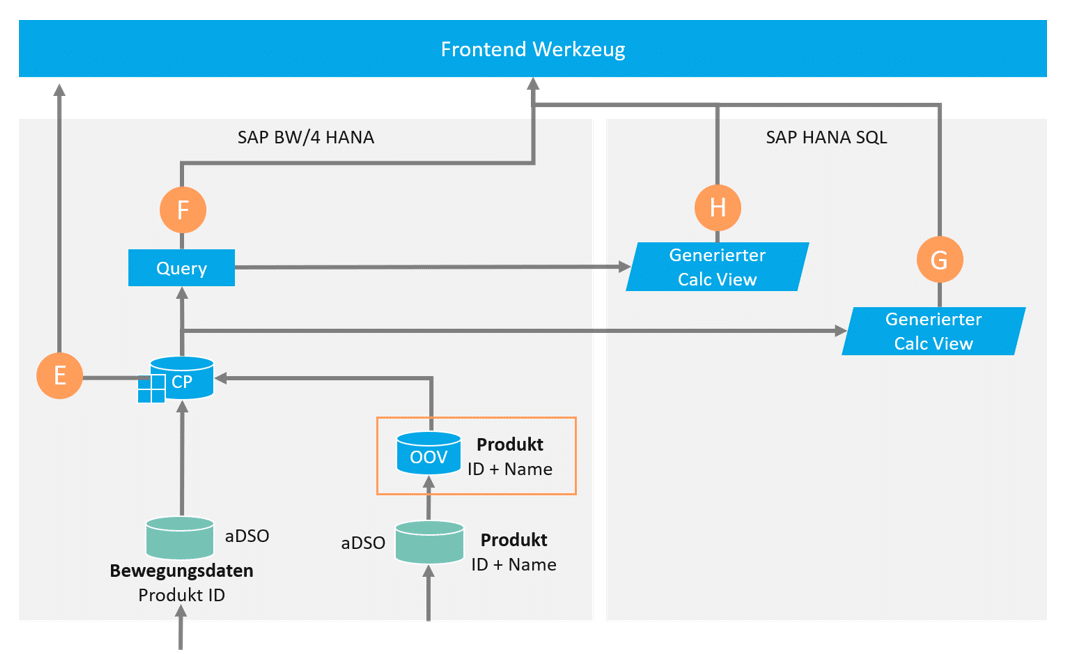
In this scenario, an Open ODS View is utilized; all other aspects are identical to the InfoObject scenario.
Creation of the Open ODS View (Texts)
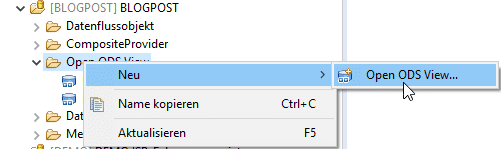
Open ODS Views can be created in the BW Modeling Tools using a wizard. The wizard is accessed by right-clicking / New / Open ODS View.
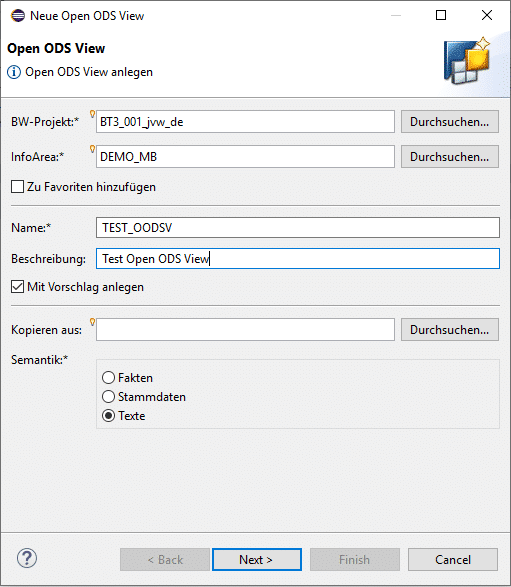
Subsequently, the technical name and semantics must be defined. In this instance, the Text semantic is relevant.
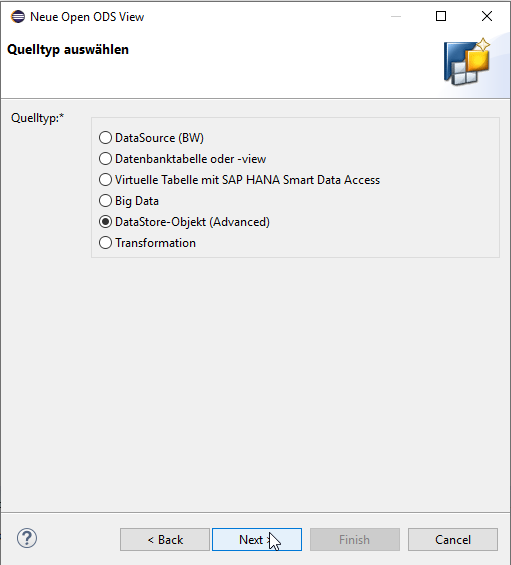
In the subsequent step, the source type for the texts must be determined.
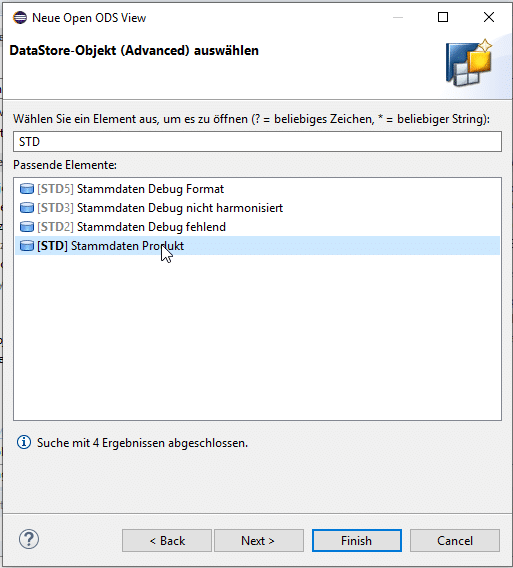
A specific object must be selected.
Additional master data sources can now be connected, if applicable.

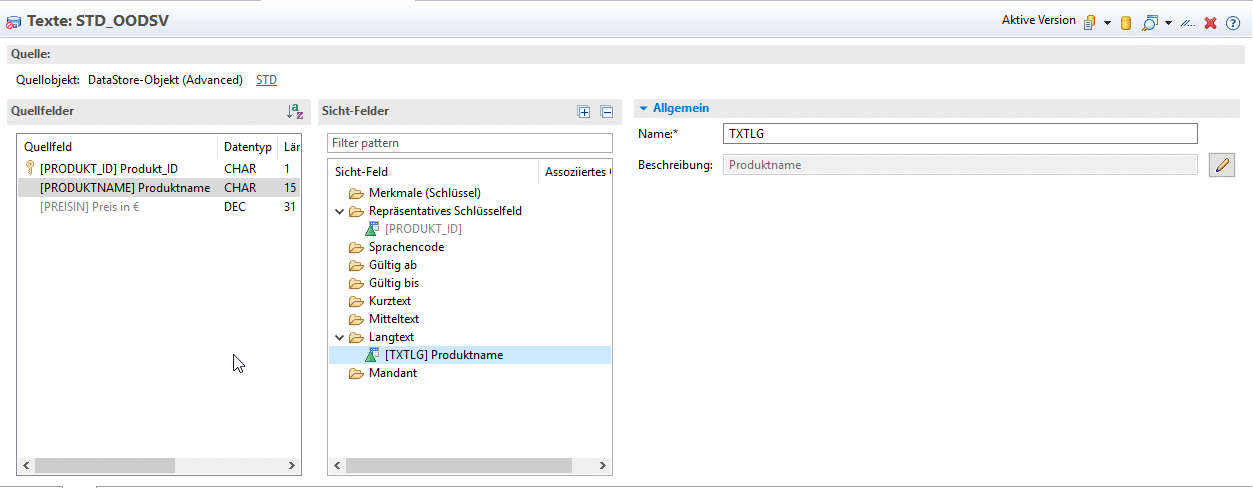
Under the 'Texts' tab, a representative key field must be defined. This field serves as the key for associating texts during the association process.
Intermediate Result for 1:1 Utilization of Open ODS View Texts
If an Open ODS View is modeled as described, significant limitations arise for HANA-side access. While SAP frontends can efficiently access BW data via the BW server, most non-SAP frontends leverage the MDX interface, which entails functional and performance drawbacks. From the perspective of non-SAP frontends, accessing SAP BW data through HANA Calculation Views is generally more advantageous. Consequently, it is imperative to acknowledge these modeling constraints, as Open ODS Views cannot be readily utilized effectively under such conditions.
| Short Title | Object for Frontend Access | Texts Available |
|---|---|---|
| E | Composite Provider/ ADSO with associated Open ODS View (including texts) | ✔ |
| F | Query on E | ✔ |
| G | Generated Calculation View of E | ✖ |
| H | Generated Calculation View from F | ✖ |
| Legend | |
|---|---|
| ✔ | The frontend tool receives the typical Key/Text semantics of an InfoObject |
| ✖ | The frontend receives only keys |
Workaround: Modeling Texts as Attributes of Open ODS Views and Creation of Reporting Calculation Views
In this chapter, we would like to present a workaround for these limitations.

The workaround consists of two components:
1) Modeling Open ODS View with “Text Attributes”
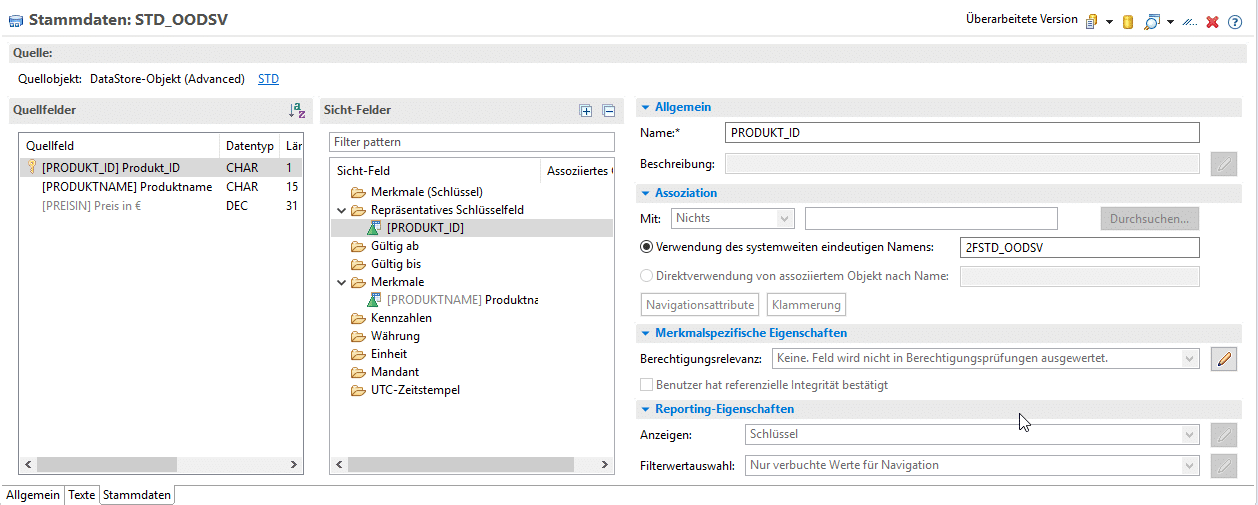
Subsequently, these “text attributes” can be added as navigation attributes in the Composite Provider during association.
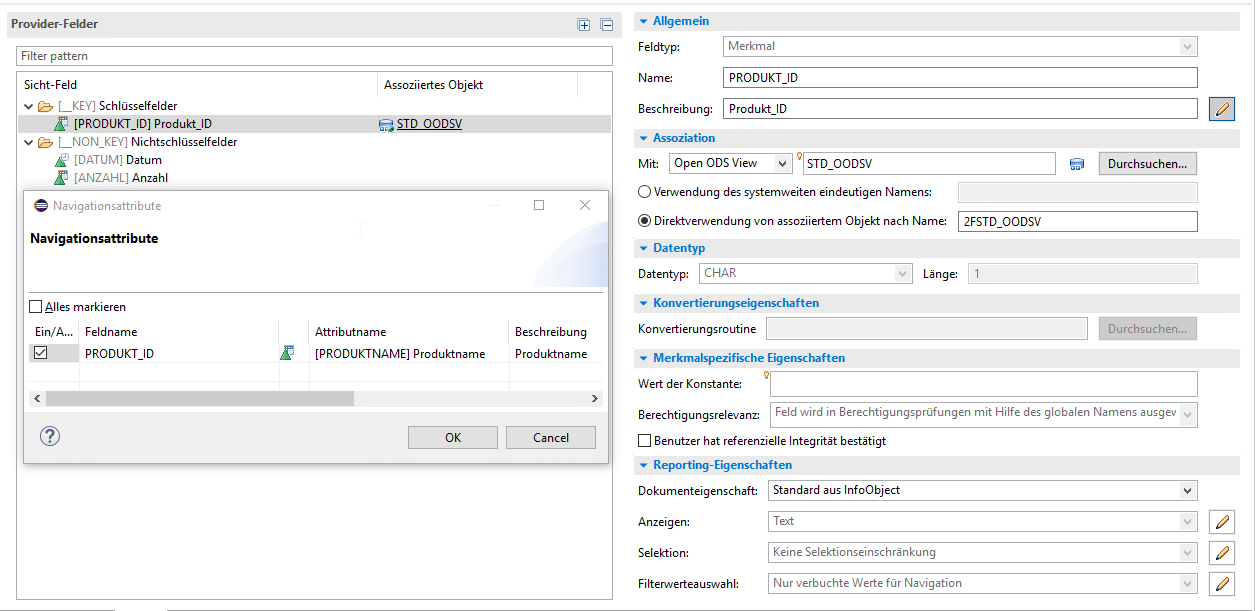
2) Creation of Reporting Calculation Views and Labeling
A dedicated Calculation View is created, which contains the respective generated Calculation View. The generated Calculation View must be connected within a Projection. A separate Calculation View is necessary because changes in the generated Calculation View would be lost upon activation of the Composite Provider. The required settings are made in the Semantics node of the Calculation View.
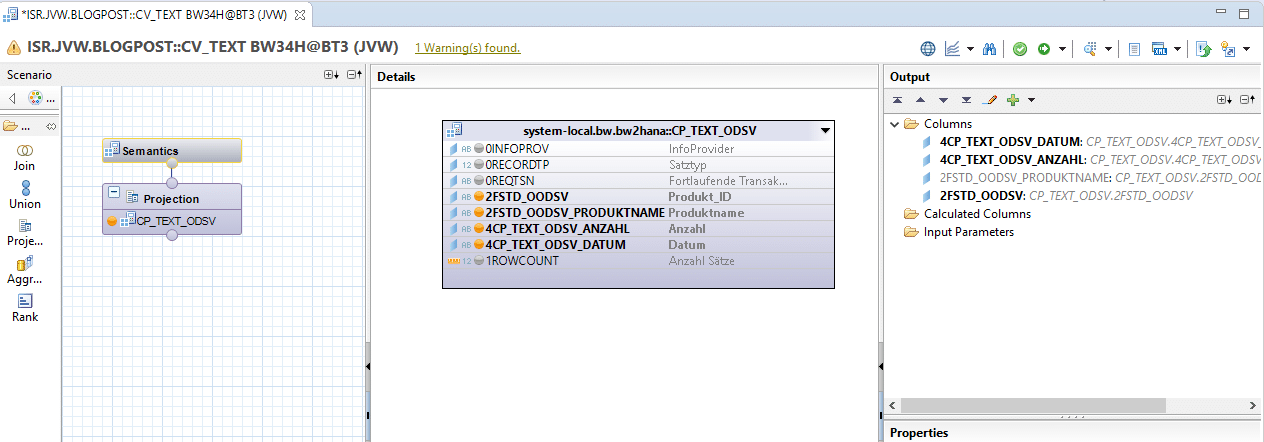
- Hiding the Text Attribute
- Adding the Text Attribute as a “Label Column”
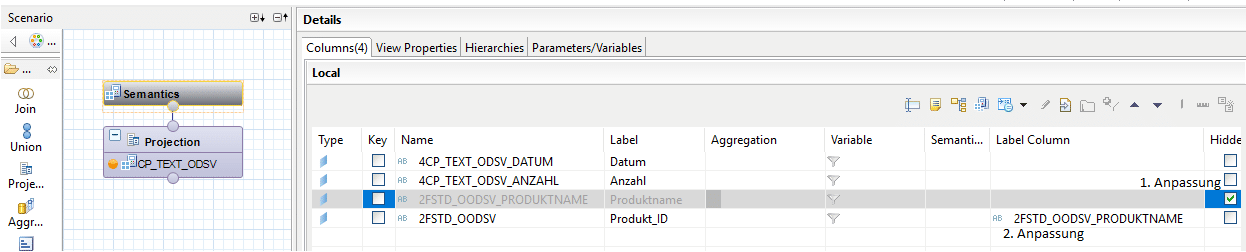
Results of the Workaround
The workaround enables the use of Open ODS Views for HANA-side access as well. Due to the limitations of pure “text” Open ODS Views, we recommend additionally modeling texts as attributes.
| Short Title | Object for Frontend Access | Texts Available |
|---|---|---|
| I | Composite Provider with associated Open ODS View (including texts as attributes & texts) | ✔ |
| J | Query on I | ✔ |
| K | Generated Calculation View from I | ✔ |
| L | Generated Calculation View from L | ✔ |
| M | Mapping of Key-Text Relationship via Join in the Calculation View (no BW-side association) | ✔ |
| Legend | |
|---|---|
| ✔ | The frontend tool receives the typical Key/Text semantics of an InfoObject |
| ✖ | The frontend receives only keys |
| ✔ | Requires a dedicated Reporting Calculation View |
Conclusion
The association of master data within Composite Providers represents a significant and valuable enhancement introduced by SAP BW/4HANA. While classic SAP BW scenarios function seamlessly, mixed scenarios are highly dependent on specific details. Based on our experience, these details encompass not only the modeling approach but also the particular BW release in use. SAP consistently optimizes BW, and observations indicate that system behavior can indeed vary considerably based on the Service Pack (SP) level.
Despite this inherent complexity, the chosen frontend solution may necessitate accessing SAP BW data through HANA Calculation Views. Our contribution outlines an approach to overcome the functional limitations of Open ODS Views. Consequently, the critical determinant for selecting the modeling strategy shifts from the mere display of texts to other functional considerations, such as stability versus agility and development velocity.

Christopher Kampmann
Head of Business Unit
Data & Analytics
christopher.kampmann@isr.de
+49 (0) 151 422 05 448