Changing requirements for modern data warehouse systems mean that aspects such as simplicity, flexibility, and agility are becoming significantly more important and should therefore be inherently considered in the architecture and modeling of such systems.
With its data warehouse product, SAP BW4/HANA, SAP offers the possibility of implementing such modern architectures beyond a rigid and outdated Layered Scalable Architecture (LSA). SAP recommends an architecture based on LSA++. This new layered approach is particularly characterized by its focus on virtual objects. Virtualization means that fewer copies of data are needed between architecture layers, making their design simpler, smaller, and faster. The data warehouse architecture should be as lean and simple as possible.
Further information
Read here our blog article on the topic of "Agile Data Warehousing with SAP BW/4HANA."
The classic BW developer with extensive experience in BW 3.x – 7.x knows that warnings are nothing to worry about – if you know what you are doing, everything will work fine in the end. In this sense, SAP BW warnings should be understood more ashints. Or, in other words: "If the traffic light is yellow, quickly step on the gas again."
However, this is different with hybrid modeling under BW/4HANA!
When generating HANA calculation views, it is important to take BW's "notes" in the form of warnings into account – otherwise you may later discover that not everything "just works."
When yellow is the new red: modeling persistent data
Modeling persistent data
SAP BW supports a wide range of data types in data modeling. A persistence layer, for example in the form of ADSOs, can contain all data types permitted on the BW side, including, for example:
- DEC (Decimal with freely selectable length and decimal places)
- RAW (unconverted byte string)
- INT1 and INT2 (1-byte or 2-byte integer)
An ADSO containing fields with these data types can be activated and loaded without any problems.
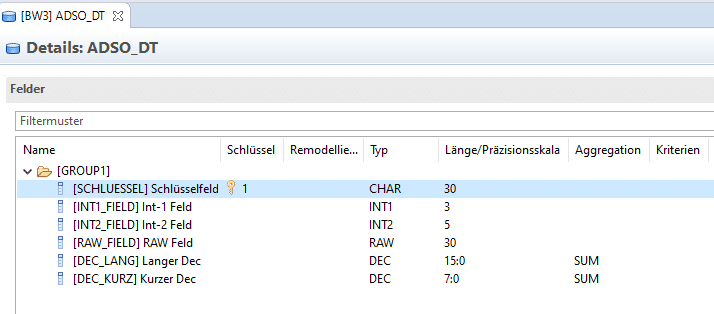
However, if the object is now to be used in reporting, either via Composite Provider or HANA CalcView, the above fields are not included and therefore cannot be used. This is due to the warnings generated during activation but ignored until now:
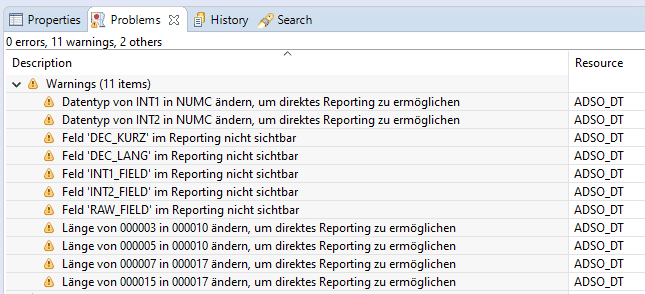
In addition to BW's own restrictions for reporting (e.g., the RAW data type cannot be used), there are also restrictions on the HANA side. In particular, there is a minimum length requirement for key figures on the HANA side to enable safe aggregation of values. These restrictions are documented by SAP.
Solution: The only solution here is to heed the warnings from BW and modify the data types in the persistence layer so that further processing is possible without any problems on both the BW and HANA sides.
Master data associations
The association of master data—via OpenODS View or InfoObjects—with any field-based transaction data is one of the great strengths of agile modeling in BW/4HANA.
When generating HANA calculation views based on these data models, however, you must pay close attention in the composite provider or fact OpenODS view to whether and which warnings are generated by the system:
- RS2HANA_VIEW151: "Navigation attribute is excluded from the external SAP HANA view"
- RS2HANA_VIEW160: "External SAP HANA view: No PartProvider supported"
- RS2HANA_VIEW047: "Navigation attributes are not supported"
The reason for this is a chosen model that, in this case, does not (fully) support consumption on the HANA side.
These include:
- Association (for example, in the composite provider) with InfoObjects and use of transitive navigation attributes. However, these are then not available in the generated HANA calculation view.
- Possible solution/workaround: Perform the association with the InfoObject in an OpenODS view of type "facts," map the transitive navigation attributes to your own fields, and then use this OOV in a composite provider.
- Association (for example, in the Composite Provider) with OpenODS views of the "Master Data" type, using the "System-wide Unique Name" association type.
- Possible solution/workaround: The association with the OpenODS view must then be made using the "direct use" association type. However, this means that a composite provider can only be associated with this OpenODS view once.
In addition, there are further restrictions that may prevent object types (such as ADSO, InfoObject, OpenODS View) from being used in the generation of HANA views in specific cases.
See the following SAP documentation for more information
It is important to note that there are usually ways to make the relevant information available on the HANA side using mixed modeling:
- Select a different modeling variant– as mentioned above, perform associations elsewhere (facts OOV), or perform link satellite modeling based on CalcViews/OpenODS views instead of using InfoObjects with transitive attributes.
- Update to the latest BW/4HANA Support Package. Various restrictions, including association with OpenODS views via system-wide unique names (instead of direct use), no longer exist in BW/4HANA 2.0 SPS04. The possibilities for mixed modeling should therefore not be considered static, but are improving all the time.
Generation of CalcViews when importing transports
Classic BW developers often ignore yellow warning messages when importing transports into the target system.
Unlike classic ABAP transports in the ERP environment, where an import with green is the norm, BW developers are used to transports generating various warnings in both the "Import" and "Postprocessing" steps. However, these are usually not a problem and can be resolved by cleverly structuring transports using follow-up transports. A typical example here would be the warning that DTPs have been deactivated after a transformation has been adjusted and reactivated. However, this deactivated DTP is already on the same job or a follow-up job, so that no incorrectly inactive objects remain after all object post-processing has been completed.
However, with BW/4HANA and mixed modeling, some messages require extra attention: if the HANA views cannot be activated for the BW objects that have just been imported and activated, this indicates a structural problem with BW+HANA communication and/or permissions.
Typical warnings in this context belong to the message class RS2HANA_AUTH, for example:
- RS2HANA_AUTH234: "Replication failed"
The cause here does not lie in the modeling itself—that was successfully carried out in the development environment.
Instead, the following points should be checked:
- Has the authorization concept been correctly implemented in the target system with the assignment of the necessary roles, object, analytics, and system privileges?
- Are the system users—including DDIC, BWREMOTE, SAPHANADB, etc.—correctly equipped with the necessary (and extensive) write permissions on the BW and HANA sides?
- Has authorization replication for the analytic privileges generated by BW to the corresponding HANA DB users taken place? This can also be done manually using transaction RS2HANA_GEN.
- As a workaround, you can also try to manually generate the HANA views that were not successfully generated. The transaction RS2HANA_ADMIN on page BW is available for this purpose.
Conclusion
Yellow is the new red – at least in some cases, and when you are working with BW/4HANA hybrid modeling, where it is essential that both the BW-side and HANA-side objects are created correctly and are synchronized with each other.
Of course, it has never hurt the classic BW developer to take a closer look at the warnings and not simply ignore them per se.
Here, too, agile development methodology—and above all, test-driven development and continuous testing approaches—makes a clear statement: it is much more efficient and cheaper to detect and fix a potential problem early on than to wait until it becomes apparent later on, or even during productive use.

Christopher Kampmann
Head of Business Unit
Data & Analytics
christopher.kampmann@isr.de
+49 (0) 151 422 05 448