In certain planning scenarios, planning on 'unposted' entities/characteristics is required. This requirement can be further complicated by the need to permit only specific combinations of entities (in the SAP context, the term 'characteristic combinations' is frequently used for this). SAP Analytics Cloud (SAC) offers various methods to implement this requirement.
Typically, planning scenarios utilize historical actual data, which not only serves as benchmarks/suggested values for future planning but also defines the breakdown or permitted combination of entities (e.g., different customers for different sales organizations). However, in some planning scenarios, actual data is unavailable, yet the planning input forms must still allow only specific combinations of entities for data entry.
SAP Analytics Cloud, at this juncture, already provides out-of-the-box functionalities such as hierarchies, dimension attributes ("Custom Properties"), and validation rules to address this requirement, which will be explored in this article. Furthermore, a straightforward custom development utilizing "Data Actions" will be explained, offering additional benefits beyond SAP's standard functionalities.
Requirement Definition
As previously described in the guide, the requirement is to permit only specific combinations of entities for planning. Invalid entity combinations must not be planned and, ideally, should not be displayed at all. No historical data is available for this planning scenario.
The following example will illustrate the combination of three fictitious entities:
- Sales Organization (SALES_ORG)
- Customer Group (CUSTOMER_GROUP)
- Customer (CUSTOMER)
Only the following combinations are to be permitted for these three entities:
| Sales Organization | Customer Group | Customer |
|---|---|---|
| 1000 | A | 1001 |
| 1000 | A | 1002 |
| 1000 | B | 1003 |
| 2000 | A | 2001 |
| 2000 | C | 2002 |
| 2000 | C | 2003 |
SAC Implementation
Initial Scenario
To implement the requirement, an SAC planning model is initially defined as follows:
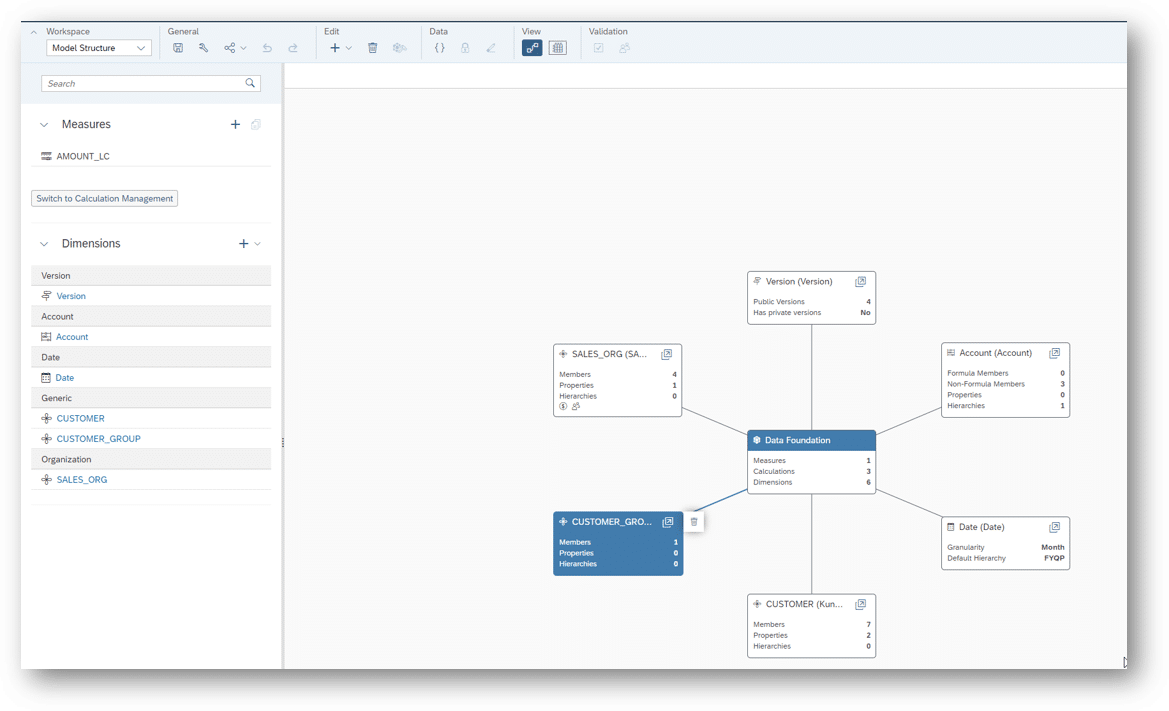
This is an account-based (Account Dimension) planning model. However, a key figure-based planning model would be equally viable for the approach described in this article.
The dimensions (generic type) used for the combinations have the following characteristics:
| Dimension | Member ID |
|---|---|
| Sales Organization | 1000 |
| 2000 | |
| Customer Group | A |
| B | |
| C | |
| Customer | 1001 |
| 1002 | |
| 1003 | |
| 2001 | |
| 2002 | |
| 2003 |
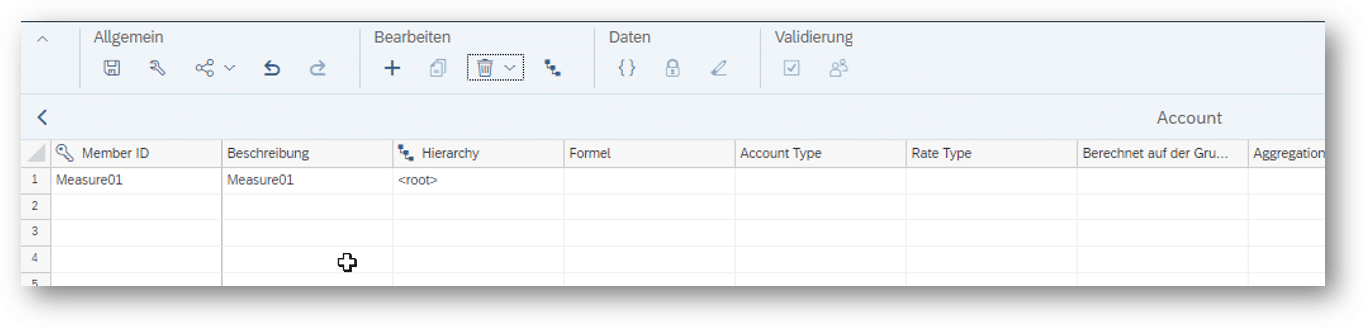
The Account Dimension has only one example characteristic that is to be planned:
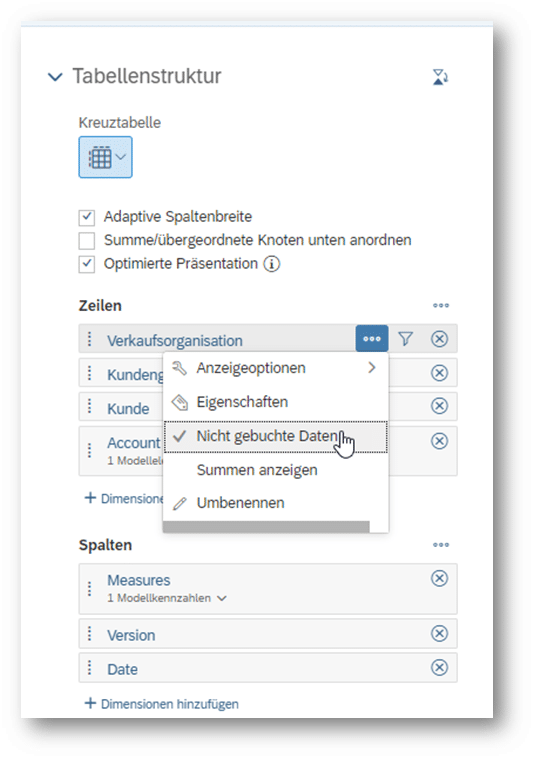
Based on the model defined above, a story is defined with a planning table and the three dimensions Sales Organization, Customer Group, Customer in the drill-down. All three dimensions are set to "Unposted Data":
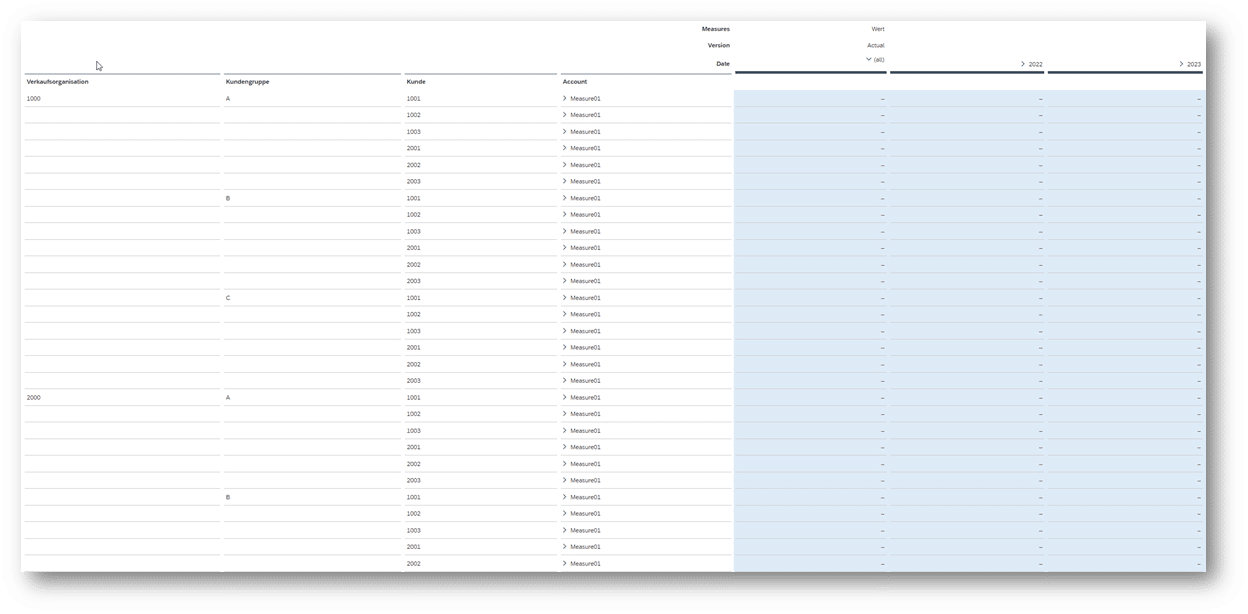
As expected, SAC generates a cross-product of all combinations across the three dimensions. This does not align with the requirement that only specific combinations should be available for planning:
Solution Approach
One way to implement the requirement would be to use hierarchies. However, this would only allow correct combinations in stories that utilize this specific hierarchy. A story with a flat display could still permit invalid combinations.
Validation Rules Based on "Custom Properties"
In addition to hierarchies, SAC offers another way to model relationships between entities (dimensions) using "Custom Properties". "Custom Properties" have the advantage that they can serve not only as filters in stories, for example, but also as the basis for defining validation rules. Validation rules prevent the storage of invalid combinations at the model level.
Therefore, two "Custom Properties" ("Sales Organization" and "Customer Group") are defined for the Customer (CUSTOMER) dimension (point 1 in the screenshot), and the corresponding relationships are entered into the master data table (point 2 in the screenshot).
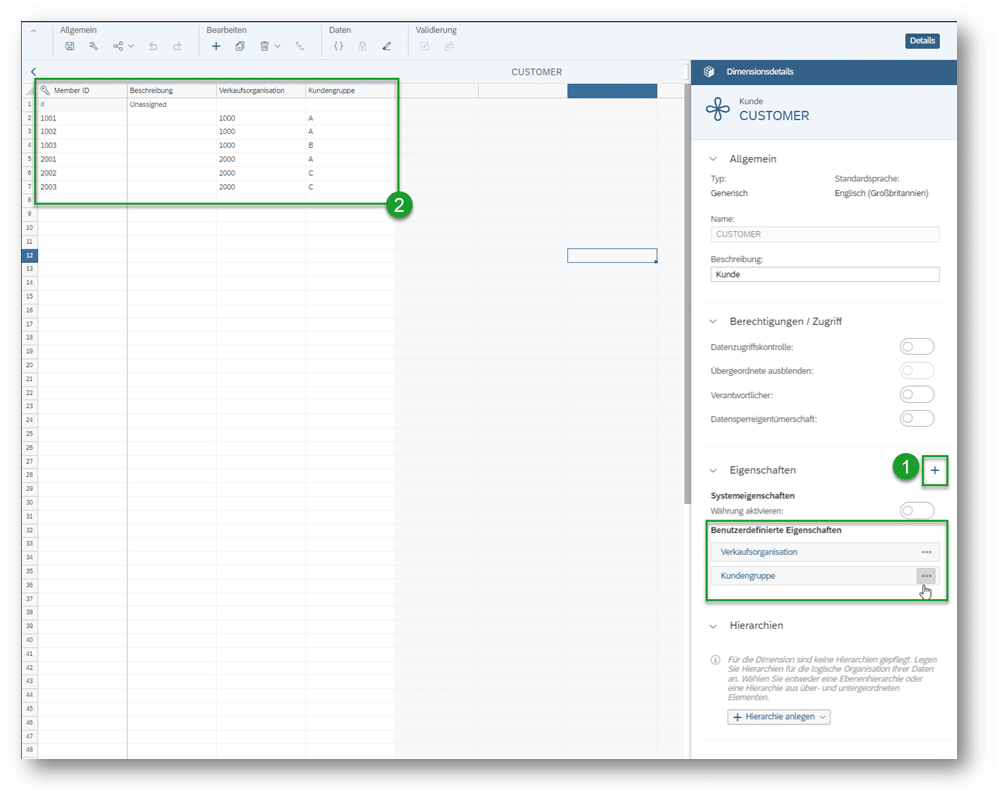
For the sake of completeness, it should be noted that the drill-down, using the defined master data, could now also be designed such that only the "Customer" dimension is included in the drill-down, and the "Sales Organization" and "Customer Group" properties are merely displayed as additional information. This would at least allow for the display of the desired combinations:

Input data would physically only be written to the "Customer" dimension. With the aid of validation rules and/or self-defined "Data Actions," the two properties "Sales Organization" and "Customer Group" could be derived and also persisted. However, since dimension properties do not correspond to "full-fledged" dimensions and thus entail various limitations (e.g., no ad-hoc filtering, no display of texts for IDs, no sorting capability), this solution approach will not be further considered here. The solution approach described below, as already presented in the initial scenario, utilizes all three dimensions for the drill-down.
Based on the master data defined above, the validation rules are created in the first step. These must first be activated in the model properties:
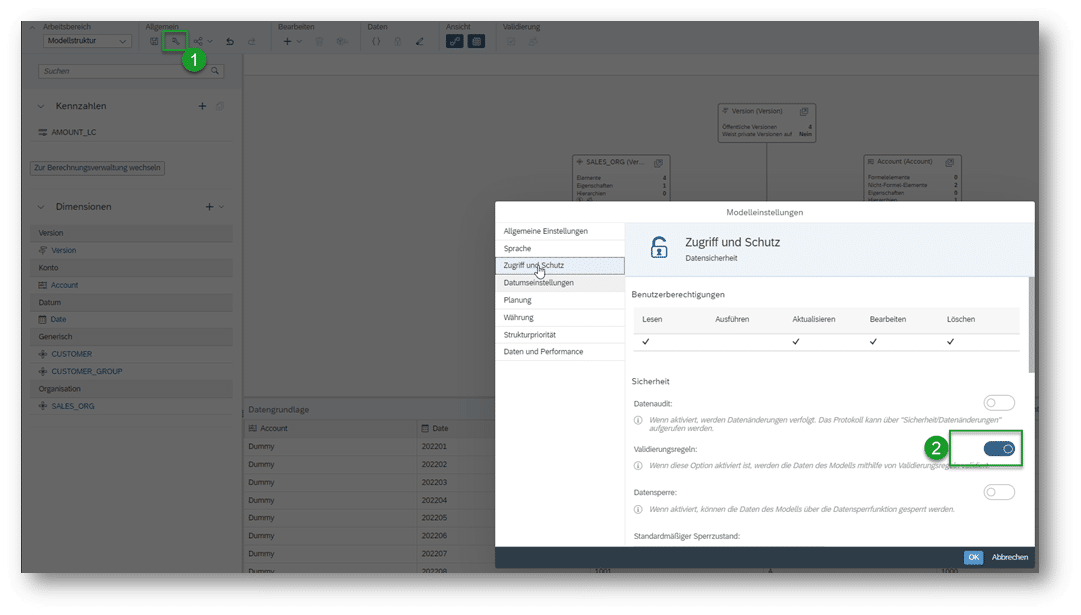
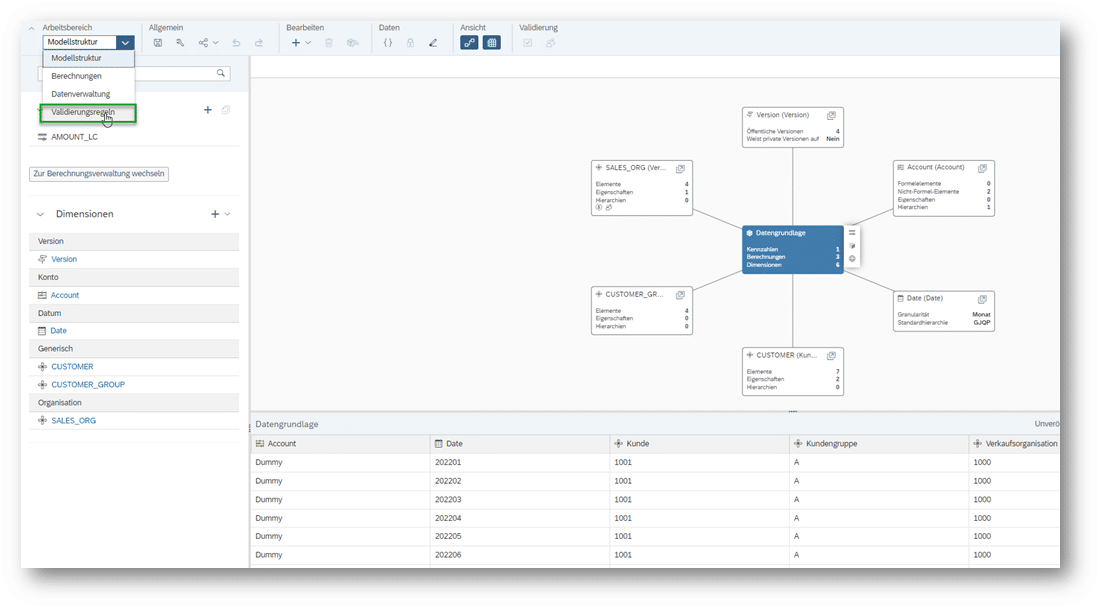
After activation, the validation rules can be found here:
Now, the validation rules can be defined using the option "Create with existing attributes":
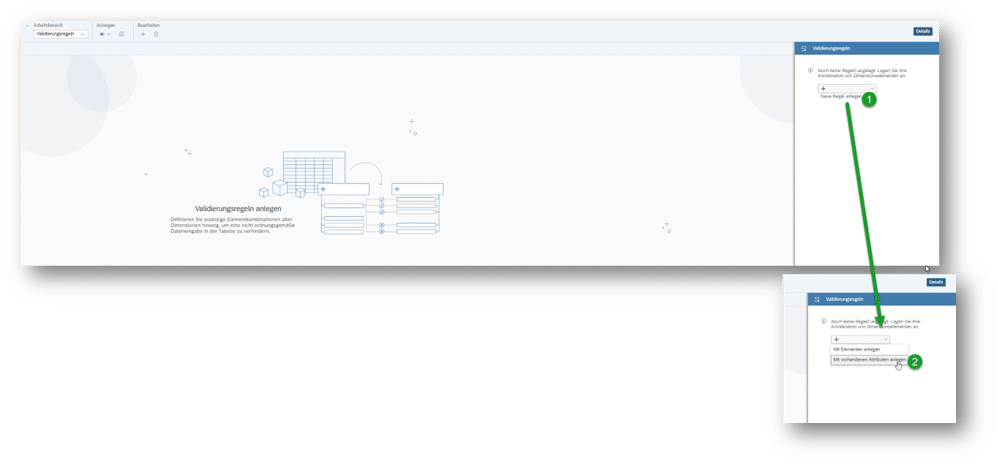
The mapping should ultimately appear as follows:
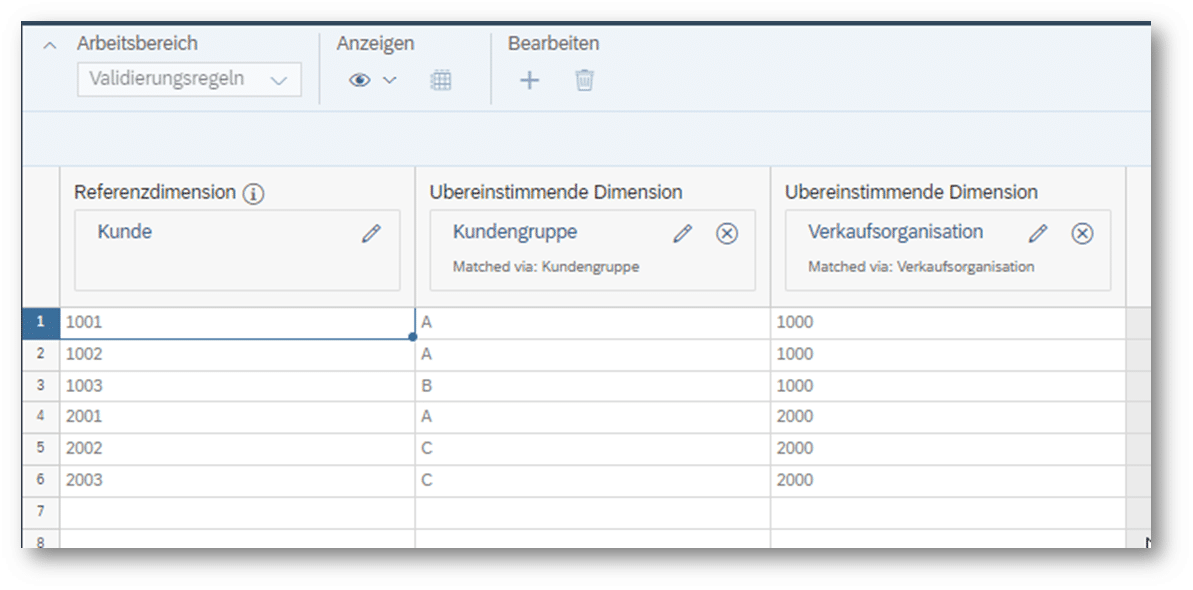
A welcome feature: The validation rules are automatically updated when the master data (Custom Properties) on which they are based is adjusted. 👍
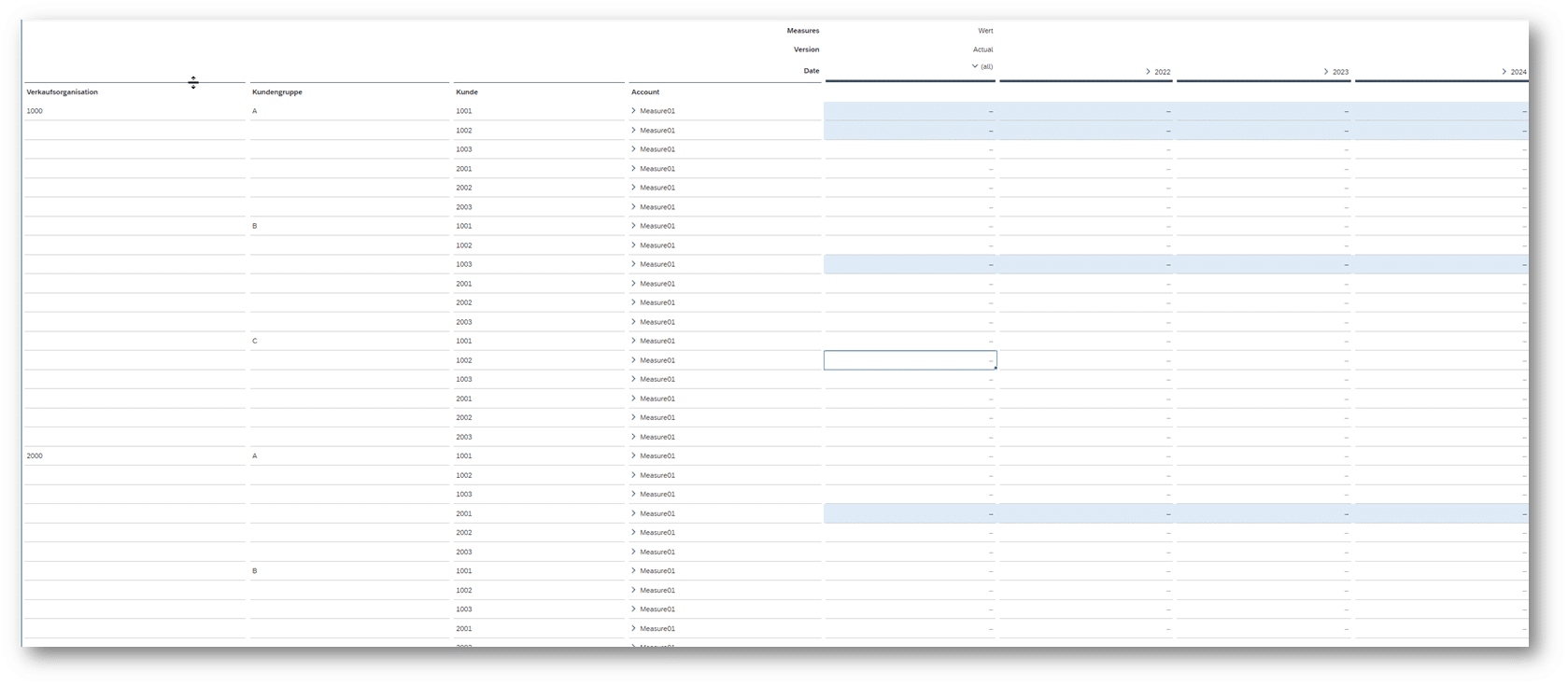
If the story defined above is accessed again, invalid combinations are now locked for input (only the blue-highlighted fields are ready for input):
Optimizing the planning interface using a "Planning Grid"
Now, the breakdown must be "cleaned up" accordingly to exclude invalid combinations.
For this, a hierarchical representation could also be used. However, this would necessitate maintaining the relationships in two locations: as "Custom Properties" of the Customer dimension and again as a hierarchy.
Another option is to create a "Planning Grid" based on the stored attributes using a self-defined "Data Action", allowing planning to be performed on posted "dummy" data within the planning interface.
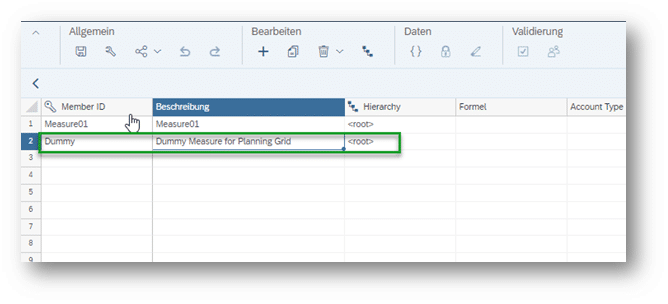
For this purpose, initially, a dummy account is created in the Account dimension:
Subsequently, the following "Data Action" of type "Script" is implemented:
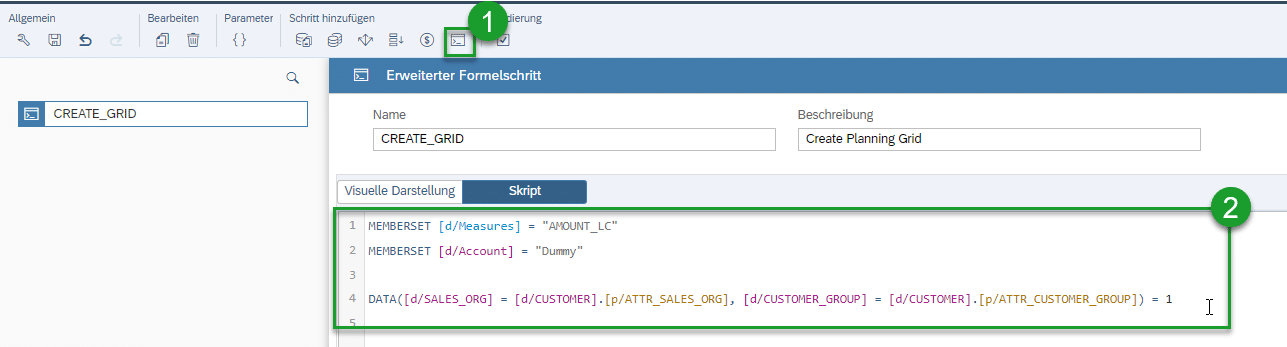
MEMBERSET [d/Measures] = “AMOUNT_LC”
MEMBERSET [d/Account] = “Dummy”
DATA([d/SALES_ORG] = [d/CUSTOMER].[p/ATTR_SALES_ORG], [d/CUSTOMER_GROUP] = [d/CUSTOMER].[p/ATTR_CUSTOMER_GROUP]) = 1
As described above, this "Data Action" creates the corresponding rows in the fact table based on the stored entity combinations of the Customer dimension, using the "dummy" value 1 (any other arbitrary value can also be used).
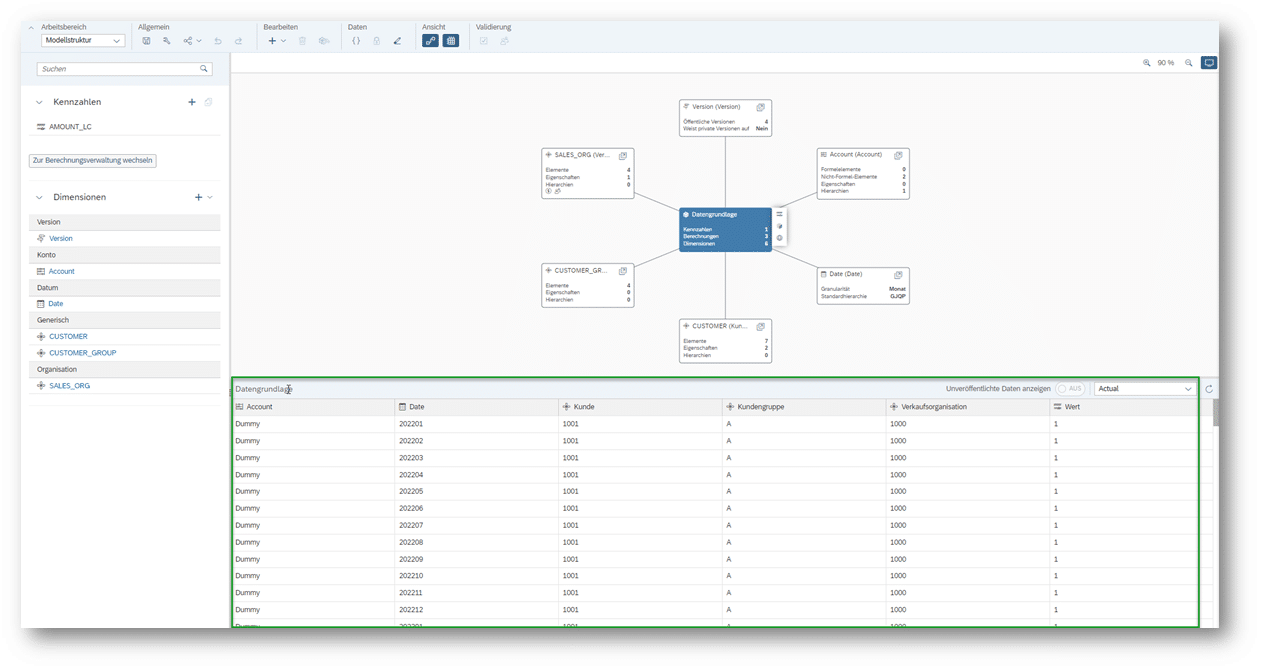
The "dummy" characteristic is now added for the Account dimension in the story's table and can be immediately hidden, as its sole purpose is to establish the "Planning Grid".
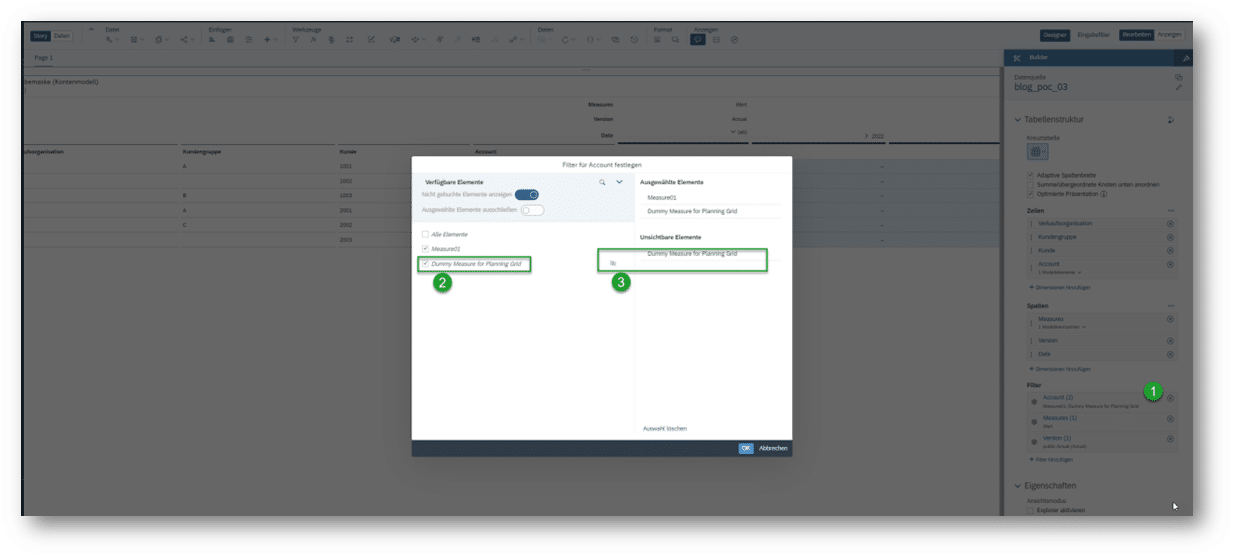
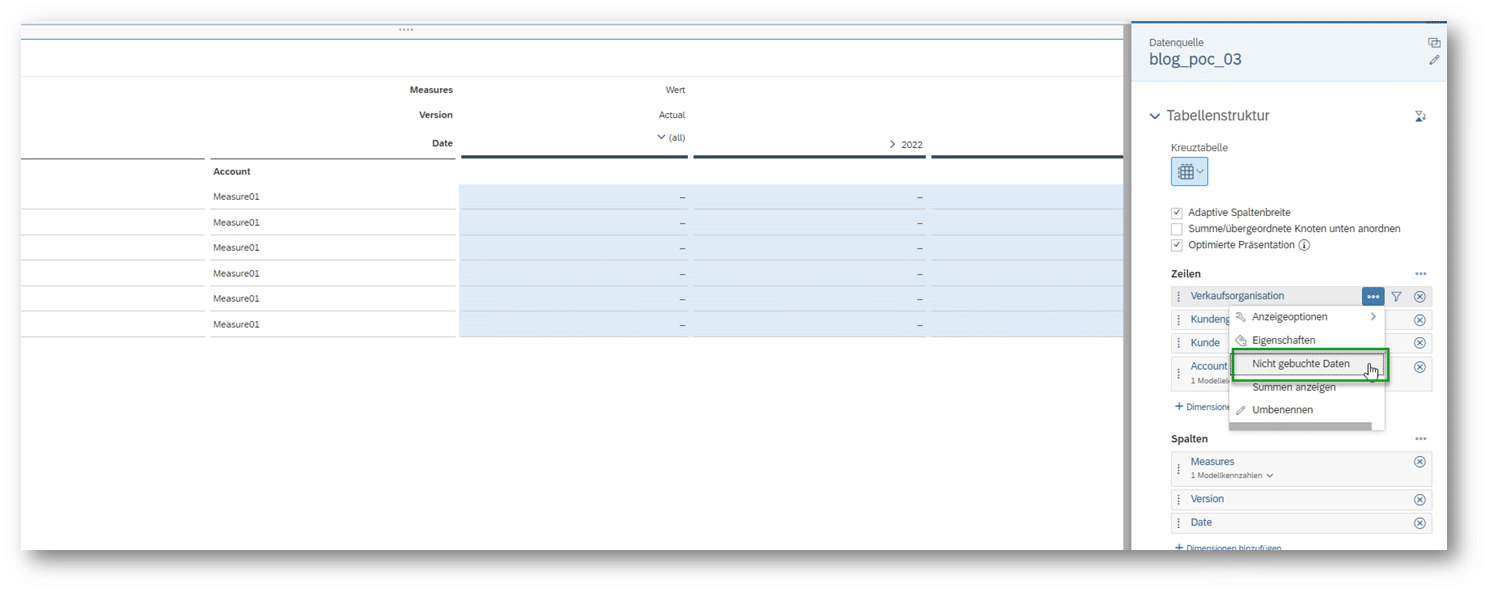
As a final step, the "Unposted Data" property for the three dimensions must be deactivated again.
Now, the table in the story displays only the permitted combinations, as required:
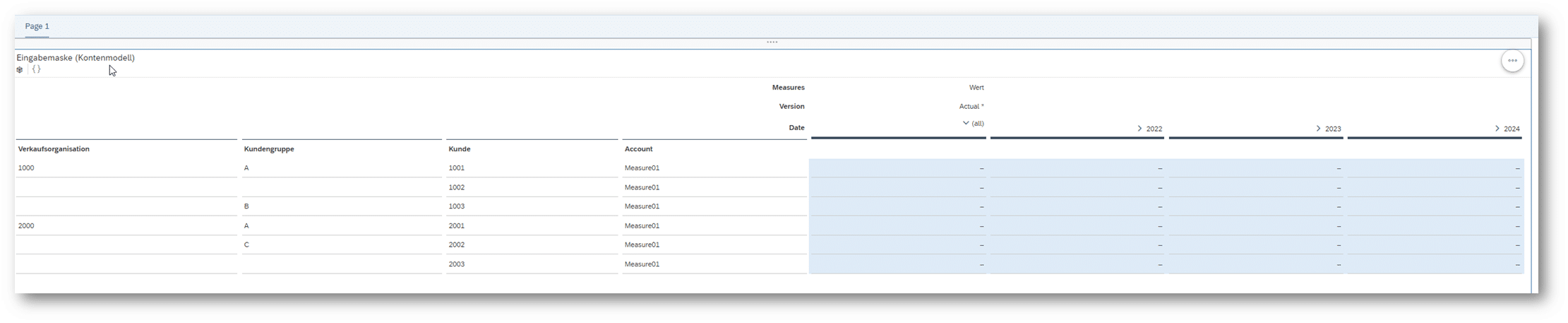
The fact that planning is now based on posted "dummy" values also offers additional advantages, for instance, in filtering. However, this aspect will not be further elaborated upon in this blog.
Conclusion
As demonstrated by the implementation example presented above, SAC offers various possibilities for planning on "unposted" entity combinations. Particularly, the functionality to define "Custom Attributes" on a dimension proves highly beneficial in this context. Thus, in the example, validation rules not only ensured at the model level that only combinations present in the attributes could be planned. The same attribute information could also be utilized to create a "Planning Grid" with a self-defined Data Action, thereby ensuring that the input mask only presents valid entity combinations for display.
Author: Michael Wilk
Your Point of Contact

Thomas Riedel
Managing Consultant
SAP Information Management
Thomas.Riedel@isr.de
+49 (0) 151 422 05 422