Converting and Displaying Currencies in CalcViews

Share post via

The classic path to the finished key figure in SAP BW 7.x systems is easy to follow and can be traced back to just a few tables.

For transaction data, an InfoObject is assigned to the currency (usually 0CURRENCY), which is then read from a table containing the corresponding currency and exchange rate in the background, and the value is then calculated.

In connection with hybrid scenarios, another component is added to this process: HANA database processing. This means that a distinction must be made between the BW and HANA sides when it comes to currency conversions and representations. In short, the HANA database does not necessarily process and store currencies in the same way as was previously the case in the classic SAP Business Warehouse.

What are currency representations and currency conversions based on?

The basis for this is provided by tables in which the respective currency keys, including master data and conversion rates, are stored. These tables exist on both the BW and HANA sides. The following list shows all SAP tables relevant for currency conversions:

Table name (technical) Description
TCURC currency codes
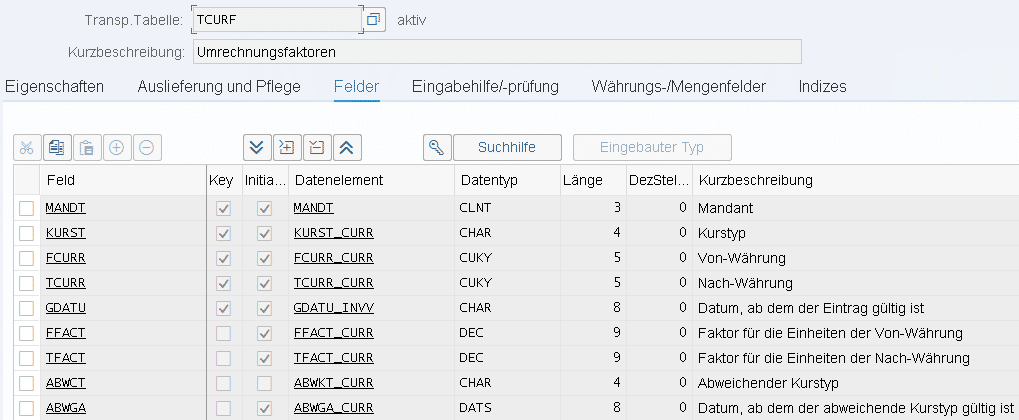
TCURF conversion factors
TCURN notations
TCURS price ranges
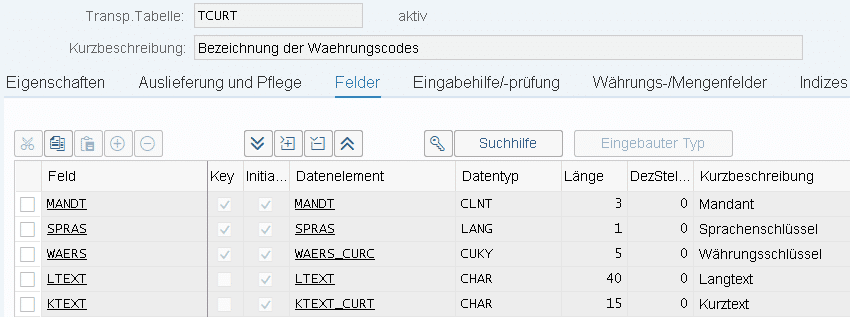
TCURT Currency code designation
TCURV Currency conversion rate types
TCURW Use of course types
TCURX Decimal places of currencies

Below are some examples of the most important table definitions in both BW and HANA contexts:

BW tables

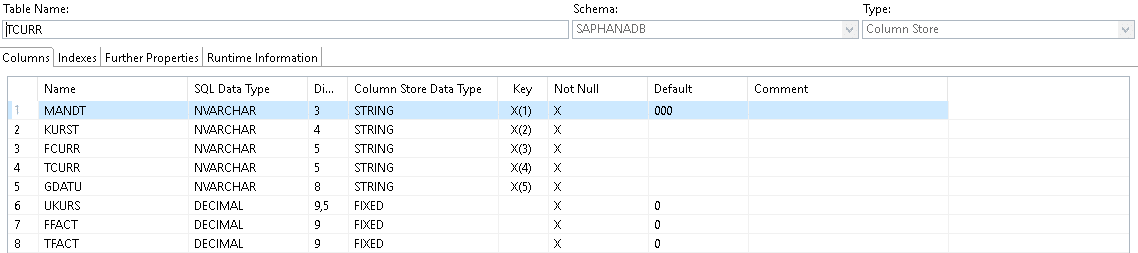
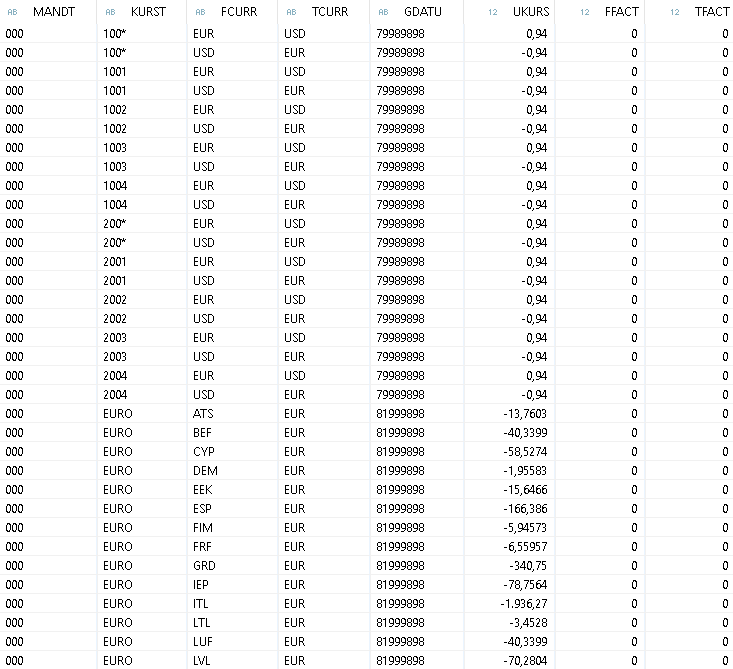
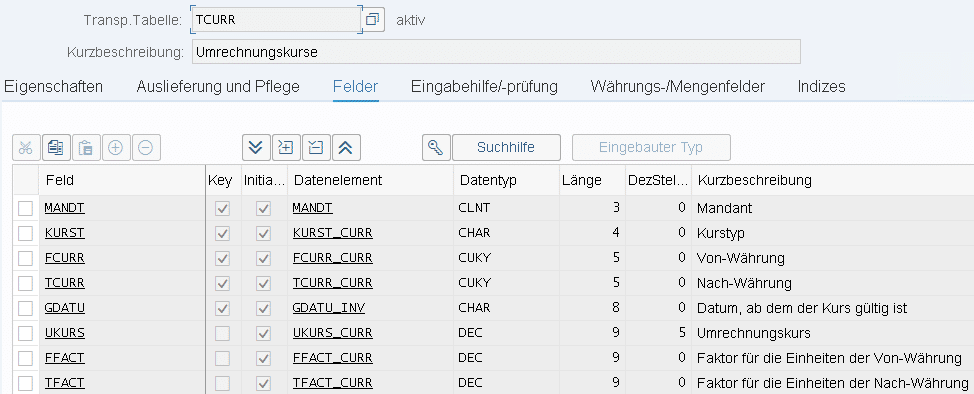
On the BW side, the tables can be accessed using the standard transaction "SE11."The table "TCURR" contains the data required for currency conversion:

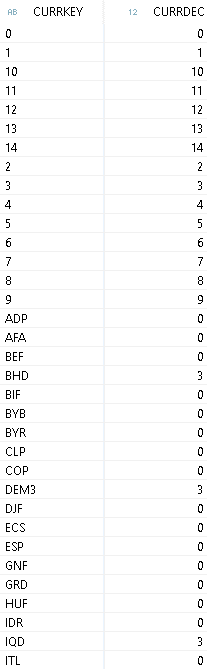
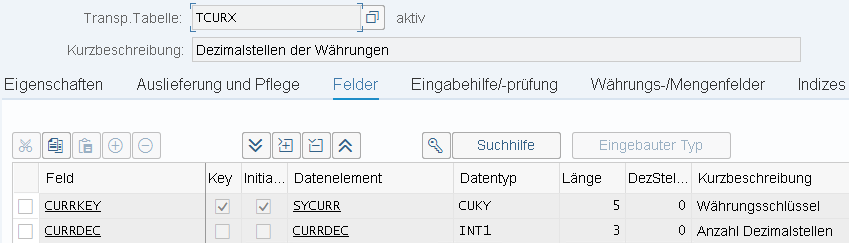
The "TCURX" table is extremely important for avoiding display and calculation errors. The number of decimal places is taken from this table during currency conversion operations to ensure correct rounding:

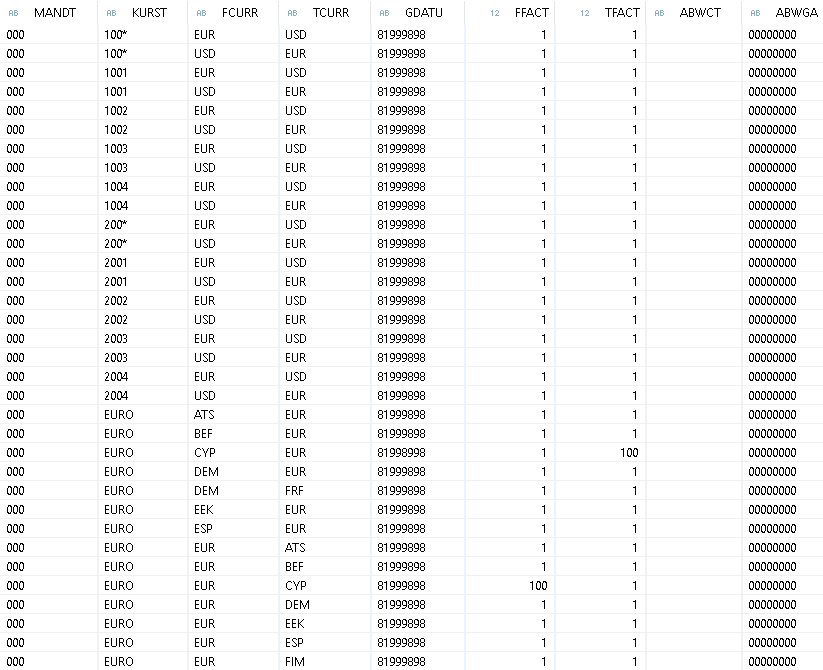
The table "TCURF" provides the factors to be used for currency conversion:

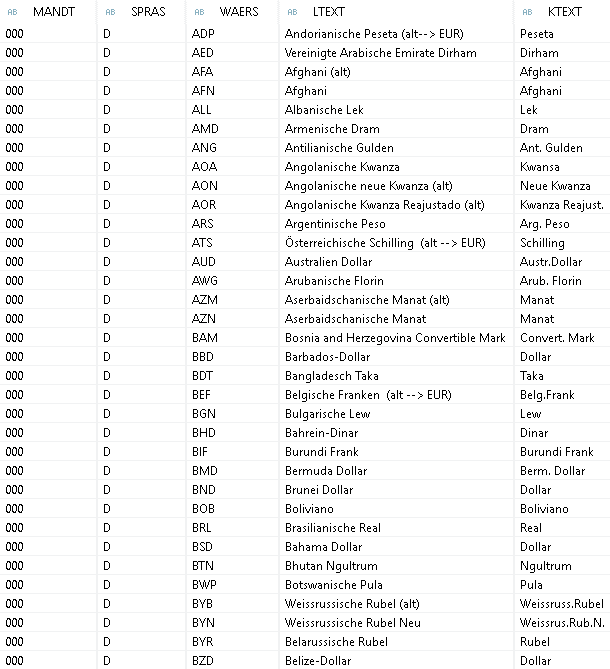
The texts for the individual currency codes are stored in the "TCURT" table:

HANA tables

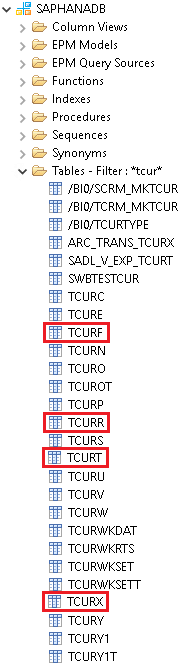
The tables can be found in the HANA database under the standard schema "SAPHANADB."

The tables are structured exactly like the corresponding BW tables, so they will not be described again here. The excerpts from the table definitions are supplemented by sample data extracts from these tables:

formatting

The values can be formatted in both internal and external formats. Internal means that the value is displayed as it is at the database level of the respective system (e.g., SAP ERP). External representations are usually always present when the output is directed at users (e.g., reports). The difference between internal and external representation lies in the number of decimal places used. All SAP currency data types normally have two decimal places. This is problematic in some cases, as there are currencies that use more or fewer decimal places. To get around this problem, the TCURX table clearly defines how many decimal places a currency type has. This table is included in currency operations, in addition to the actual exchange rate from the TCURR table.

For data sources intended for users, the exact values of the respective currency are usually output, which is achieved via the external format. The conversion between internal and external formats is performed with the aid of the so-called "decimal shift" or "decimal shift back." These two functions cause the comma to be shifted accordingly. The underlying operations are as follows:

Decimal shift: 

Initial value * 10 ^ (2 – number of decimal places according to TCURX)

Decimal shift back:

Initial value / 10 ^ (2 – number of decimal places according to TCURX)

To illustrate how this works, we will use the yen (JPY) currency as an example. This currency is stored in internal SAP tables with two decimal places. This means, for example, that 1510 yen is stored internally as 15.10 yen. The SAP system can handle this, of course, and knows its own conversions, but this should by no means be assumed for third-party systems.

In this example, the decimal shift results in the following external representation:

15.10 * 10 ^ (2 – 0) = 1510

The "decimal shift back," on the other hand, leads to the opposite or original representation (internally):

1510 / 10 ^ (2-0) = 15.10

Within SAP ERP, the operations mentioned above are performed automatically in the background. However, if ERP data serves as a source for other systems, such as SAP BW/4HANA, the correct conversion should be checked, especially for currencies that do not use the standard two decimal places in SAP. Depending on the architecture, incorrect conversions may occur. An example of this would be a scenario in which data records with amount and currency information are loaded from an SAP ERP into an SAP BW/4HANA. Problems can arise here, especially when switching between BW and HANA objects, as the conversions performed by the HANA DB are independent of those performed by the ABAP stack and use their own TCUR* tables.
An example

The following example illustrates the "path" of a key figure with currency in a mixed modeling scenario. This path leads from the extractor, via persistence in an aDSO, to a HANA view, which can ultimately be consumed by a front end.

extractor

Data preview of a standard extractor from an SAP ERP system (external format)

Data preview of a standard extractor from an SAP ERP system (internal format)

Advanced Data Store Object

Data preview of an aDSO loaded from the standard extractor (currency conversion in the ABAP stack):

HANA Calculation View (system-generated)

Data preview of the generated HANA view of an aDSO loaded from the standard extractor:

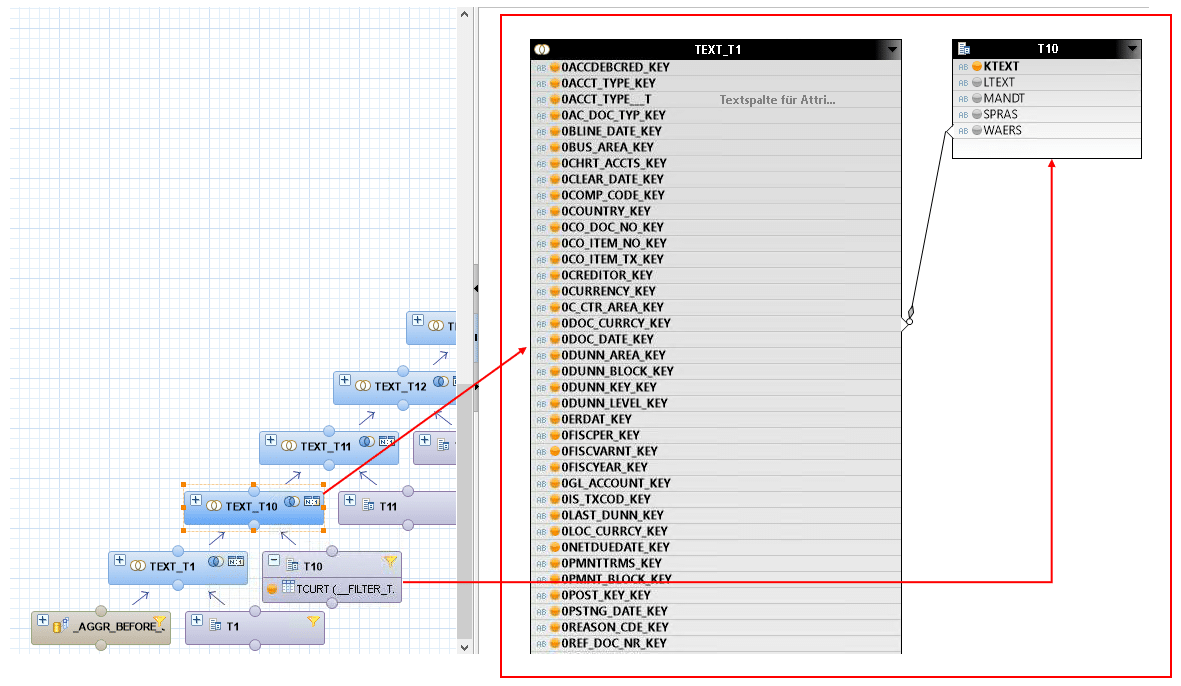
Read the texts on currency codes:

Currency configuration in the semantics of a HANA view with the aid of a currency column:

Currency conversion in detail

HANA view

In addition to the use of currency attributes already shown, individual currency conversions can also be defined during modeling. The HANA Calculation View is ideal for this in mixed modeling scenarios, although there are various other options and approaches for successfully converting key figures with currency. One of the advantages of the Calculation View solution is that it allows you to take advantage of the performance benefits of processing directly on the HANA DB.

The following shows a scenario in which a conversion is performed using a HANA Calculation View.

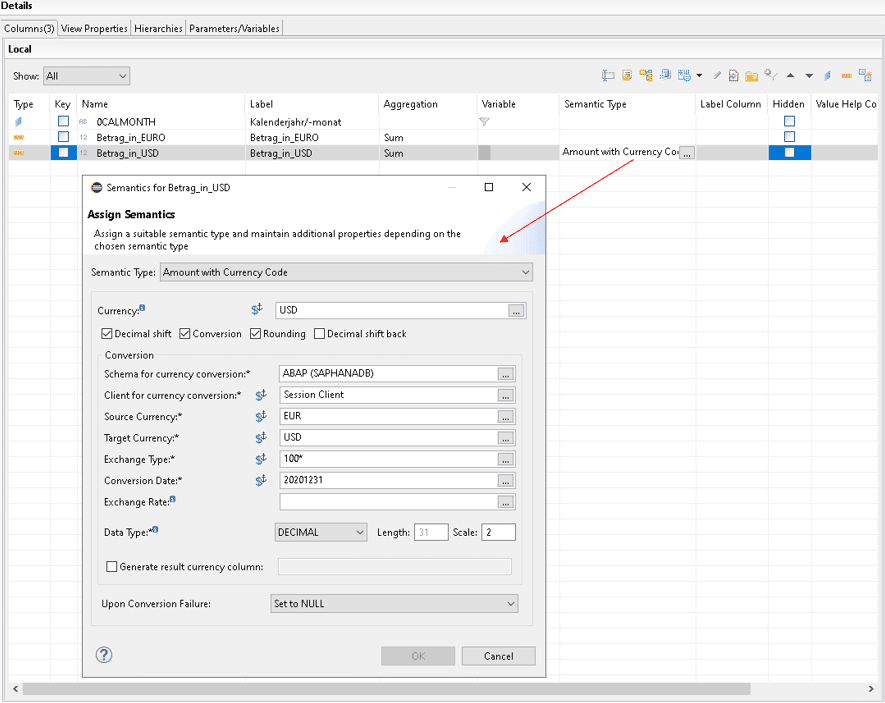
In the HANA development environment, you can define a separate currency conversion for each key figure within the semantic settings of a calculation view:

In the first step, a display currency can be set either as fixed or based on a column. In addition, the Decimal shift and Decimal shift back functions, as well as rounding, can be enabled or disabled. The essential definition part can only be edited if the check mark is set for "Conversion." This specifies that all values of the key figure should be converted according to the same scheme.

The information required for individual currency conversion is

  • currency scheme
  • Client for currency conversion
  • source currency
  • target currency
  • currency conversion type
  • conversion date
  • data type

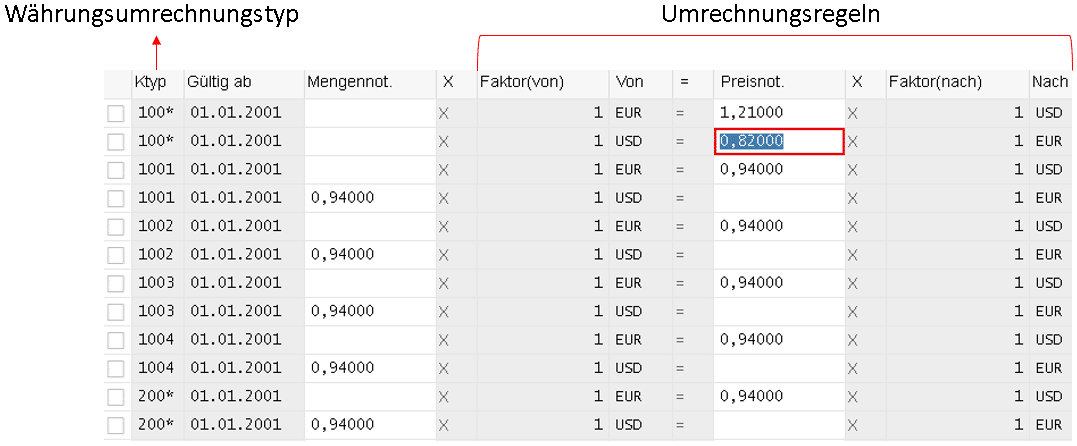
Depending on the selection of the source/target currency and the currency conversion type, different conversion formulas are applied. These rules usually come directly from an ERP system, but can also be manually adjusted in the DWH if necessary. Depending on whether the HANA view is called directly or reused via the BW page, either the TCURR table of the ABAP stack or that of the HANA DB would have to be adjusted. 

For this example, this adjustment takes place on the BW side, specifically in transaction "OB08." The following figure shows this using the example of conversions between EUR and USD. Changes in this transaction have an immediate effect on data without requiring a restart of the BW system or individual parts of it.

An adjustment to the HANA table could be implemented using SQL commands, for example.

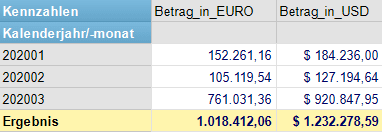
The following shows the source and target currency in a composite provider that consumes an SAP HANA view including stored currency conversion:

BW transformation

Alternatively, currency conversion can also be performed in the traditional way within the ABAP stack. This takes place within a transformation between the data source and the data target. It should be noted that in this scenario, predefined currency conversion types are generally used, which do not support variables within the scope of a transformation. See also:https://help.sap.com/viewer/dd104a87ab9249968e6279e61378ff66/11.0.0/de-DE/4a27af0d81661d10e10000000a42189b.html

BW query

In addition, currency conversion can also take place at an even higher level in the BI client. There, conversion can either be stored as part of the query definition or performed directly at runtime. In complex use cases, it is recommended to configure the conversion directly in the definition of a query, as this has fewer limitations than conversion during runtime. If currency conversion takes place at this level, currency conversion types that include variables can also be used. Detailed information on this can be found in the official SAP Help Portal:

https://help.sap.com/viewer/dd104a87ab9249968e6279e61378ff66/11.0.0/de-DE/4a27b4dc81661d10e10000000a42189b.html

Conclusion

The basic functionalities for handling different currencies within an SAP Business Warehouse have not changed in hybrid BW/4HANA modeling scenarios. Keys in internal tables are used to read the respective characteristic values of a currency type, and this information is then used to convert the values and adjust the texts.

One pitfall arises when currency amounts are transferred between the ABAP stack and the HANA DB (for example, the continued use of a system-generated HANA view of a BW object). It should be noted here that the tables for currency adjustments are located both in the ABAP stack and on the HANA DB, so they could theoretically differ from each other.

Furthermore, in addition to the traditional conversion methods of SAP BW 7.x, such as in the context of a transformation or at query level, currency properties can also be extensively and individually customized in BW/4HANA using the semantic settings of a HANA view.

ISR Employee Image

Christopher Kampmann
Head of Business Unit
Data & Analytics
christopher.kampmann@isr.de
+49 (0) 151 422 05 448

About ISR

Since 1993, we have been operating as IT consultants for Data Analytics and Document Logistics, focusing on data management and process automation.
We provide comprehensive support, from strategic IT consulting to specific implementations and solutions, all the way to IT operations, within the framework of holistic Enterprise Information Management (EIM).
ISR is part of the CENIT EIM Group.

Visit us virtually on these channels:

News Categories
News Archive

Latest Publications

Upcoming ISR Events

[tribe_events_list limit=”3″]