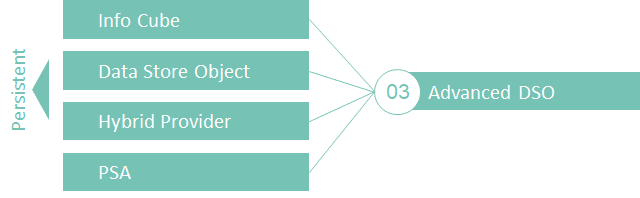
With BW/4 HANA, SAP has consolidated the types of Info Providers. Of central importance is the advanced Data Store Object (DSO), which replaces several Info Providers at once.
In this article, we will discuss the characteristics of the aDSO in detail and explain how to find the right aDSO type.
Fig.: Advanced Data Store Objects | isr.de
Setting up an aDSO
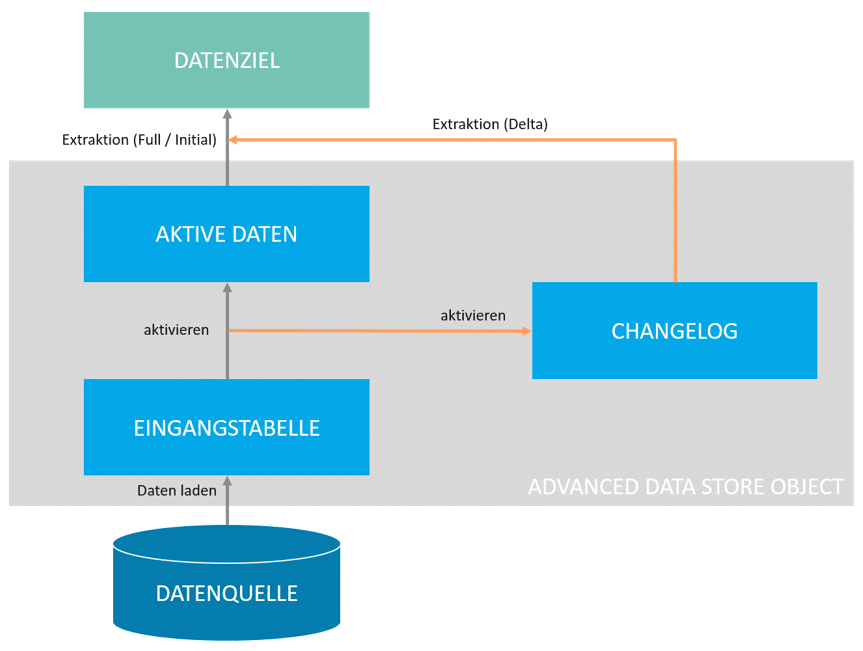
An aDSO always consists of three tables, which may or may not be used depending on the type. However, even unused tables are created in the background. Therefore, care must be taken during development.
Theinput table of anadvanced data store object contains loaded requests prior to data activation. This means that no key attribute checks or SID generation have taken place yet. All successfully activated requests are written to the active data table. As part of the activation process, the semantic keys are checked, among other things. In addition, unique identifiers (SIDs = SAP System Identifiers) are generated if InfoObjects have been used in the modeling. Finally, the changelog table stores all changes made to the active data table. This includes new data records, changed data records, and deleted data records. The type of change is recorded in the 0RECORDMODE attribute, which can have the following values:
“ “ = Modified record, after modification
"N" = New record
"X" = Modified record, before modification
"D" = Deleted record
"R" = Reversible record; this is equivalent to "X," but when a record with the same key is loaded, the record marked with "R" is deleted.
This was also familiar from the (standard) Data Store Object in classic SAP BW. But how does the aDSO differ from the DSO?
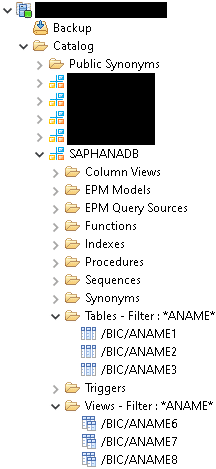
The following screenshot shows all DDIC objects of an aDSO. The structure of these is identical for every aDSO, and individual tables or views can be identified by the final digit in their name. The digits 1-3 stand for the tables mentioned above, which may be active or inactive depending on the configuration.
The additional views with the final digits 6-8 differ from conventional DSOs. These are always generated by default when an aDSO is activated and can be used to access data. The views can be found in the HANA development perspective under the following path and can be used directly for modeling. Compared to generated HANA calculation views, the external SQL view has performance advantages (see also SAP Note 2723506) because no joins to master data are formed (if info objects are in the aDSO). This makes it well suited for lookups or HANA-side processing.
Types of an aDSO
The following section provides a concise overview of the available and useful modeling features of aDSO.
In general, it is recommended to always have an external SAP HANA view generated when activating an aDSO. This view can be reused in the HANA modeling perspective and accessed via front ends. This can help optimize performance. However, starting with BW/4HANA 2.0, three different views are automatically generated for each aDSO (see “Structure of an aDSO”), so it is not necessarily required to create a calculation view via the aDSO configuration.
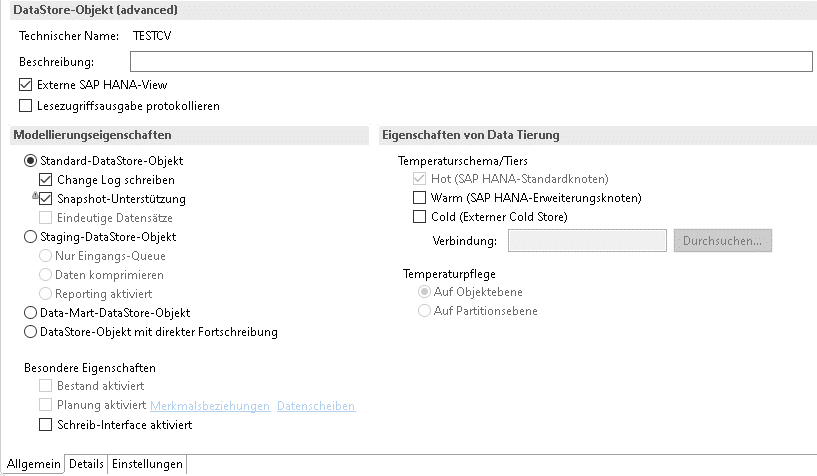
"Standard"
Selecting the Standard DataStore object in the modeling properties allows you to select or deselect the following properties:
"Write Change Log" – The ChangeLog table is used, and changes to the Active data table are recorded. Reporting is available on the aDSO.
"Snapshot Support" – All requests are written in full to the active data table, and deletions are detected. Reporting is available on the aDSO.
"Unique Records" – During activation, records with matching keys are not updated. Reporting is available in aDSO.
In this case, the input table and the active data table are always active.
The standard aDSO can cover various scenarios. On the one hand, it can be integrated into data flows like a classic DSO. In this case, the change log is useful so that delta data records can be updated. If no delta update is required, the change log can generally be dispensed with, saving DB space. Snapshot support is a great extension of the delta functionality because deletions in source tables are recognized (provided that a full load is performed).
Fig.: aDSO types: Standard | isr.de
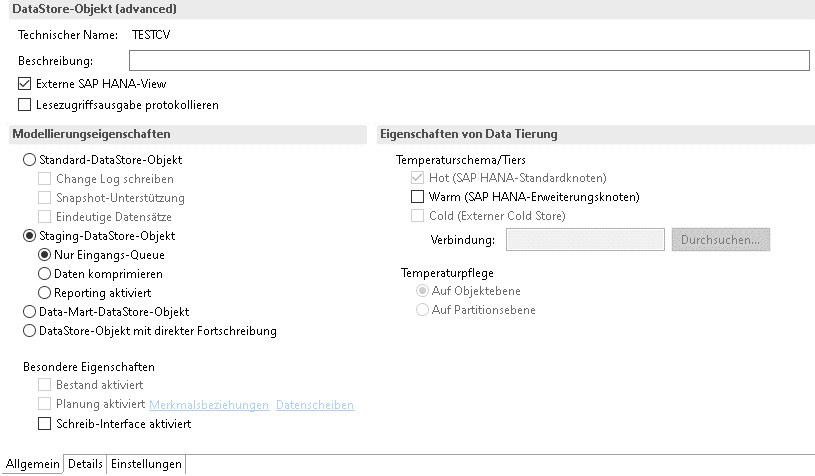
"Staging"
Selecting the Staging DataStore object in the modeling properties allows you to select or deselect the following properties:
"Inbound Queue Only" – Only the inbound table is used. Records are stored with a technical key that equals the primary key. Reporting on the aDSO is not available.
"Compress Data" – The input table and the active data table are used to store the compressed data. Reporting on the aDSO is not available.
"Reporting enabled" – The input table and the active data table are used to activate the data. Even after activation, the data remains in the input table as well. Reporting is available on the aDSO.
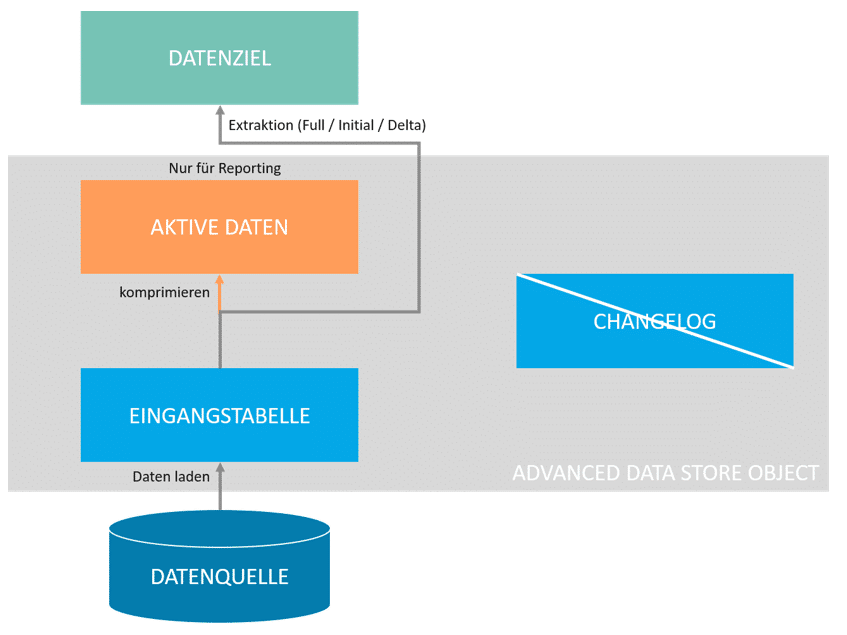
In this case, the input table is always active and is used for data extraction. The active data table is used exclusively for reporting purposes.
As a rule, a staging aDSO should be used when data is to be further processed. For example, a staging aDSO can serve as intermediate persistence, which can then be accessed via further transformations and loaded into further data targets. In the simplest setting (input queue only), the aDSO largely corresponds to the old write-optimized DSO.
Fig.: aDSO types: Staging | isr.de
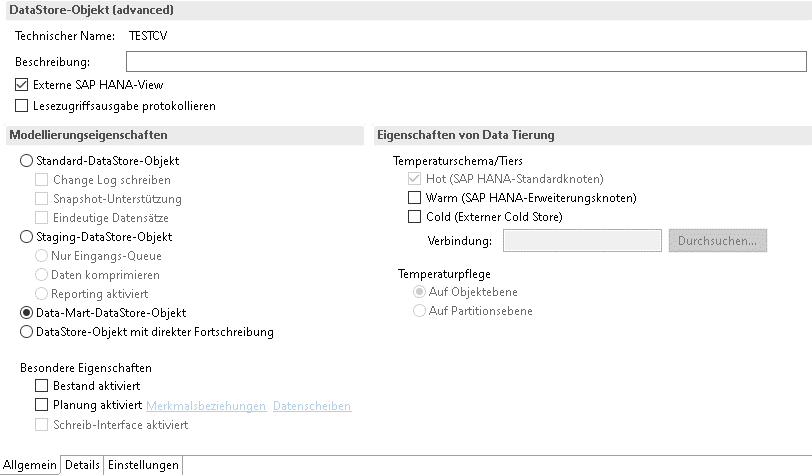
"Data Mart"
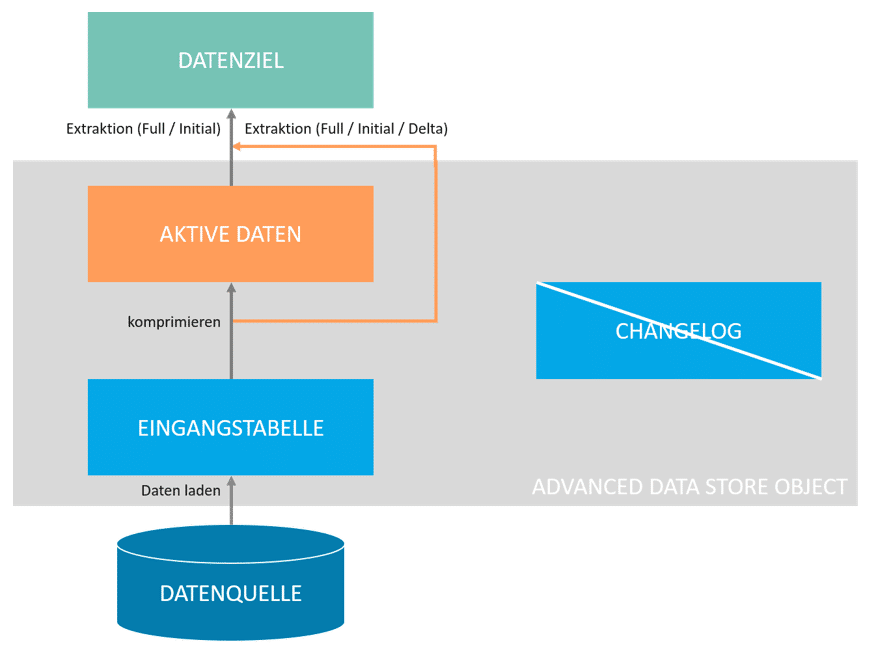
Selecting the Staging DataStore object in the modeling properties means that loading processes can only be executed as additive deltas. Overwriting data records is not intended. All characteristics are key fields (analogous to InfoCubes in BW 7.x). Reporting on the aDSO is available. Extraction from the source takes place serially.
In this case, the input table and the active data table are always active.
This type of aDSO behaves like an InfoCube in earlier SAP BW versions. This means that all characteristics count as keys. In addition, the active data table is updated in the form of an additive delta.
Fig.: aDSO types: Data Mart | isr.de
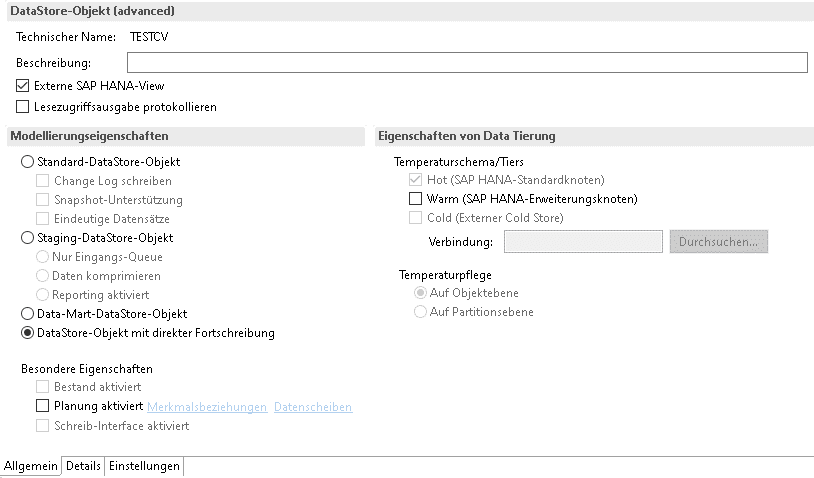
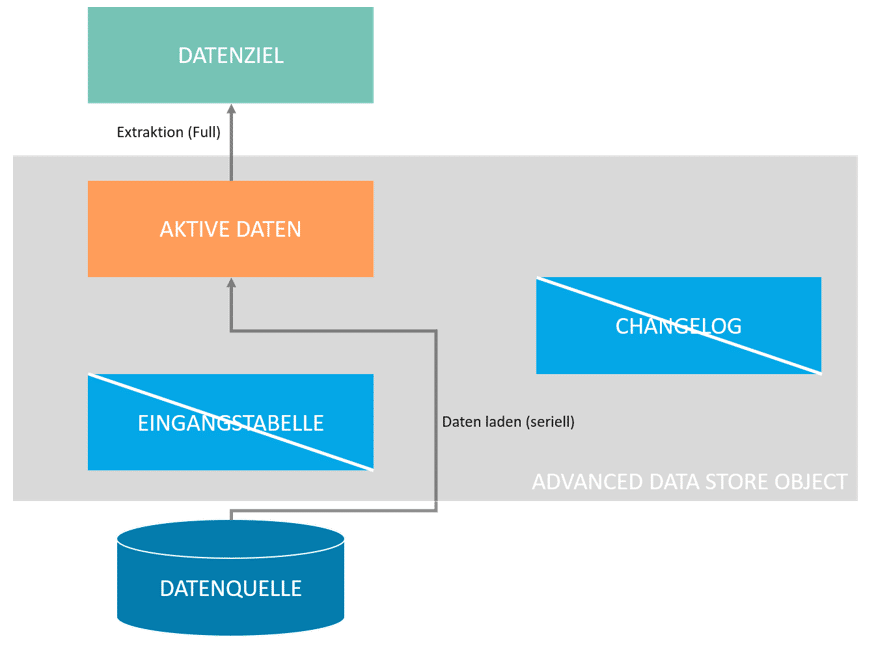
"Direct Update"
Selecting the DataStore object with direct updating in the modeling properties results in writing directly to the active data table. Although individual checks are performed (including SID management and consistency of time characteristics), there is no check for overlapping requests. Reporting on the aDSO is available.
In this case, the active data table is always active.
This configuration offers the option of writing to the active data table of an aDSO via DTP or using an API. However, subsequent extraction is only possible as a full extraction.
Fig.: aDSO types: Direct update
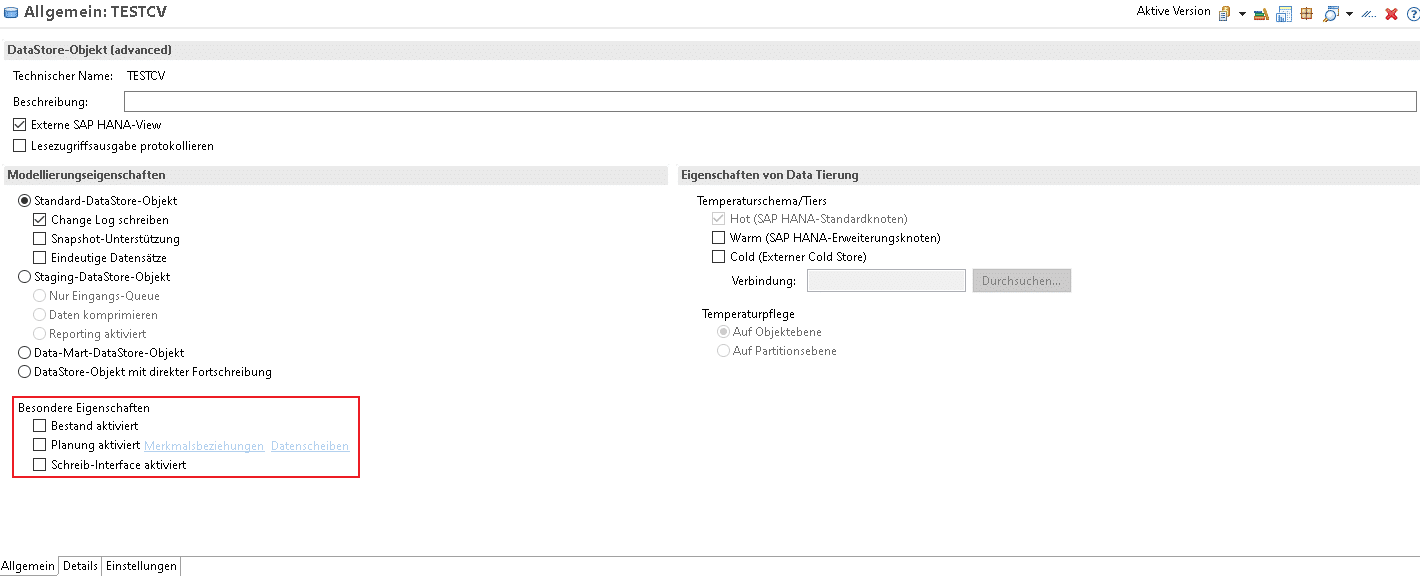
"Special Features"
There are additional properties that can be assigned to an aDSO. We will discuss two of them below:
Planning
This includes, among other things, the planning feature. When activated, aDSO can switch between two states: load mode and plan mode. In plan mode, planning applications such as Analysis for Office or SAP Analytics Cloud can write directly back to aDSO. BPC 11 is required for this option. In load mode, this is not possible so that data can be loaded without any problems.
writing interface
Another possible feature is the activation of the write interface. If this is activated, external tools such as SAP Data Services, Data Intelligence, or Platform Integration can write directly to the input table of the aDSO. This feature cannot be used in conjunction with inventory or planning activation.
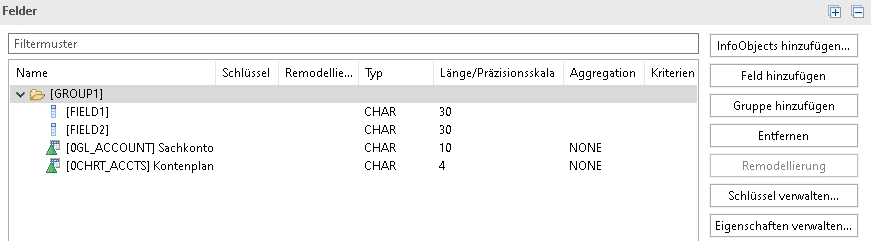
Modeling of aDSO with fields and/or InfoObjects
One of the most interesting innovations offered by the advanced Data Store Object, in contrast to the older Data Store Object, is the possibility of field-based modeling (or bottom-up modeling). For this purpose, the fields of the data source can usually be transferred 1:1 in the modeling process (provided that the data type and length are usable). The fields can be easily generated based on the respective source object.There is no longer any need to create and configure a large number of InfoObjects(depending on the size of the system, this can be >1000). This can significantly speed up data modeling. On the other hand, there are also advantages of InfoObjects that must be dispensed with. There are undoubtedly advantages to having an InfoObject define the field type and length for a business entity throughout the entire system. With field-based modeling, you have to manually ensure that, for example, the Customer field has the same field type and length everywhere. This is necessary to avoid problems later on when associating. There are also mixed scenarios in which InfoObjects are used for certain business entities (e.g., business content) and fields are used for other information. The decision should be made based on the context.
We can clearly answer this question with a “yes and no.” The consolidation of four information providers into the aDSO simplifies the architecture at first glance. On the other hand, the “old” objects can be replicated using aDSO settings to support the required data model scenarios. However, this in turn increases complexity because developers must understand the effects and interrelationships of the various aDSO settings.
From our perspective, the aDSO is, overall, a very well-rounded and mature development. Like its predecessor (Data Store Object), the advanced Data Store Object also proves to be a compelling choice as the central storage medium in SAP Business Warehouse. It offers proven functionalities from older SAP BW systems, including delta processing as well as SID and key handling. In addition, it introduces several interesting new features, such as the ability to perform field-based modeling, which can accelerate development. This is because, with bottom-up modeling, data integration and analysis can take place before the semantics (= InfoObjects) are defined, allowing users to perform initial data views very quickly. For more on this, take a look at the blog post“Agile Data Warehousing with SAP BW/4HANA.”
In this context, you should always evaluate on a case-by-case basis which modeling approach best meets your requirements. Otherwise, if planning is too limited, the effort saved through field-based modeling could quickly be lost—for example, if it turns out that you need to resort to InfoObjects after all due to complex master data scenarios. Retroactive adjustments to the architecture are always possible and are significantly simplified by the “remodeling function” of an aDSO. However, depending on the complexity of the changes, certain prerequisites must be met; otherwise, remodeling could result in error messages or even data loss (see SAP Help Portal).
Since 1993, we have been operating as IT consultants for Data Analytics and Document Logistics, focusing on data management and process automation. We provide comprehensive support, from strategic IT consulting to specific implementations and solutions, all the way to IT operations, within the framework of holistic Enterprise Information Management (EIM). ISR is part of the CENIT EIM Group.