Changing requirements for modern data warehouse systems mean that aspects such as agility and openness for integration with other solutions are becoming significantly more important and should therefore be inherently considered in the architecture and modeling of such systems.
Modern analytics also means that end users are empowered to independently access, analyze, and visualize data from the data warehouse using self-service BI. Traditionally, this has not been a strength of SAP tools such as BEx or Business Objects: a distinction was usually made between individual evaluation on the one hand, which was carried out on an Excel basis – BEx or Analysis for Office – and standard reporting on the other, which was created and maintained by IT using Lumira Designer, dashboards, WebIntelligence, or similar tools.
While SAP has made great strides toward simpler and more scalable self-service BI with Analytics Cloud, many companies have already introduced third-party tools for precisely this purpose. A glance at the Gartner Magic Quadrants reveals the major players in this field: PowerBI, Tableau, Qlik, etc. A modern data warehouse must therefore be open to the integration of such analytics solutions.
In this article, we will examine why BW/4HANA is far superior to classic BW in this regard, and what connection options and associated architectural considerations are available.
Further information
Read more: Advantages of BW/4 HANA
Note
This article will focus on the functional aspects of connecting Tableau to SAP BW/4HANA.
However, the issue of user and authorization management should not be neglected in such a heterogeneous environment if you do not want to manage roles and authorizations in three places (BW, HANA database, front end). Due to the complexity and individual configuration, this consideration is not addressed here.
Third-party analytics
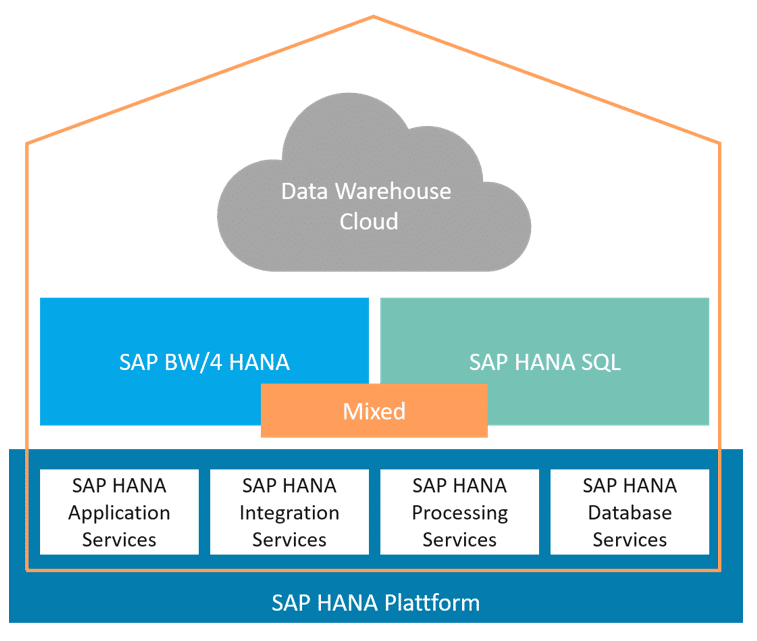
In hybrid modeling, the information in the data warehouse can basically be provided to the analytics front end in two different ways:
- On the BW side, through the objects and interfaces of SAP BW. These are, in particular, composite providers as (virtual) data marts and BW queries as an access layer.
- On the HANA side, through the objects and interfaces of the HANA platform. These are, in particular, calculation views as virtual data marts and also access layers.
The modeling of the analytics provision on the HANA side is therefore more streamlined than on the BW side, as no other object is required apart from the CalcView.
In addition, depending on the scenario, a distinction must be made between whether the provision is made to an SAP Analytics front end or to a third-party analytics front end:
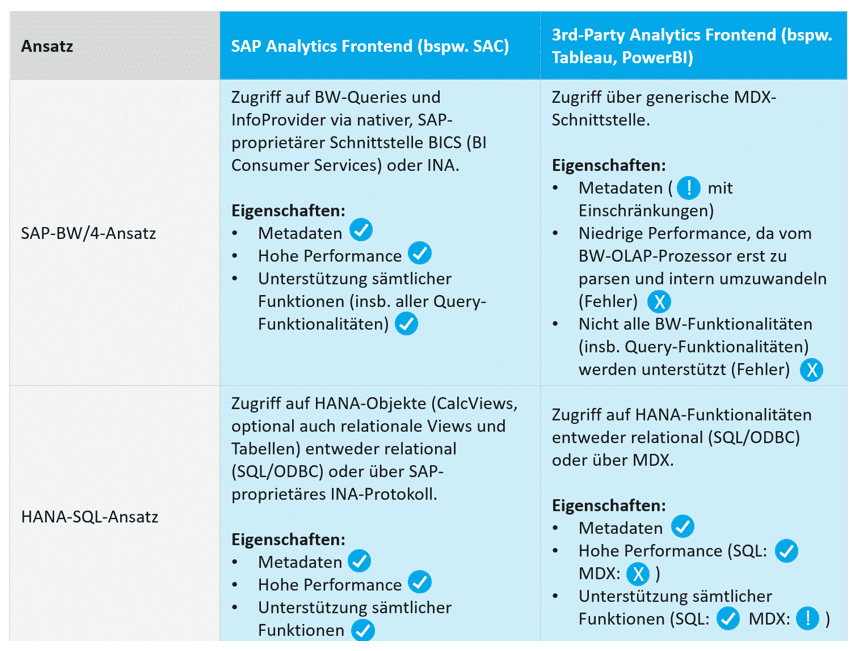
This comparison clearly shows that provisioning to third-party front ends is much better supported using a HANA SQL approach than using a BW approach. Basically, there is no longer any significant difference between an SAP Analytics front end and a third-party front end on the HANA side.
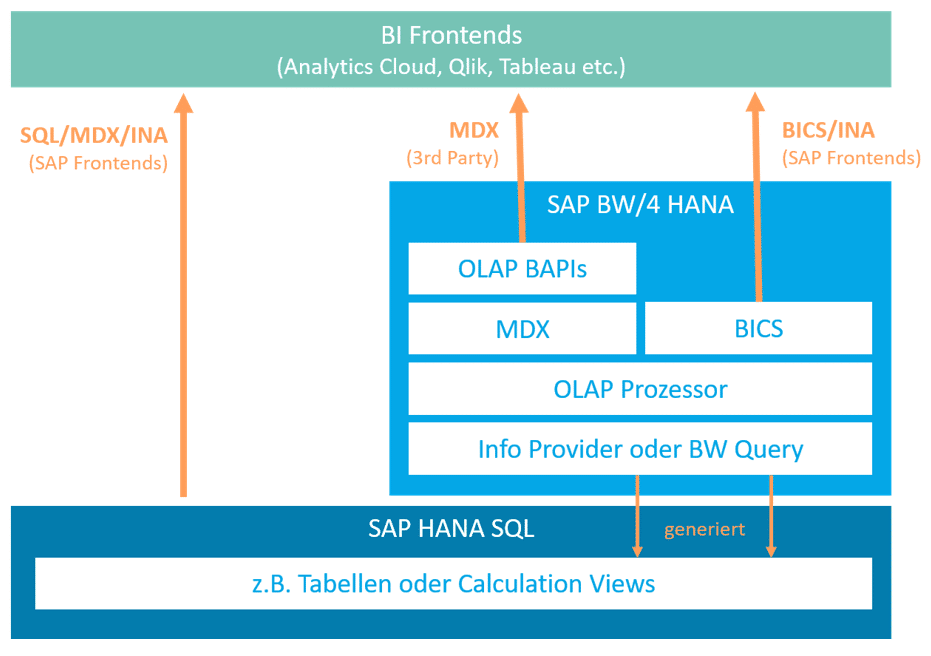
A mixed (hybrid) architecture and modeling is therefore recommended if a BW/4HANA data warehouse wants to integrate as well as possible with such non-SAP front ends in terms of openness.
Connection with a third-party front end using Tableau as an example
As a third-party analytics tool, Tableau is divided into several components:
- Tableau Desktop– Front end for developing dashboards
- Tableau Server– Platform for providing dashboards and access to the underlying data sources
- Tableau Data Prep– Complement to Desktop, enables data preparation in addition to the creation of dashboards and reports
Tableau can connect to the data warehouse, in this case SAP BW/4HANA, in two different ways via Tableau Server:
- Live connection –The data is retrieved from BW as soon as the corresponding Tableau report is opened (executed) by a user. Each navigation within the report results in a new query to BW. This functionality corresponds to how SAP front ends (Analysis Office, Business Objects) typically work.
- Import connection –Periodic snapshots of the data are retrieved and persisted on the Tableau Server. The report therefore does not show live data. However, performance is generally better. The amount of data persisted on the Tableau Server can easily become very large. Before using the import connection, the licensing conditions of the BW/4 HANA Runtime license should be checked.
Tableau supports the following connection options for connecting to SAP BW/4HANA:
- SAP BW: As a third-party analytics front end, the only option available is to use MDX to access both BW queries and, optionally, BW InfoProvidersInfoProviders are objects on which reporting (e.g., queries) can be executed.... More directly.
- SAP HANA: Tableau only supports HANA connections via a generic SQL/ODBC interface. This allows calculation views, SQL views, and tables to be consumed.
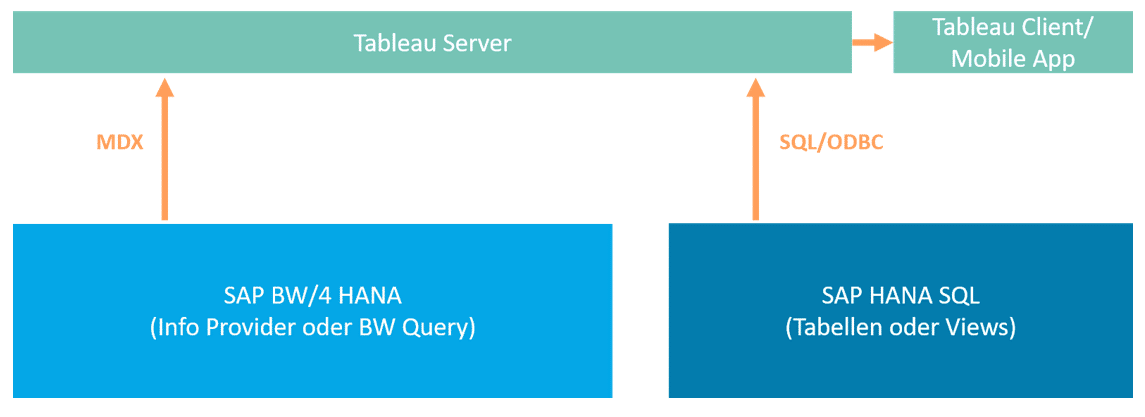
Limitations in connecting Tableau to SAP BW (MDX)
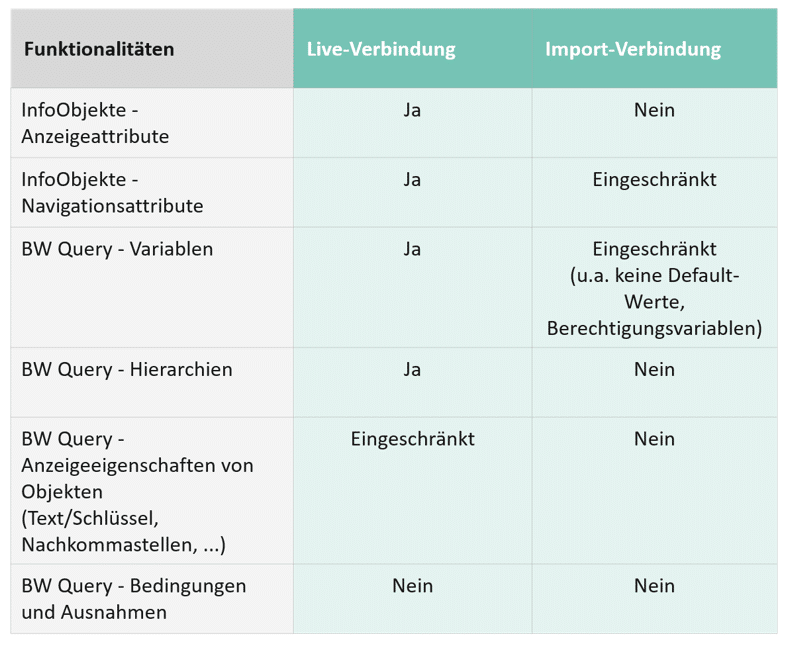
Not all SAP BW functionalities are available via the MDX connection in Tableau. In addition, the range of functions also depends on whether Tableau is connected to SAP BW via a live connection or an import connection. The following functions may be restricted:
Limitations in connecting Tableau to SAP HANA (SQL/ODBC)
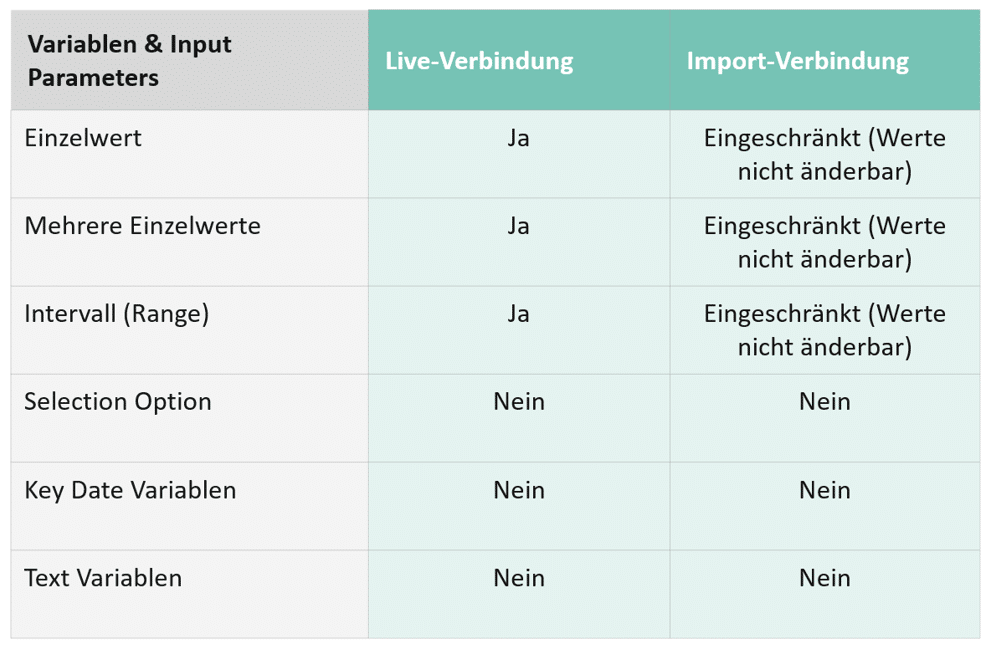
Tableau supports SAP HANA using a generic ODBC driver and queries the data relationally via SQL. However, some HANA functions are not available or only available to a limited extent:
Significant differences
- Tableau currently supports hierarchies only via live connection to BW queries up to version 2019.3. HANA-side hierarchies are not supported. From version 2019.3 onwards, hierarchies defined on the HANA side will also be supported.
- Performance based on BW queries is significantly worse than that of the SQL connection to HANA. The reasons for this are the inefficient MDX interface of BW and the fact that BW queries are significantly slower on the BW OLAP processor than in-database calculations using HANA Calculation Views.
- The limitations in terms of the number of result rows, size of the result set, and level of detail in the breakdown are significantly tighter for BW queries than for HANA queries via SQL connection.
Architecture and modeling in the data warehouse
To determine the optimal architecture for providing information to a third-party analytics front end such as Tableau, several questions must be answered in order to determine which modeling is required in which cases:
- Which front ends must be supported?
- Is Tableau the only front end, or do other front ends need to be supported?
- Is there any overlap in functionality between the front ends used that can be covered by a single provision (e.g., HANA CalcViews)?
- Hierarchies in reporting
- Is reporting based on essential hierarchies that must be made available in any case?
Yes → BW queries offer the simplest method of processing hierarchies and making them available for reporting.
No/not critical → Hierarchies can also be defined in HANA in the Calculation View (available from Tableau 2019.3 onwards), or defined in the report itself on the Tableau side.
- Is reporting based on essential hierarchies that must be made available in any case?
- Real-time data display in the report
- Does the report need to display real-time ("live") data?
Here, the decision is more about whether Tableau should use a live connection or an import connection to the application.
- Does the report need to display real-time ("live") data?
- performance
- Granularity and scope of result sets – HANA SQL connections are significantly superior to BW MDX connections in this regard.
The optimal way to provide information from a BW/4HANA data warehouse to Tableau as analytics front ends is therefore via mixed modeling—BW data models and virtual data marts (composite providers), which provide HANA calculation views (generated on the basis of the BW composite provider) for direct consumption via SQL connection.
The advantages of this architectural approach are:
- Use of BW modeling with all its advantages and simplifications (InfoObjects, virtual data models, Flexible Dynamic Star Schema)
- Provision of (virtual) data marts via calculation views, which can be used by any third-party front end via HANA SQL connection using SQL/ODBC
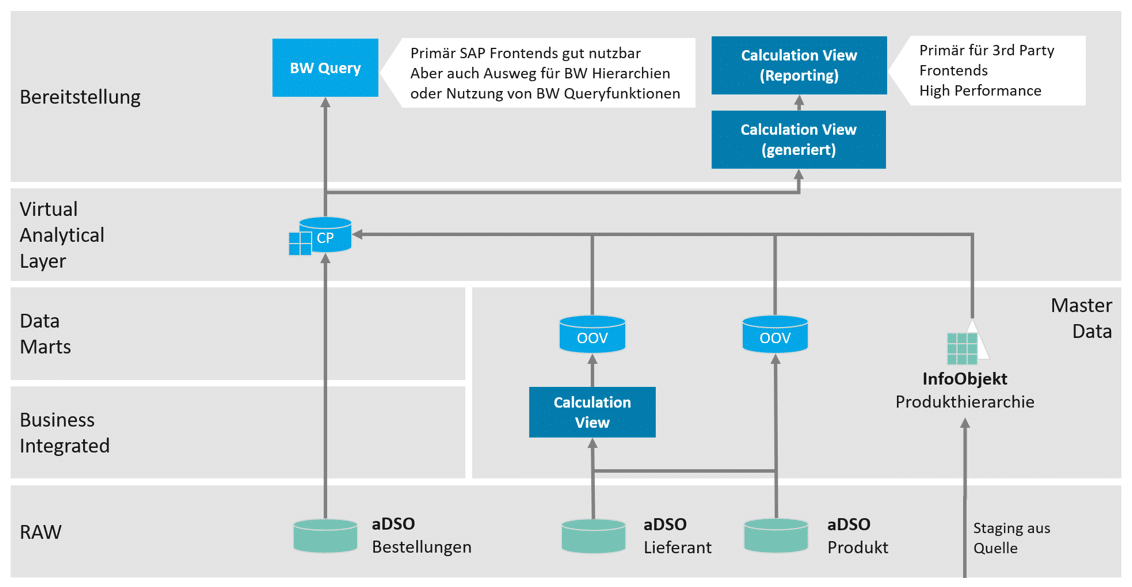
- As a "workaround," for example, to better support hierarchies, it is also possible to provide the information as a BW query based on the same virtual data mart (composite provider).
HANA Calculation View and BW Query are simply different access and consumption interfaces to the same data mart, without creating redundancies.
Architecture overview with BW and HANA-side provisioning:
The following adjustments must be made in the HANA calculation views to make them functionally equivalent to BW queries for Tableau consumption:
1. Assignment of label columns to dynamically design key values in the display between "Key," "Text," and "Text and Key" (as is customary in BW queries).
Further information
See also our article: Front-end access to SAP BW data – Focus on master data texts
2. Assigning semantics todata fields: Key figures, units, date semantics for date fields.
When modeling with InfoObjects, this is already correctly mapped in the generated CalcView of the composite provider.
When modeling on a field basis and using the Dynamic Flexible Star Schema with master data association, however, this may need to be done manually, as the composite provider does not recognize these semantics and therefore could not generate them in the HANA CalcView.
Further information
See also our article: Flexible master data associations with BW/4HANA – possibilities and limitations
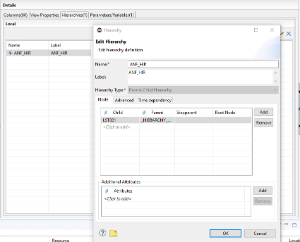
3. Provision of hierarchiesthrough definition in HANA CalcView.
Starting with Tableau 2019.3, the hierarchies defined in CalcView can be used by Tableau without requiring redefinition on the Tableau side.
However, the hierarchy must be defined accordingly in HANA CalcView:
Since such adjustments are not useful in the system-generated CalcView (they would be overwritten when regenerated), a separate reporting CalcView based on the generated DataMart CalcView must be defined for each case.
Assigning the reporting CalcViews to individual HANA packages can also support authorization management (all system-generated CalcViews are located in the same package, usually system-local.bw.bw2hana, while self-defined CalcViews can be assigned to any package, which can then be accessed via authorization roles).
Conclusion
Third-party analytics front ends such as Tableau have their strengths in the classic SQL area and can therefore work extremely well with SAP HANA as a database. In terms of available functionality, there are few to no differences between whether HANA calculation views are consumed by SAP front ends (such as Analysis for Office or SAC) or by third-party front ends such as Tableau.
However, the consumption of SAP-specific constructs, in particular BW queries, on the BW side is only fully and efficiently available to SAP front ends. All third-party analytics solutions struggle in this area.
For a flexible and open data warehouse architecture, we therefore strongly recommend taking advantage of the benefits of hybrid architecture and modeling with SAP BW/4HANA. The architecture with virtual data marts, which provide the same data without redundancy for consumption on both the BW side (via queries) and the HANA side (via calculation views), also allows for optimal support of landscapes with heterogeneous front ends.
With this ability to implement such modern architecture, SAP BW/4HANA has taken a major step toward a flexible and open data warehouse solution.
Our services
We are happy to support you in your challenges to achieve a modern architecture! Please also read our position paper: ISR LSA++ Architecture @ BW/4 HANA

Christopher Kampmann
Head of Business Unit
Data & Analytics
christopher.kampmann@isr.de
+49 (0) 151 422 05 448